

Prickle is a library mod that brings a JSON-based configuration file format to Minecraft, available for Fabric, Forge, NeoForge, and Quilt mod loaders. Developed by Darkhax, Prickle extends standard JSON with comments and decorators, giving mod developers a cleaner and more expressive way to handle configuration files across their projects.
If you have ever opened a Minecraft mod's config file and wished you could leave yourself notes, see what the default values were, or understand what a setting actually does — you are not alone. Standard JSON, which Minecraft already uses for datapacks and commands, lacks support for comments entirely. That means config files are often cryptic walls of key-value pairs with no explanation. Prickle solves this by extending JSON with human-readable comments and metadata decorators while remaining fully backwards compatible. With over 7 million downloads, Prickle has quietly become one of the most widely used library mods in the Minecraft ecosystem, powering configuration systems for numerous popular mods by Darkhax and other developers who have adopted the format.
Key Features of Prickle Mod
- JSON-Based Comments — Prickle reserves the
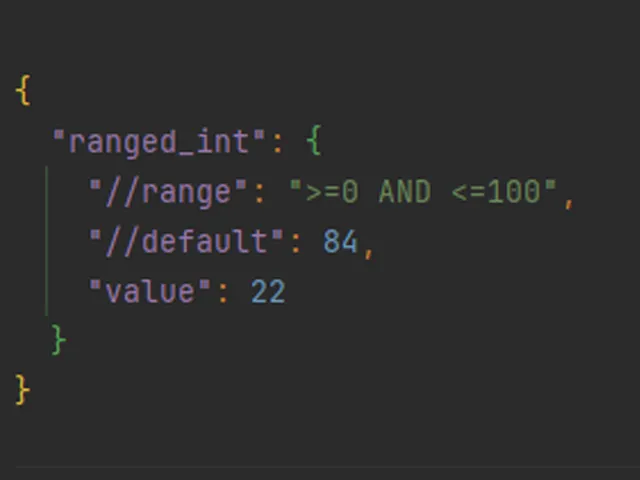
//key for inline comments, allowing mod developers to explain what each config setting does directly inside the file. This means you no longer need to search a wiki or guess what a mysterious property controls — the explanation lives right next to the value. Comments support both single-line strings and arrays of strings for multi-line explanations. - Decorator System for Metadata — Beyond simple comments, Prickle introduces decorators like
//default,//range, and//regexthat describe how a property should be used. For example,//defaultshows you the original value so you can always revert a change, while//rangetells you the acceptable boundaries for numerical settings. This self-documenting approach drastically reduces configuration errors. - Full JSON Backwards Compatibility — Prickle is 100% backwards compatible with standard JSON, meaning every existing JSON file is already a valid Prickle file. This matters because it lets mod developers adopt Prickle incrementally without breaking anything. All existing JSON tools, syntax highlighting, and editors work with Prickle files out of the box.
- Default Value References — The
//defaultdecorator lets config files display their original default values alongside current settings. This is invaluable when you have tweaked multiple settings and cannot remember what the original value was, eliminating the need to re-download or search for documentation. - Input Validation with Regex and Range — The
//regexand//rangedecorators describe acceptable input formats and value boundaries for each property. If a config value must match a specific pattern (like an IP address format) or fall within a numerical range, these decorators make the requirements immediately visible to anyone editing the file. - Multi-Loader Support — Prickle runs on Fabric, NeoForge, Forge, and Quilt, covering virtually every major Minecraft mod loader available today. This cross-platform availability means mod developers can use a single configuration system regardless of which loader their users prefer, and players do not need to worry about compatibility.
- Empty Value Control — The
//empty-alloweddecorator indicates whether a property can be left blank. This seemingly small feature prevents a common source of configuration bugs where an accidentally empty field causes a mod to crash or behave unexpectedly on startup.
Screenshots
How to Install Prickle Mod
- First, install the mod loader your modpack requires. Prickle supports Fabric, NeoForge, Forge, and Quilt. Download and run the installer for your chosen loader, then launch Minecraft once to create the necessary profile.
- Download the correct version of Prickle for your Minecraft version and mod loader. Make sure the file matches both — for example, if you play on Minecraft 1.21.11 with Fabric, download the Fabric version for 1.21.11.
- Locate your Minecraft
modsfolder. On Windows, press Win + R, type%appdata%\.minecraft\mods, and press Enter. On macOS, navigate to~/Library/Application Support/minecraft/mods. - Place the downloaded Prickle
.jarfile into themodsfolder. Do not extract or unzip the file — drop the jar in as-is. - Launch Minecraft using the mod loader profile. Prickle will load automatically in the background. Any mods that depend on Prickle will now be able to use its configuration format.
Requirements & Compatibility
| Requirement | Details |
|---|---|
| Minecraft Versions | 1.21.11, 1.21.10, 1.21.9, 1.21.8, 1.21.7, 1.21.6, 1.21.5, 1.21.4, 1.21.3, 1.21.2, 1.21.1, 1.21 |
| Mod Loaders | Fabric, Forge, NeoForge, Quilt |
| License | LGPL-2.1-only (open source) |
| Author | Darkhax |
| Dependencies | Respective mod loader installed |
What's New
- Ported to Minecraft 1.21.11, ensuring compatibility with the latest game version.
- Continued Patreon-supported development with community backing from contributors.
- Maintained cross-loader support across Fabric, NeoForge, and Quilt for the latest release.
Pros and Cons
Pros
- Adds human-readable comments and metadata to JSON config files
- Fully backwards compatible with standard JSON — no migration needed
- Supports all four major mod loaders (Fabric, Forge, NeoForge, Quilt)
- Over 7 million downloads — well-established and widely trusted
- Open source under LGPL-2.1 with active development
- Self-documenting config files reduce user confusion and errors
Cons
- Library mod only — does not add gameplay features on its own
- Only useful if you have a mod that depends on Prickle installed
- Config format is developer-facing; casual players may never interact with it directly
- Limited documentation outside of the GitHub page for advanced usage
Alternatives to Prickle Mod
- Cloth Config API — A popular configuration screen library that gives mods graphical in-game settings menus, useful if you prefer editing configs through a GUI rather than text files.
- Forge Config API Port — Brings the Forge configuration system to Fabric, offering an alternative config framework for mod developers who want Forge-style config handling on other loaders.
- YetAnotherConfigLib (YACL) — A modern config library that provides rich in-game configuration screens with categories, tooltips, and search, serving as both a developer API and a player-friendly config tool.
Download Prickle Mod
| Minecraft Version | Fabric | Forge | NeoForge | Quilt |
|---|---|---|---|---|
| For Minecraft 1.21.11 | Download | — | Download | Download |
| For Minecraft 1.21.10 | Download | — | Download | Download |
| For Minecraft 1.21.9 | Download | — | Download | Download |
| For Minecraft 1.21.8 | Download | — | Download | Download |
| For Minecraft 1.21.7 | Download | — | Download | Download |
| For Minecraft 1.21.6 | Download | — | Download | Download |
| For Minecraft 1.21.5 | Download | — | Download | Download |
| For Minecraft 1.21.4 | Download | — | Download | Download |
| For Minecraft 1.21.3 | Download | — | Download | Download |
| For Minecraft 1.21.2 | Download | — | Download | Download |
| For Minecraft 1.21.1 | Download | Download | Download | Download |
| For Minecraft 1.21 | Download | Download | Download | Download |
Always download mods from official sources to stay safe.
Frequently Asked Questions
Do I need Prickle to play Minecraft?
No — Prickle is a library mod that only needs to be installed when another mod explicitly requires it as a dependency. On its own, Prickle does not change any gameplay, visuals, or mechanics. If a mod you want to use lists Prickle in its requirements, then you will need to install it for that mod to function properly.
Is Prickle compatible with Fabric and NeoForge at the same time?
Yes — Prickle provides separate builds for Fabric, NeoForge, Forge, and Quilt. You need to download the version that matches your specific mod loader. The mod cannot run on multiple loaders simultaneously within a single Minecraft installation, but the developer maintains builds for all four major loaders so you are covered regardless of your setup.
Will Prickle affect my game performance?
Prickle appears to be lightweight and should have negligible impact on performance. It functions as a configuration file parser that runs primarily during mod loading and when reading config files, not during active gameplay. As a library mod used by over 7 million installations, there are no widespread reports of performance issues associated with it.
Can I edit Prickle config files with a normal text editor?
Yes — because Prickle is fully backwards compatible with JSON, any text editor that handles JSON files will work perfectly. Editors like VS Code, Notepad++, or even basic Notepad can open and edit Prickle configuration files. You will also get proper JSON syntax highlighting since the format is valid JSON with reserved keys for comments and decorators.
What Minecraft versions does Prickle support?
Prickle supports Minecraft 1.21 through 1.21.11, covering the entire 1.21.x release cycle. The mod is actively maintained by Darkhax, with the latest update porting it to Minecraft 1.21.11 in January 2026. This broad version range means you can use Prickle whether you are on the latest snapshot-adjacent release or prefer staying on an older stable version within the 1.21 series.


![[Let's Do] Brewery - Farm&Charm Compat Mod (1.21.1) - thumbnail](http://mcinside.com/wp-content/uploads/2026/04/thumbnail-116-52x52.webp)


