

If you love building with Create's decorative blocks but wish there were more options, Rechiseled Create Mod bridges the gap between Create and Rechiseled to unlock over 100 new block variants — all swappable with a single chisel click. Downloaded over 2.1 million times, this addon by SuperMartijn642 turns Create's already impressive palette into a builder's dream, adding stairs, slabs, and window blocks alongside the new decorative options.
Key Features
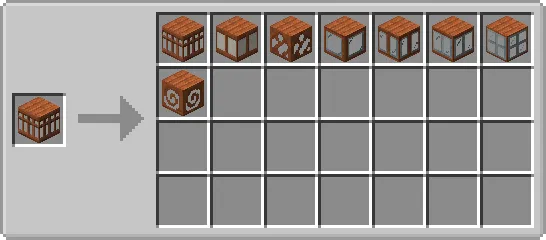
- Chisel integration for Create blocks — Every decorative block from Create, plus all new variants added by Rechiseled: Create, can be swapped instantly using the chisel. No crafting table required; just right-click to cycle through styles.
- Mechanical Chisel block — A kinetic machine similar to Create's Mechanical Saw. Feed blocks through it and it automatically chisels them into their variant, making bulk conversions practical for large builds.
- 100+ new block variants — Expanded decorative options including new patterns and textures for existing Create materials, giving builders far more creative flexibility.
- Stairs and slabs support — All Rechiseled: Create blocks come with matching stairs and slabs, so you can use the new variants in detailed builds without visual mismatches.
- JEI/REI recipe support — The Mechanical Chisel shows up as a catalyst in JEI and REI, making it easy to browse all available chiseling recipes in-game.
Screenshots



How to Install
- Install your preferred mod loader — Forge, Fabric, or NeoForge — matching your Minecraft version.
- Download and install both Create Mod and Re-Chiseled Mod, as Rechiseled Create requires both to function.
- If playing on Fabric, make sure Fabric API is also installed.
- Download Rechiseled Create Mod for your Minecraft version and drop the .jar file into your
modsfolder. - Launch Minecraft and confirm all three mods load without conflicts.
Requirements
| Mod Loader | Dependencies | Minecraft Versions |
|---|---|---|
| Forge, Fabric, NeoForge | Create Mod, Re-Chiseled Mod, Fabric API (Fabric only) | 1.21.1, 1.21, 1.19.2, 1.18.2 |
Pros & Cons
Pros
- Massively expands Create's decorative block library with 100+ variants
- Mechanical Chisel automates bulk block conversion using Create's kinetic system
- Supports all three major mod loaders (Forge, Fabric, NeoForge)
- Includes stairs and slabs for every new block variant
- Actively maintained with updates through early 2026
Cons
- Requires both Create and Re-Chiseled as dependencies — heavier mod setup
- No support for older versions like 1.20.1 or 1.20.4
- All rights reserved license limits modpack redistribution flexibility
Download
Always download mods from official sources to stay safe.
What's New
- Stairs and slabs added — All Rechiseled: Create blocks now have matching stairs and slab variants for more detailed building.
- JEI/REI integration improved — The Mechanical Chisel is now properly marked as a catalyst in the chiseling recipe category.
- Window block rendering fixed — Neighboring block culling for window blocks has been corrected, eliminating visual glitches.
- Compatibility fixes — Resolved crashes that occurred when running alongside certain other Create addons.
- Create 6.0 baseline — Minimum Create version raised to 6.0 for the 1.21.1 release.
FAQ
Does Rechiseled Create work with other Create addons?
Yes, Rechiseled Create is designed to work alongside other Create addons. The latest update specifically fixed crashes that occurred with some addon combinations, so make sure you're running the most recent version.
Can the Mechanical Chisel be automated with Create's kinetic system?
The Mechanical Chisel is a kinetic block that works similarly to Create's Mechanical Saw. You can power it with rotational force and feed blocks through it for automated chiseling, making it ideal for large-scale building projects.
Which Minecraft versions support NeoForge for this mod?
NeoForge support is available for Minecraft 1.21.1 and 1.21. Older versions like 1.19.2 and 1.18.2 are supported through Forge and Fabric instead.




![[Let's Do] Candlelight - Farm&Charm compat Mod (1.21.1) - thumbnail](http://mcinside.com/wp-content/uploads/2026/04/thumbnail-81-52x52.webp)


![[Let's Do] Meadow Mod (1.21.1) - thumbnail](http://mcinside.com/wp-content/uploads/2026/04/thumbnail-64-52x52.webp)


![Not Enough Recipe Book [NERB] Mod (1.21.11) - thumbnail](http://mcinside.com/wp-content/uploads/2026/04/thumbnail-63-52x52.webp)