

Reese's Sodium Options is a utility mod that replaces Sodium's default options screen with a redesigned, more user-friendly interface for Minecraft, available on Fabric, NeoForge, and Quilt mod loaders.
Anyone who has used Sodium knows the frustration: you open the settings menu to tweak a single option, and you're stuck scrolling through a flat, cluttered list of settings with no way to quickly find what you need. That's the exact problem Reese's Sodium Options was built to solve. Created by FlashyReese, this mod has earned over 53 million downloads since its 2021 release — a clear sign that the Minecraft community overwhelmingly agrees Sodium's default options screen needed an upgrade. Rather than replacing Sodium itself, Reese's Sodium Options acts as a UI layer on top of it, giving players a cleaner, more organized way to manage their performance settings without touching Sodium's core functionality.
Key Features of Reese's Sodium Options
- Search Bar — This is arguably the most impactful addition. Instead of manually scrolling through dozens of settings to find one specific toggle, you can simply type a keyword and jump straight to it. For players who frequently switch between performance profiles or test different configurations, this feature alone saves a significant amount of time.
- Scroll-to-Adjust Sliders (SHIFT + Scroll) — Normally, adjusting slider values in Minecraft menus requires precise mouse dragging, which can be finicky. With Reese's Sodium Options, you can hold down the SHIFT key and scroll your mouse wheel to increment slider values precisely. This gives you much finer control over settings like render distance or brightness without overshooting your target value.
- Scrollable Tabs — When you install multiple mods that add their own Sodium settings tabs, the tab bar can quickly overflow off-screen. Reese's Sodium Options makes the entire tab row scrollable, so every tab remains accessible no matter how many mods you have installed. This is particularly valuable for heavily modded setups where dozens of configuration tabs compete for space.
- Scrollable Pages — The individual settings pages themselves become scrollable, which dramatically improves the user experience when combined with Sodium Extra. Instead of settings being cut off or crammed into a fixed viewport, you get a smooth, continuous scroll through all available options on any page.
- Iris Shader Pack Button — If you use the Iris Shaders mod alongside Sodium, Reese's Sodium Options integrates a convenient shader pack button directly into the options screen. This means you can switch between shader packs without navigating away from your settings — a small but welcome quality-of-life improvement for players who frequently swap shaders.
Screenshots
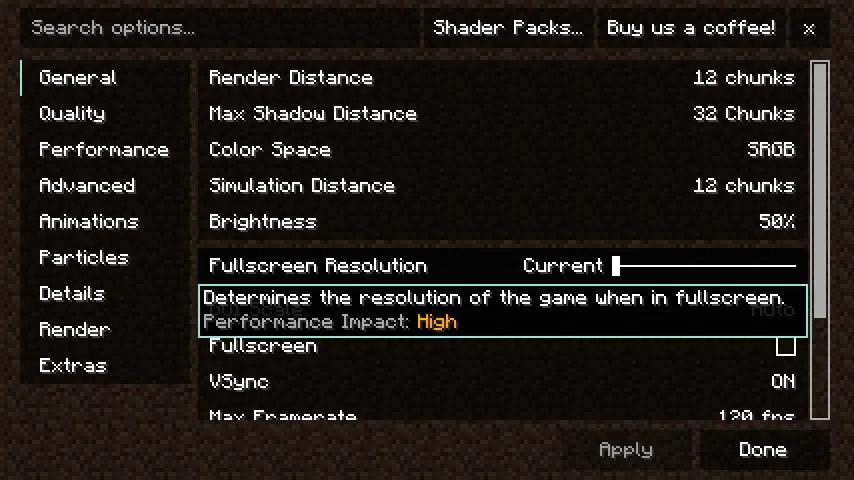
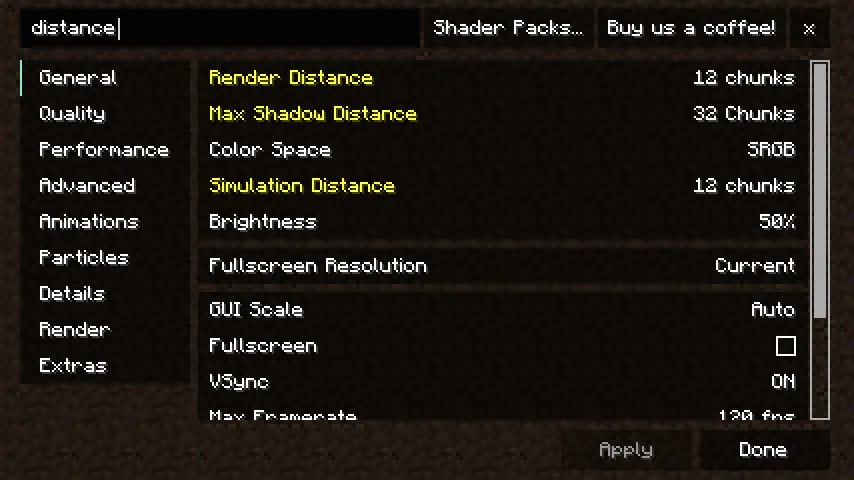
How to Install Reese's Sodium Options
- Install your preferred mod loader: Fabric, NeoForge, or Quilt. Make sure it matches your Minecraft version.
- Download and install Sodium — this is a required dependency, as Reese's Sodium Options is built to enhance Sodium's settings menu.
- Download Reese's Sodium Options for your Minecraft version from the download section below.
- Place the downloaded
.jarfile into your.minecraft/modsfolder. If the folder doesn't exist, launch Minecraft once with your mod loader to generate it. - Launch Minecraft with your mod loader profile. Open Sodium's video settings and you should see the redesigned options interface immediately.
Requirements & Compatibility
| Requirement | Details |
|---|---|
| Required Mod | Sodium |
| Supported Loaders | Fabric, NeoForge, Quilt |
| Minecraft Versions | 1.18 through 26.1 |
| License | MIT (open source) |
| Author | FlashyReese |
What's New
- Updated to support Minecraft 26.1 on Fabric.
- Maintains compatibility with the latest Sodium builds for the 26.1 game version.
- Continued multi-loader support across Fabric, NeoForge, and Quilt for recent 1.21.x releases.
- Full changelog available on the GitHub repository.
Pros and Cons
Pros
- Search bar makes finding settings instant instead of scrolling through long lists
- Scrollable tabs and pages handle heavily modded setups gracefully
- SHIFT + scroll slider control offers precision that the default UI lacks
- Built-in Iris shader button streamlines the shader switching workflow
- Open-source under MIT license with active development since 2021
- Supports all three major mod loaders (Fabric, NeoForge, Quilt)
Cons
- Requires Sodium — cannot be used standalone or with other optimization mods like OptiFine
- Not affiliated with CaffeineMC, so Sodium updates may temporarily break compatibility
- Purely a UI mod — does not add any new performance settings or optimizations itself
Alternatives to Reese's Sodium Options
- Sodium Extra — Adds additional graphics settings and toggles to Sodium that aren't available in the base mod. Works exceptionally well alongside Reese's Sodium Options for a complete settings overhaul.
- Iris Shaders — The shader mod designed for Sodium compatibility. If you're already using Reese's Sodium Options for its Iris button integration, Iris itself is the natural companion for shader support.
- Sodium — The core performance mod that Reese's Sodium Options enhances. If you haven't installed Sodium yet, it's the essential foundation that makes this entire mod ecosystem possible.
Download Reese's Sodium Options
| Minecraft Version | Fabric | NeoForge | Quilt |
|---|---|---|---|
| For Minecraft 26.1 | Download | — | — |
| For Minecraft 1.21.11 | Download | Download | Download |
| For Minecraft 1.21.10 | Download | Download | Download |
| For Minecraft 1.21.9 | Download | Download | Download |
| For Minecraft 1.21.8 | Download | Download | Download |
| For Minecraft 1.21.7 | Download | Download | Download |
| For Minecraft 1.21.6 | Download | Download | Download |
| For Minecraft 1.21.5 | Download | Download | Download |
| For Minecraft 1.21.4 | Download | Download | Download |
| For Minecraft 1.21.3 | Download | Download | Download |
| For Minecraft 1.21.2 | Download | Download | Download |
| For Minecraft 1.21.1 | Download | Download | Download |
Always download mods from official sources to stay safe.
Frequently Asked Questions
Does Reese's Sodium Options work without Sodium installed?
No — Sodium is a required dependency. Reese's Sodium Options is specifically designed to replace Sodium's options screen, so it has no function without Sodium present in your mods folder. Install Sodium first, then add this mod on top of it.
Is Reese's Sodium Options compatible with Iris Shaders?
Yes — it includes a dedicated Iris Shader Pack button built into the redesigned options menu. This integration lets you manage your shader packs directly from the Sodium settings screen without needing to navigate to a separate menu.
Can I use Reese's Sodium Options on NeoForge?
Yes — the mod supports NeoForge in addition to Fabric and Quilt. NeoForge versions are available for Minecraft 1.21.5 through 1.21.11, with loader-specific builds provided in the download section above.
Does this mod affect game performance or FPS?
No measurable impact is expected, as Reese's Sodium Options only modifies the settings menu UI. It does not change any rendering behavior or game logic during actual gameplay — the mod is only active when you have the options screen open.
Is Reese's Sodium Options affiliated with CaffeineMC or the official Sodium team?
No — this is an independent project created by FlashyReese with no affiliation to CaffeineMC. The mod author explicitly asks that users do not contact CaffeineMC for support regarding this mod. For issues or feature requests, visit the mod's GitHub repository instead.




![[Let's Do] Candlelight - Farm&Charm compat Mod (1.21.1) - thumbnail](http://mcinside.com/wp-content/uploads/2026/04/thumbnail-81-52x52.webp)


![[Let's Do] Meadow Mod (1.21.1) - thumbnail](http://mcinside.com/wp-content/uploads/2026/04/thumbnail-64-52x52.webp)


![Not Enough Recipe Book [NERB] Mod (1.21.11) - thumbnail](http://mcinside.com/wp-content/uploads/2026/04/thumbnail-63-52x52.webp)