

Resourcify is a utility mod that lets you browse, install, and update resource packs, data packs, and shaders directly from within Minecraft, supporting Fabric, Forge, NeoForge, and Quilt mod loaders.
Managing resource packs and shaders in Minecraft has always been a clunky process. You leave the game, open a browser, search through Modrinth or CurseForge, download a file, move it to the correct folder, then restart or reload inside Minecraft. For players who frequently swap between packs or like to experiment with new shaders, this cycle gets old fast. Resourcify eliminates that friction entirely by embedding a full-featured browser and updater right inside the game's existing GUI. With over 7.6 million downloads since its 2023 release, it has become one of the most popular utility mods in the Minecraft ecosystem — and for good reason. Created by DeDiamondPro, the mod is actively maintained and has steadily expanded its loader support from Fabric to Forge, NeoForge, and Quilt.
Key Features of Resourcify
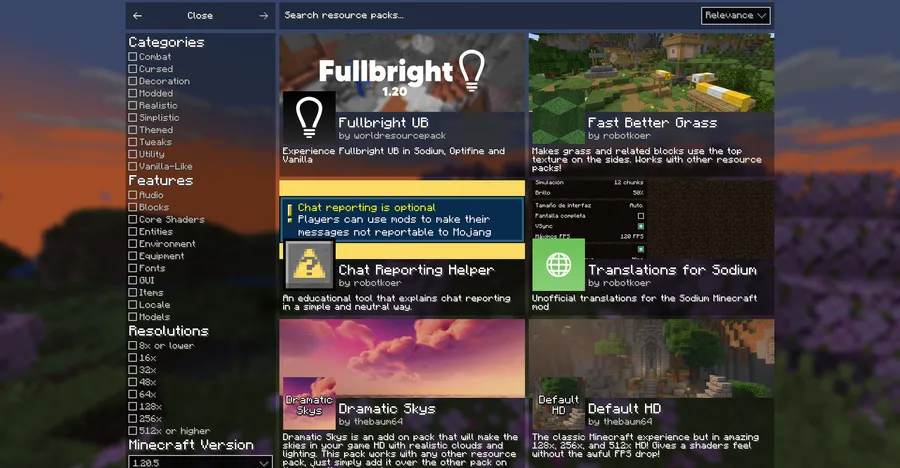
- In-Game Resource Pack Browser — Instead of leaving Minecraft to search for resource packs, you can browse the full Modrinth and CurseForge catalogs directly from the resource pack selection screen. This means you can preview, compare, and install packs without ever closing your game, saving significant time when you are setting up a new world or profile.
- Shader Pack Browser — Finding the right shader pack usually involves watching comparison videos or downloading multiple files to test. Resourcify lets you browse available shaders in-game and view their descriptions and galleries before committing to a download, making it much easier to find the look you want.
- Data Pack Support — Data packs are increasingly popular for adding custom recipes, loot tables, and gameplay tweaks. Resourcify extends its browsing and installation capabilities to data packs as well, giving you a single unified interface for all three content types rather than managing them separately.
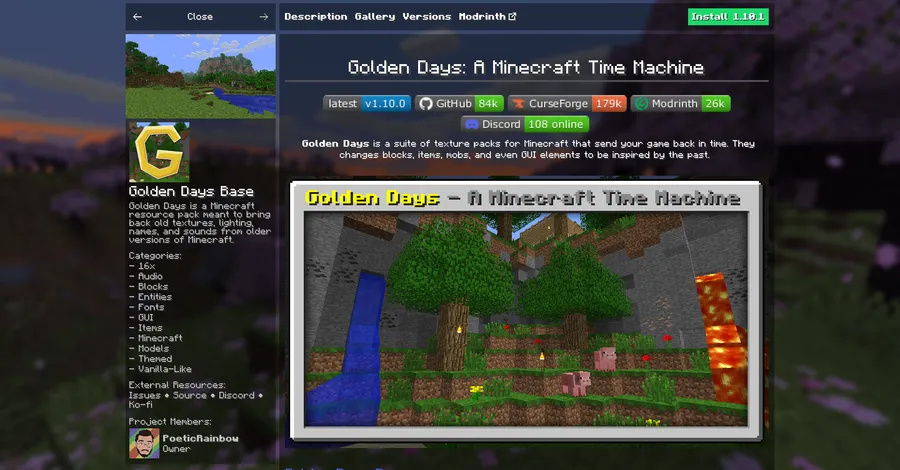
- One-Click Installation — Once you find a pack you like, installing it is a single button press. Resourcify handles downloading the file to the correct directory and making it available to Minecraft immediately. There is no need to manually move files between folders or figure out where your .minecraft directory lives.
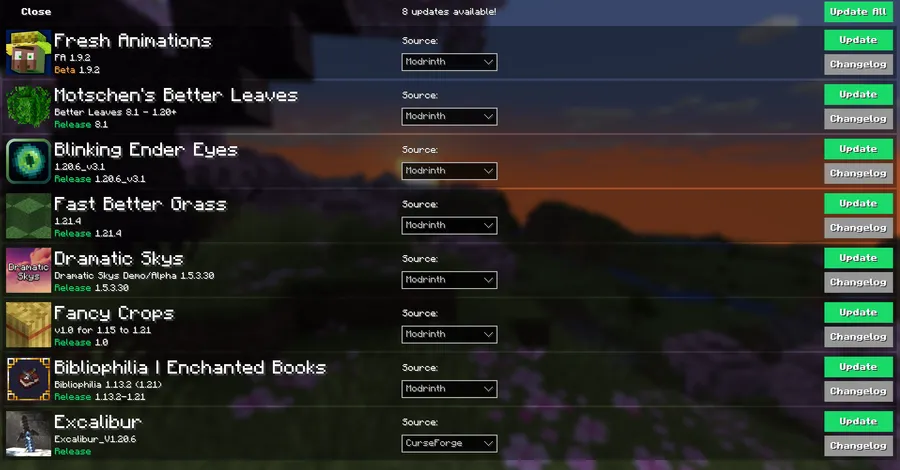
- Built-In Update Manager — Keeping resource packs and shaders up to date is something most players forget to do. Resourcify shows you which installed packs have updates available and lets you install all updates at once or selectively update individual packs. This is especially useful for shader packs, which frequently receive performance improvements and bug fixes.
- Pack Details and Gallery Viewer — Before installing anything, you can read the full description and browse the image gallery of each pack right inside Minecraft. This gives you a clear picture of what you are getting without relying on thumbnail images alone, helping you avoid downloading packs that don't match your expectations.
- Multi-Platform Catalog Access — Resourcify pulls content from both Modrinth and CurseForge, the two largest mod hosting platforms. This means you have access to virtually every publicly available resource pack, shader, and data pack from a single search interface inside the game.
Screenshots

How to Install Resourcify
- Install your preferred mod loader. Resourcify supports Fabric, Minecraft Forge, NeoForge, or Quilt — pick whichever one matches your existing setup.
- Download the Resourcify .jar file for your Minecraft version and loader from the download section below.
- Open your Minecraft installation directory. On Windows, press Win+R, type
%appdata%\.minecraft, and press Enter. - Place the downloaded .jar file into the
modsfolder. If the folder does not exist, create it. - Launch Minecraft using your mod loader profile. Open the resource pack, shader, or data pack screen and look for the new plus button in the top right corner to start browsing.
Requirements & Compatibility
| Requirement | Details |
|---|---|
| Mod Loaders | Fabric, Forge, NeoForge, Quilt |
| Minecraft Versions | 1.20 – 26.1 |
| Fabric Versions | 1.20 – 26.1 |
| NeoForge Versions | 1.21.5 – 1.21.8 |
| Forge Versions | 1.21.5 |
| Quilt Versions | 1.21.5 – 1.21.10 |
| License | LGPL-3.0-only (open source) |
What's New
- Ported to Minecraft 26.1 on Fabric, keeping the mod current with the latest release.
- Fixed cancel button offset that appeared on the download screen when downloading a world.
- Continued support for multiple mod loaders across a wide version range.
- Bug reports can be submitted on the project's GitHub repository or Discord server.
Pros and Cons
Pros
- Browse Modrinth and CurseForge catalogs without leaving Minecraft
- One-click install and update for resource packs, shaders, and data packs
- Supports all four major mod loaders (Fabric, Forge, NeoForge, Quilt)
- Open source under LGPL-3.0 with active development
- Appears to be lightweight — adds UI functionality without altering game mechanics
Cons
- Requires an active internet connection to browse and download packs
- NeoForge and Forge support covers fewer Minecraft versions than Fabric
- No offline catalog or caching for previously browsed packs
- Quilt support is not available for the newest Minecraft versions (1.21.11+)
Alternatives to Resourcify
- Mod Menu — A Fabric mod that provides an in-game interface for viewing and configuring installed mods, useful as a companion to Resourcify for managing your full mod setup.
- Puzzle — A resource pack and configuration management mod that offers some overlapping functionality with a focus on OptiFine-alternative settings.
- Modrinth App — A standalone desktop launcher with built-in mod, resource pack, and shader management for players who prefer managing content outside of Minecraft.
Download Resourcify
| Minecraft Version | Fabric | Forge | NeoForge | Quilt |
|---|---|---|---|---|
| For Minecraft 26.1 | Download | — | — | — |
| For Minecraft 1.21.11 | Download | — | — | — |
| For Minecraft 1.21.10 | Download | — | — | Download |
| For Minecraft 1.21.9 | Download | — | — | Download |
| For Minecraft 1.21.8 | Download | — | Download | Download |
| For Minecraft 1.21.7 | Download | — | Download | Download |
| For Minecraft 1.21.6 | Download | — | Download | Download |
| For Minecraft 1.21.5 | Download | Download | Download | Download |
| For Minecraft 1.21.4 | Download | Download | Download | Download |
| For Minecraft 1.21.3 | Download | Download | — | Download |
| For Minecraft 1.21.2 | Download | Download | — | Download |
| For Minecraft 1.21.1 | Download | Download | Download | Download |
Always download mods from official sources to stay safe.
Frequently Asked Questions
Is Resourcify compatible with OptiFine?
No — Resourcify requires Fabric, Forge, NeoForge, or Quilt mod loaders, which are not compatible with OptiFine's standalone installer. If you use OptiFine through OptiFabric on Fabric, compatibility may vary. Most players pair Resourcify with shader loaders like Iris Shaders instead.
Does Resourcify work with Minecraft 26.1?
Yes — Resourcify was updated to support Minecraft 26.1 on Fabric in its latest release (version 1.8.2). Other loaders may receive 26.1 support in future updates as those platforms add compatibility.
Can Resourcify install shaders as well as resource packs?
Yes — Resourcify supports browsing and installing resource packs, data packs, and shader packs from both Modrinth and CurseForge. All three content types are accessible through their respective in-game menus after installing the mod.
Is Resourcify safe to use on multiplayer servers?
Yes — Resourcify is a client-side utility mod that only manages local resource packs, shaders, and data packs. It does not modify game behavior or send data to servers, so it is generally safe for use on multiplayer servers that allow client-side mods.
Does Resourcify affect game performance?
The mod appears to be lightweight during normal gameplay since it only activates its browsing interface when you open a pack selection screen. While browsing and downloading packs, it uses network bandwidth to fetch catalog data and files, but this does not impact in-game frame rates during regular play.




![[Let's Do Addon] Structures Mod (1.20.1) - thumbnail](http://mcinside.com/wp-content/uploads/2026/04/thumbnail-146-52x52.webp)


