

Shield Statuses Mod is a Fabric mod that shows shield states with color overlays for Minecraft players on supported Fabric versions. It helps you see at a glance whether a shield is disabled or ready again.
Shield timing is one of those small combat details that can decide whether you block a hit or eat damage. This mod solves that problem by turning shield state into readable color feedback, and the fact that it has more than 1.6 million downloads suggests a lot of players value that clarity.
Key Features of Shield Statuses Mod
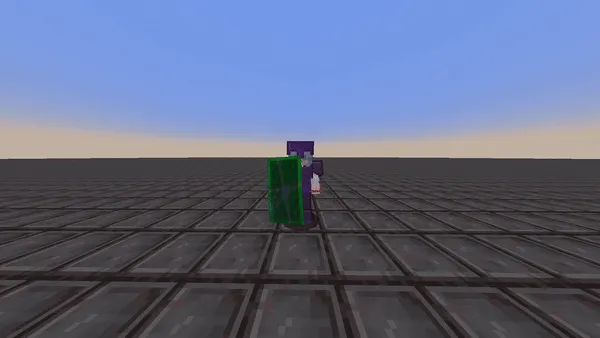
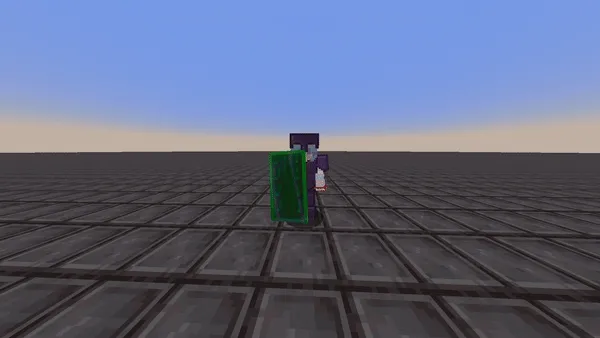
- Color-based shield state overlays — The core idea is simple, but it matters in live combat. Instead of watching and guessing, you get immediate visual feedback about whether the shield is currently disabled or active, which makes reaction timing easier.
- Customizable enabled and disabled colors — The mod gives you control over the colors used for each shield state through its config screen. That is useful if you want stronger contrast, a more subtle look, or a setup that fits your resource pack and HUD preferences better.
- Interpolation option — You can choose between static colors or a gradual transition from the disabled color to the enabled color. That transition gives you a better sense of recovery timing, so it is easier to estimate when your shield is about to become usable again.
- Overlay-based rendering — This version does not replace the shield's base texture. That is important if you use custom shield textures from resource packs, because the mod can add its visual cue without overriding the original look of the item.
- Shader color fix — The update history notes a fix for incorrect colors when shaders are enabled. For players who use shader packs, that makes the mod more dependable and keeps the shield state indicator readable in more setups.
- Improved state prediction — The newer version includes near-perfect state prediction, which is exactly the kind of refinement this mod needed. In practice, that means the overlay is better at matching the shield's real status instead of lagging behind what is happening in game.
- Ported forward and improved by Walksy — This is not just a basic reupload of the original idea. The mod has been carried forward and refined, which is a good sign if you want a maintained visual utility rather than an abandoned clone.
Screenshots
How to Install Shield Statuses Mod
- Install Fabric Mod Loader for the Minecraft version you want to play.
- Install Mod Menu if you want access to the configuration screen for color and interpolation settings.
- Download the Shield Statuses Mod file for your exact Minecraft version and Fabric setup.
- Open your Minecraft
modsfolder and place the mod jar there along with any required companion mods. - Launch the game, open the config screen through Mod Menu, and tune the shield colors and interpolation to match your preference.
Requirements & Compatibility
| Requirement | Details | Notes |
|---|---|---|
| Mod loader | Fabric Mod Loader | Required for all listed downloads. |
| Configuration access | Mod Menu | Needed if you want to adjust colors and interpolation in-game. |
| Supported Minecraft versions | 26.1.1, 26.1, 1.21.11 through 1.19.2 | The mod is offered across a broad version range, including multiple 1.21 and 1.20 releases. |
| Rendering approach | Overlay-based shield indicators | Designed to avoid overwriting shield textures from resource packs. |
| Visual compatibility | Shader-aware | The changelog specifically notes a shader color fix. |
What's New
- Incorrect shield colors shown with shaders have been fixed.
- State prediction has been improved to be near perfect.
- The latest update focuses on making shield feedback more accurate and reliable in real play.
- The visual overlay behavior continues to preserve custom shield textures from resource packs.
Pros and Cons
Pros
- Clear visual shield state feedback during combat.
- Custom color controls let you tailor the overlay to your UI style.
- Interpolation adds a helpful sense of shield recovery timing.
- Overlay rendering avoids clashing with custom shield textures.
- Recent fixes improve behavior with shaders and state prediction.
Cons
- You need Fabric Mod Loader.
- Mod Menu is required if you want to change settings easily.
- The listed support is tied to specific Minecraft versions, so version matching matters.
Alternatives to Shield Statuses Mod
- Mod Menu - A practical companion for Fabric players who want quick access to mod configuration screens, including settings for utility mods like this one.
- Sodium - A strong visual-side companion for Fabric users who want to improve the client experience alongside HUD and overlay-focused mods.
- AppleSkin - Another useful information mod that improves how clearly Minecraft communicates survival mechanics on the HUD.
Download Shield Statuses Mod
| Minecraft Version | Fabric |
|---|---|
| For Minecraft 26.1.1 | Download |
| For Minecraft 26.1 | Download |
| For Minecraft 1.21.11 | Download |
| For Minecraft 1.21.10 | Download |
| For Minecraft 1.21.9 | Download |
| For Minecraft 1.21.8 | Download |
| For Minecraft 1.21.7 | Download |
| For Minecraft 1.21.6 | Download |
| For Minecraft 1.21.5 | Download |
| For Minecraft 1.21.4 | Download |
| For Minecraft 1.21.3 | Download |
| For Minecraft 1.21.2 | Download |
Always download mods from official sources to stay safe.
Frequently Asked Questions
What does Shield Statuses Mod actually do?
It adds color overlays that show whether your shield is disabled or enabled. That makes shield timing easier to read in combat, instead of forcing you to guess when the item is ready again.
Do I need Fabric to use this mod?
Yes, Fabric Mod Loader is required. The available downloads in the data are all for Fabric.
Do I need Mod Menu?
Yes, if you want to access the configuration screen easily. The mod's color and interpolation settings are exposed through Mod Menu.
Does it replace my shield texture?
No, it renders as an overlay instead of changing the shield texture itself. That is useful if you use custom shield textures from a resource pack.
Does Shield Statuses Mod work with shaders?
Yes, the changelog says shader color behavior was fixed. That means the overlay should be more reliable when shaders are enabled.
Can I make the shield colors change gradually?
Yes, interpolation is supported. You can choose a gradual transition from disabled to enabled, or keep the colors static if you prefer a simpler look.
Is Shield Statuses Mod lightweight?
It appears to be lightweight. The mod focuses on a narrow HUD-style overlay rather than replacing large systems or overhauling core gameplay.


