

Show Me Your Skin! is a client-side armor customization mod that lets you hide or adjust how armor, elytra, and shields are rendered in Minecraft Fabric. It focuses on visual control, optional server syncing, and flexible per-player display settings.
One of the biggest annoyances with cosmetic-heavy Minecraft setups is that armor quickly covers the skin, cape, and overall look you spent time choosing. Show Me Your Skin! solves that problem by letting you decide exactly how visible each piece of gear should be, and its nearly 6 million downloads suggest that a lot of players wanted the same kind of control. Instead of forcing a single on-or-off approach, it gives you room to tune the experience around your playstyle, whether you care more about aesthetics, clarity, or multiplayer presentation.
Key Features of Show Me Your Skin!
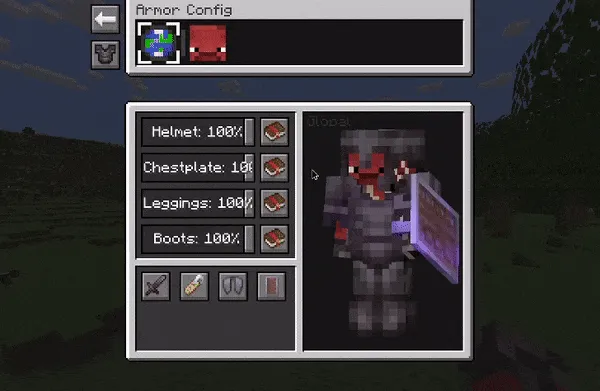
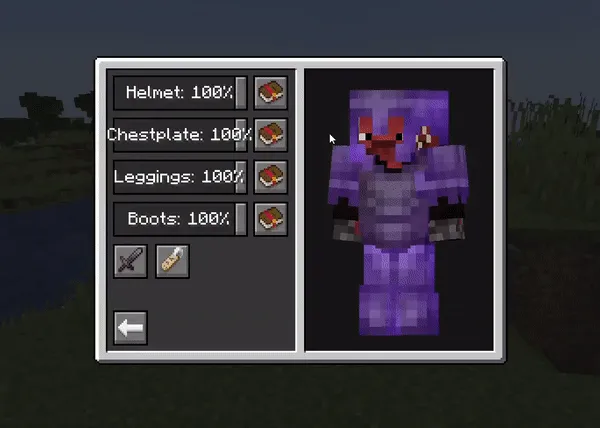
- Individual armor, elytra, and shield configuration — This is the feature that makes the mod genuinely practical instead of just cosmetic. You can treat helmets, chestplates, leggings, boots, elytra, and shields as separate visual elements, which means you are not stuck hiding everything at once when you only want part of your outfit to show.
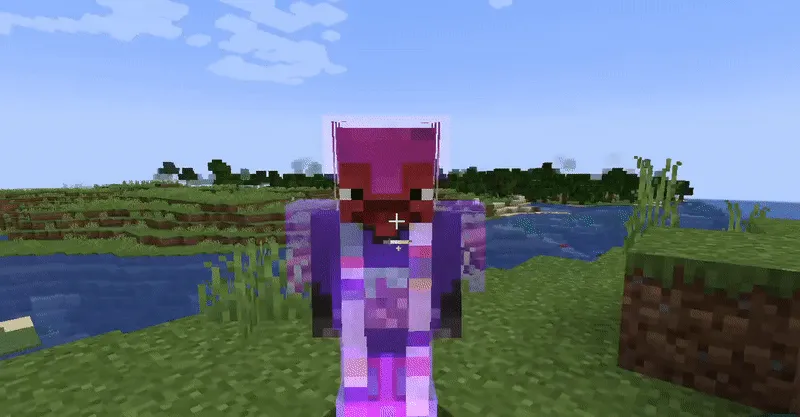
- Transparency and invisibility controls — The mod supports more than a simple hide toggle, which matters because full invisibility is not always the best-looking option. Being able to reduce visibility instead of removing it entirely gives you a more natural way to keep armor readable while still letting your skin stand out.
- Enchant glint hiding — Enchant effects can make already busy armor visuals feel even more distracting. Hiding the glint is useful if you prefer a cleaner look, take screenshots, or just want your character design to be more visible without the extra animated overlay.
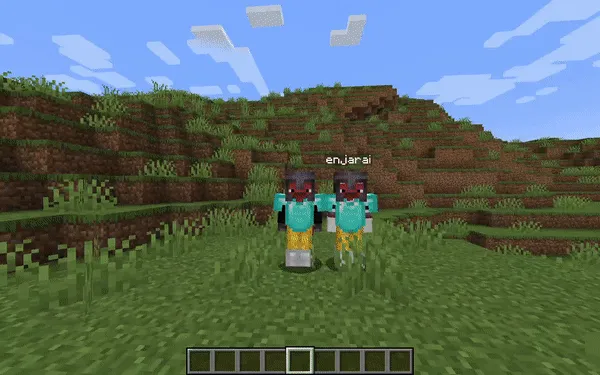
- Server-based syncing of settings — When the mod is present on a server, your visual settings can be shown to other players in real time. That matters in multiplayer because it turns armor customization from a private client tweak into a shared presentation feature, while still allowing server admins to limit what is available if needed.
- Player name tag display toggle — Name tags can be helpful, but they can also clutter the screen or clash with a more immersive look. Having a toggle for them gives you one more way to clean up player visuals, especially in social hubs, roleplay servers, or group screenshots.
- Context-sensitive armor hiding — This is one of the smartest parts of the mod because it avoids the usual downside of cosmetic armor hiding. Armor can return to normal vanilla behavior under specific conditions, such as after taking damage, so you can keep a polished look most of the time without permanently losing that familiar in-combat visibility.
- Per-player overrides — Client-side per-player settings are more useful than they sound. They let you adjust how individual players appear on your screen, which is helpful on crowded servers where you may want different visual rules for friends, rivals, or anyone whose setup is harder to read.
Screenshots
How to Install Show Me Your Skin!
- Download and install Fabric Mod Loader for the Minecraft version you want to play.
- Get the correct Show Me Your Skin! file for your game version, such as Minecraft 1.21.11, 1.21.8, 1.21.7, 1.21.6, 1.21.1, 1.21, 1.20.6, or 1.20.5.
- Place the mod file into your Minecraft
modsfolder while using a Fabric profile. - Launch Minecraft with Fabric and open the mod configuration in-game to adjust armor, elytra, shield, and name tag settings.
- If you play on a server that also has the mod installed, test your preferred setup there to see which settings sync to other players.
Requirements & Compatibility
| Item | Details |
|---|---|
| Mod Loader | Fabric Mod Loader |
| Type | Client-side mod with optional server-side support |
| Minecraft Versions | 1.21.11, 1.21.8, 1.21.7, 1.21.6, 1.21.1, 1.21, 1.20.6, 1.20.5, 1.20.4, 1.20.3, 1.20.2, 1.20.1, 1.20, 1.19.4, 1.19.3, 1.19.2, 1.19.1, 1.19, 1.18.2, 1.18.1 |
| Author | enjarai |
| License | MIT |
| Category | Minecraft Mods |
| Tags | equipment, utility |
What's New
- The latest listed update is dated 2026-03-05.
- The current changelog notes a fix for a potential crash.
- The crash fix applies when reusing configuration files from the 1.0 versions of the mod.
- This kind of update is useful for players carrying old settings forward into newer releases.
Pros and Cons
Pros
- Granular control over each armor piece, elytra, and shield.
- Supports both personal client-side tweaks and synced multiplayer presentation.
- Context-sensitive hiding helps preserve useful armor visibility in combat situations.
- Name tag and glint options make the overall visual cleanup more complete.
- The interface appears designed around frequent adjustment rather than one-time setup.
Cons
- Fabric Mod Loader is required.
- Some multiplayer features depend on the mod also being installed server-side.
- Players who want pure vanilla visuals may not need this level of customization.
- Heavy use of hidden armor can reduce how much gear you visually notice at a glance.
Alternatives to Show Me Your Skin!
- Cosmetic Armor Reworked — A similar choice for players who want armor appearance control without making visual style an afterthought.
- 3D Skin Layers — A complementary mod for players who want character skins to stand out more clearly once armor visuals are reduced.
- Equipment Compare — A practical companion if you like customizing gear visuals but still want clearer gear-related information while playing.
Download Show Me Your Skin!
| Minecraft Version | Fabric |
|---|---|
| For Minecraft 1.21.11 | Download |
| For Minecraft 1.21.8 | Download |
| For Minecraft 1.21.7 | Download |
| For Minecraft 1.21.6 | Download |
| For Minecraft 1.21.1 | Download |
| For Minecraft 1.21 | Download |
| For Minecraft 1.20.6 | Download |
| For Minecraft 1.20.5 | Download |
| For Minecraft 1.20.4 | Download |
| For Minecraft 1.20.3 | Download |
| For Minecraft 1.20.2 | Download |
| For Minecraft 1.20.1 | Download |
Always download mods from official sources to stay safe.
Frequently Asked Questions
Is Show Me Your Skin! a client-side mod?
Yes — Show Me Your Skin! works as a client-side mod with optional server-side support. That means you can use it on your own client for personal visual changes, while servers that also install it can enable synced settings between players.
Does Show Me Your Skin! require Fabric?
Yes — Fabric Mod Loader is required based on the available download and compatibility data. The listed files are for Fabric, and no other loader is confirmed in the provided information.
Can this mod hide only specific armor pieces?
Yes — individual armor pieces can be configured separately. That is the main reason the mod feels more flexible than simple armor toggle mods, because you can fine-tune helmets, chestplates, leggings, boots, elytra, and shields independently.
Does Show Me Your Skin! work in multiplayer?
Yes — it supports multiplayer, but the exact behavior depends on where it is installed. On servers with the mod installed, settings can sync so other players see them in real time, while client-only use keeps your per-player visual overrides visible only to you.
Can armor return when needed instead of staying hidden all the time?
Yes — the mod includes context-sensitive armor hiding. One example given by the author is restoring vanilla armor behavior for a configurable number of seconds after a player takes damage.
Should you install Show Me Your Skin! for a survival server?
Yes — if you care about skin visibility and cleaner player visuals, it is a strong fit for survival multiplayer. The optional synced settings and condition-based visibility make it more useful than a basic cosmetic toggle, especially when you still want armor to show under certain situations.




![[Let's Do] Candlelight - Farm&Charm compat Mod (1.21.1) - thumbnail](http://mcinside.com/wp-content/uploads/2026/04/thumbnail-81-52x52.webp)


![[Let's Do] Meadow Mod (1.21.1) - thumbnail](http://mcinside.com/wp-content/uploads/2026/04/thumbnail-64-52x52.webp)


![Not Enough Recipe Book [NERB] Mod (1.21.11) - thumbnail](http://mcinside.com/wp-content/uploads/2026/04/thumbnail-63-52x52.webp)