
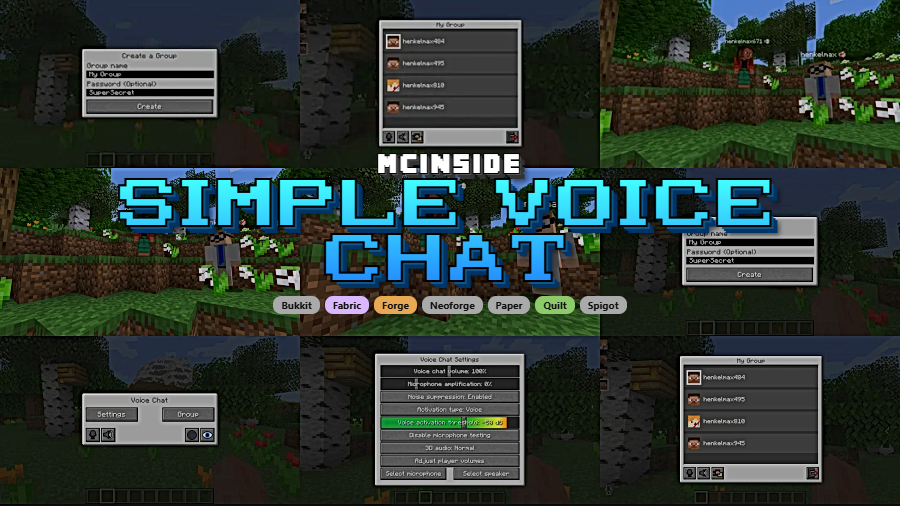
Simple Voice Chat is a proximity voice chat mod that adds real-time voice communication to Minecraft, available for Fabric, Forge, NeoForge, Quilt, and server platforms including Bukkit, Spigot, and Paper. Developed by henkelmax, the mod uses the Opus codec and supports push-to-talk, voice activation, configurable chat distance, and encrypted audio transmission.
Minecraft has never included native voice chat. For years, players have relied on Discord, TeamSpeak, or other third-party programs to communicate during multiplayer sessions. The problem? These tools have no concept of in-game proximity. Whether a player stands right next to you or is a thousand blocks away, you hear them at the same volume. Simple Voice Chat solves this by embedding a fully functional proximity voice system directly into Minecraft. Voices get louder as players approach and fade as they walk away, creating a dramatically more immersive multiplayer experience. With over 41 million downloads on Modrinth alone, it has become the definitive voice communication mod for the Minecraft community — and for good reason.
Key Features of Simple Voice Chat
- Proximity Voice Chat — This is the core feature that sets Simple Voice Chat apart from external programs like Discord. Audio volume scales based on actual in-game distance between players, so conversations feel natural and spatially accurate. You can configure the maximum voice distance to suit your server's needs, whether that is a small private world or a large public server.
- Push to Talk & Voice Activation — Players can choose between holding a configurable key to transmit audio or using automatic voice activity detection. The voice activation mode includes sensitivity adjustment, so the mod only picks up intentional speech. This flexibility means every player can use whichever input method feels most comfortable.
- RNNoise Neural Network Noise Suppression — Simple Voice Chat integrates RNNoise, a recurrent neural network-based noise suppression system, to filter out background noise from microphone input. This means keyboard clicks, fan noise, and ambient room sounds are reduced before your voice reaches other players. The result is cleaner audio without requiring players to configure external noise gates.
- Password Protected Groups — Beyond proximity chat, players can create private voice groups with password protection. This is useful for teams coordinating across long distances during raids, building projects, or minigames where proximity-based audio would not work. Group members hear each other regardless of in-game distance.
- Opus Codec & AES Encryption — The mod uses the Opus audio codec, which is the same codec used by Discord and most modern VoIP applications. It delivers high-quality audio at low bitrate, keeping bandwidth usage minimal. All voice data is encrypted with AES, ensuring that voice communications remain private and cannot be intercepted by third parties.
- Cross-Platform Loader Compatibility — Simple Voice Chat works across Fabric, NeoForge, Forge, Quilt, Bukkit, Spigot, and Paper. It also supports proxy servers including Velocity, BungeeCord, and Waterfall. This means server operators do not need to worry about which mod loader their players use — the mod handles cross-compatibility automatically.
- 3D Positional Audio & Player Volume Control — Using OpenAL, the mod renders voice audio in full 3D space. You can hear whether a player is to your left, right, above, or below you. Individual player volume sliders let you turn down loud players or boost quiet ones without affecting the rest of the server.
Screenshots
How to Install Simple Voice Chat
- Install your preferred mod loader: Fabric, Forge, NeoForge, or Quilt. Make sure the loader version matches your Minecraft version.
- Download Simple Voice Chat for your Minecraft version and loader from the official Modrinth page or CurseForge. The mod supports Minecraft versions from 1.20 through the latest 26.1 snapshots.
- Place the downloaded
.jarfile into your.minecraft/modsfolder. For a better in-game configuration experience, also install Cloth Config. - The server must also have Simple Voice Chat installed and configured. Server owners should follow the official wiki setup guide to open the required voice chat port (default: 24454/UDP) and configure server-side settings.
- Launch Minecraft, join the server, and press the voice chat key (default: V) to open the Simple Voice Chat settings screen. Test your microphone and speaker using the built-in playback test before chatting.
Requirements & Compatibility
| Requirement | Details |
|---|---|
| Mod Loaders (Client) | Fabric, Forge, NeoForge, Quilt |
| Server Platforms | Bukkit, Spigot, Paper, Fabric, Forge, NeoForge |
| Proxy Support | Velocity, BungeeCord, Waterfall |
| Minecraft Versions | 1.20 – 1.21.11, 26.1 (including snapshots) |
| Optional Dependencies | Cloth Config (configuration UI), ModMenu (Fabric menu integration) |
| Server Setup Required | Yes — dedicated voice chat port must be opened (UDP) |
What's New
- Fixed rate limit window — resolves an issue where voice connections could be incorrectly throttled under certain server conditions.
- Updated compatibility for Minecraft 26.1 snapshot builds, including snapshots 7 through 11.
- Continued support for the latest stable releases across all major mod loaders.
Pros and Cons
Pros
- True proximity-based voice chat creates immersive multiplayer interactions
- Works across all major mod loaders and server platforms simultaneously
- Built-in noise suppression via RNNoise eliminates background noise without external tools
- AES encryption and Opus codec deliver secure, high-quality audio at low bandwidth
- Highly configurable — push-to-talk key, voice distance, individual player volumes, and more
- Massive community support with 41 million+ downloads and an active addon ecosystem
Cons
- Requires server-side installation and port configuration — not a client-only mod
- Server owners must open an additional UDP port, which some hosting providers restrict
- No built-in text chat fallback for players without microphones
- Audio quality depends on each player's microphone hardware and network connection
Alternatives to Simple Voice Chat
- Plasmo Voice — Another proximity voice chat mod with a similar feature set, offering Opus codec support and addon compatibility. A strong alternative if you want a different configuration interface or specific addon support.
- Sound Physics Remastered — While not a voice chat mod, Sound Physics Remastered enhances all in-game audio with reverb and occlusion effects. It pairs well with Simple Voice Chat to make the entire Minecraft sound experience more immersive.
- Peek — A lightweight social utility mod that helps players share information and interact on servers. Useful as a complementary mod alongside voice chat for enhanced multiplayer communication.
Download Simple Voice Chat
| Minecraft Version | Fabric | Forge | NeoForge | Quilt |
|---|---|---|---|---|
| For Minecraft 26.1 | Download | Download | Download | — |
| For Minecraft 1.21.11 | Download | Download | Download | — |
| For Minecraft 1.21.10 | Download | Download | Download | — |
| For Minecraft 1.21.9 | — | — | — | — |
| For Minecraft 1.21.8 | Download | Download | Download | — |
| For Minecraft 1.21.7 | — | — | — | — |
| For Minecraft 1.21.6 | — | — | — | — |
| For Minecraft 1.21.5 | Download | Download | Download | — |
| For Minecraft 1.21.4 | Download | Download | Download | — |
| For Minecraft 1.21.3 | — | — | — | — |
| For Minecraft 1.21.2 | — | — | — | — |
| For Minecraft 1.21.1 | Download | Download | Download | Download |
Always download mods from official sources to stay safe.
Frequently Asked Questions
Does Simple Voice Chat work on singleplayer worlds?
Yes — Simple Voice Chat works in singleplayer when you open your world to LAN. The mod runs a local voice server alongside the integrated Minecraft server, so you can test voice chat features or use them with LAN players without setting up a dedicated server.
Do all players on the server need to install Simple Voice Chat?
Yes, both the server and each client must have the mod installed. Players who do not have the mod installed can still join and play on the server normally, but they will not be able to hear or transmit voice chat. The mod does not prevent vanilla clients from connecting.
Is Simple Voice Chat compatible with Minecraft 1.21 and newer versions?
Yes — Simple Voice Chat supports Minecraft versions from 1.20 through 1.21.11 and the latest 26.1 snapshot builds. The mod is actively maintained and typically receives updates within days of new Minecraft releases for Fabric, Forge, and NeoForge loaders.
Does Simple Voice Chat cause lag or performance issues?
The mod appears to be lightweight for most players. It uses the Opus codec, which is designed for low-bandwidth, high-quality audio streaming. The primary performance consideration is network bandwidth on the server side, especially with many simultaneous voice users. Client-side impact is minimal under normal conditions.
Can I use Simple Voice Chat with proxy servers like Velocity or BungeeCord?
Yes — the mod officially supports Velocity, BungeeCord, and Waterfall proxy setups. This allows voice chat to work seamlessly across multiple backend servers in a network. Server administrators should consult the official wiki for proxy-specific configuration steps to ensure proper port forwarding and routing.


![[Let's Do] Meadow Mod (1.21.1) - thumbnail](http://mcinside.com/wp-content/uploads/2026/04/thumbnail-64-52x52.webp)


![Not Enough Recipe Book [NERB] Mod (1.21.11) - thumbnail](http://mcinside.com/wp-content/uploads/2026/04/thumbnail-63-52x52.webp)


