

Create Slice & Dice Mod is a food-and-technology automation mod that extends Create-style processing for Farmer's Delight workflows in Minecraft Fabric, Forge, and NeoForge. It focuses on making cooking and cutting automation more sensible with machine-based equivalents of manual kitchen steps.
The core problem this mod solves is friction between manual food crafting and industrial automation: Farmer's Delight is excellent for cooking depth, while Create is excellent for machines, and Slice & Dice bridges that gap. Instead of manually repeating cutting-board and cooking-pot actions, you can move those steps into repeatable factory lines that feel consistent with the rest of your tech setup. It also adds sprinkler behavior that turns fluids into useful environmental effects, which opens up practical farm automation ideas without rewriting your whole base design. With 4,511,766 downloads on Modrinth and broad visibility on CurseForge, it has the kind of large-scale adoption many players look for before committing to a mod in a long-term world.
Key Features of Create Slice & Dice Mod
- Slicer machine for automatic cutting — The Slicer works like a Create machine and automatically registers Farmer's Delight cutting recipes, effectively replacing repetitive cutting-board steps. This matters because it removes one of the biggest bottlenecks in food production lines. If your goal is stable throughput, automated cutting keeps your kitchen chain predictable.
- Tool-based processing control — The Slicer requires a tool inserted with right-click, and by default accepts knives and axes. That makes automation feel intentional instead of "free crafting," because your setup still respects tool logic. You can also adjust allowed tools through the
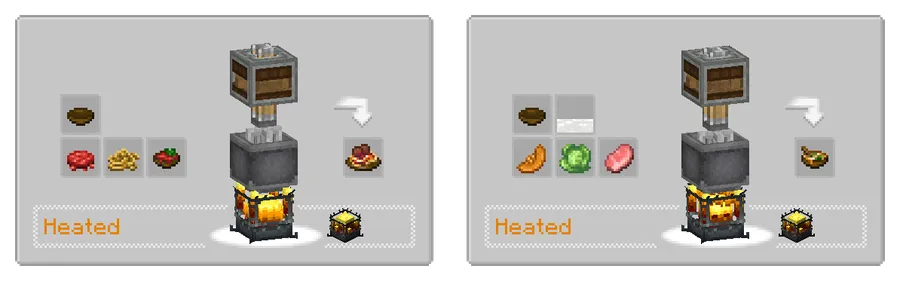
sliceanddice:allowed_toolsitem tag, which is useful for pack makers who want custom balance. - Automatic cooking integration — Farmer's Delight Cooking Pot recipes are added as heated mixing recipes. In practice, this means players can route ingredients into Create-style heated processing without constantly switching between manual and automated systems. For factory-focused gameplay, this is the exact kind of integration that keeps builds clean and scalable.
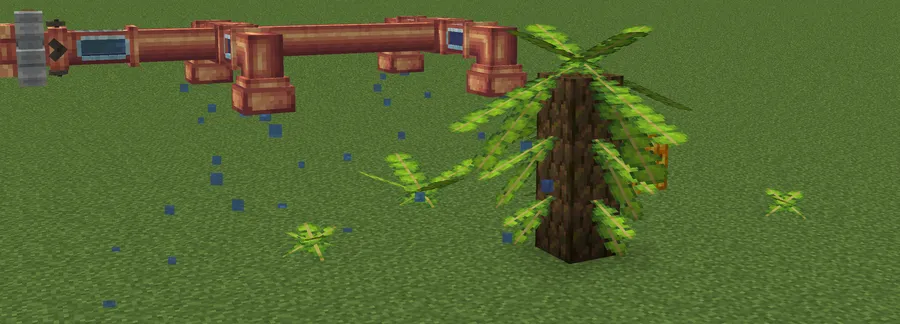
- Sprinkler water behavior — When supplied with water by pipe, the Sprinkler makes the area below "wet," so the game treats it like rain in that space. This is valuable for farm design because you can localize rain-like conditions where needed instead of relying on weather timing. It gives you environmental control through infrastructure, not luck.
- Sprinkler lava and potion behavior — Lava from the Sprinkler applies a small amount of fire damage to entities below, and potions apply short-duration effects. This creates tactical utility: you can design defensive or utility zones with fluid logic rather than only redstone triggers. It is especially interesting for players who enjoy mixed-purpose industrial builds.
- Liquid Fertilizer fluid — The mod adds Liquid Fertilizer, a fluid that applies a bonemeal effect to blocks. This matters for crop pipelines because it turns growth acceleration into something that can be pumped, stored, and distributed as part of your machine network. If you like "set-and-scale" farming systems, this is one of the most practical additions in the mod.
Screenshots
How to Install Create Slice & Dice Mod
- Choose your Minecraft version first (1.21.1, 1.20.1, 1.19.2, or 1.18.2), then match the correct loader build for that version.
- Install one supported loader: Fabric Mod Loader, Minecraft Forge, or NeoForge.
- Install Create for your loader: Create (Forge/NeoForge) or Create Fabric (Fabric).
- Install Kotlin dependency for your loader: Kotlin for Forge or Fabric Language Kotlin.
- Place the Slice & Dice file in your
modsfolder, launch the game, and verify it appears in your mod list before loading your main world.
Requirements & Compatibility
| Minecraft Version | Supported Loaders | Notes |
|---|---|---|
| 1.21.1 | NeoForge | Listed download support for NeoForge. |
| 1.20.1 | Fabric, Forge | Requires Create variant and Kotlin dependency for chosen loader. |
| 1.19.2 | Fabric, Forge | Requires Create variant and Kotlin dependency for chosen loader. |
| 1.18.2 | Forge | Forge build available for this version line. |
| Core Integration | Create + Farmer's Delight focus | Designed mainly around Farmer's Delight compatibility, but can run without it. |
What's New
- Latest listed update date: 2026-03-20.
- Re-implemented basic REI compatibility (changelog reference: #264).
- Fixed slime-ball compatibility recipe issue (changelog reference: #267).
Pros and Cons
Pros
- Strong Create-to-Farmer's Delight automation bridge for real gameplay pain points.
- Slicer and heated mixing integration simplify repeat food production.
- Sprinkler fluid effects add flexible farm and utility design options.
- Supports multiple major loaders across several Minecraft versions.
Cons
- Dependency chain is longer than a standalone mod (loader + Create + Kotlin requirement).
- 1.21.1 listing is NeoForge-only in the provided download matrix.
- Best experience is tied to Farmer's Delight and Create-style automation workflows.
- Some advanced customization (like allowed tools) may require datapack/tag edits.
Alternatives to Create Slice & Dice Mod
- Create — The core machinery framework behind rotational automation and processing chains used by Slice & Dice.
- Farmer's Delight — A cooking-focused content mod that provides the recipe ecosystem Slice & Dice automates.
- Overweight Farming — A complementary farming-oriented option if you want to expand crop gameplay around your food pipeline.
Download Create Slice & Dice Mod
| Minecraft Version | Fabric | Forge | NeoForge |
|---|---|---|---|
| For Minecraft 1.21.1 | — | — | Download |
| For Minecraft 1.20.1 | Download | Download | — |
| For Minecraft 1.19.2 | Download | Download | — |
| For Minecraft 1.18.2 | — | Download | — |
Always download mods from official sources to stay safe.
Frequently Asked Questions
Is Create Slice & Dice available for Minecraft 1.21.1?
Yes — a 1.21.1 build is listed. The provided download data shows NeoForge support for that version.
Do I need Farmer's Delight to use this mod?
No — it can run without Farmer's Delight. The mod is designed mainly for Farmer's Delight compatibility, but the description explicitly states it still works without it.
Which mod loaders does Slice & Dice support?
It supports Fabric, Forge, and NeoForge. Exact availability depends on Minecraft version, so check the version-to-loader matrix before downloading.
Does the mod require Create and Kotlin dependencies?
Yes — Create and a Kotlin dependency are listed as requirements in the provided mod description context. Use the correct variant for your loader (Create/Create Fabric and Kotlin for Forge/Fabric Language Kotlin).
Can I customize which tools work in the Slicer?
Yes — tool behavior is configurable through the sliceanddice:allowed_tools item tag. By default, knives and axes are allowed, and datapack edits can expand that list.
What does the Sprinkler do with different fluids?
It depends on the fluid. Water creates wet/rain-like conditions below, lava applies small fire damage, potions give short effects, and Liquid Fertilizer applies bonemeal-like growth behavior to blocks.


