
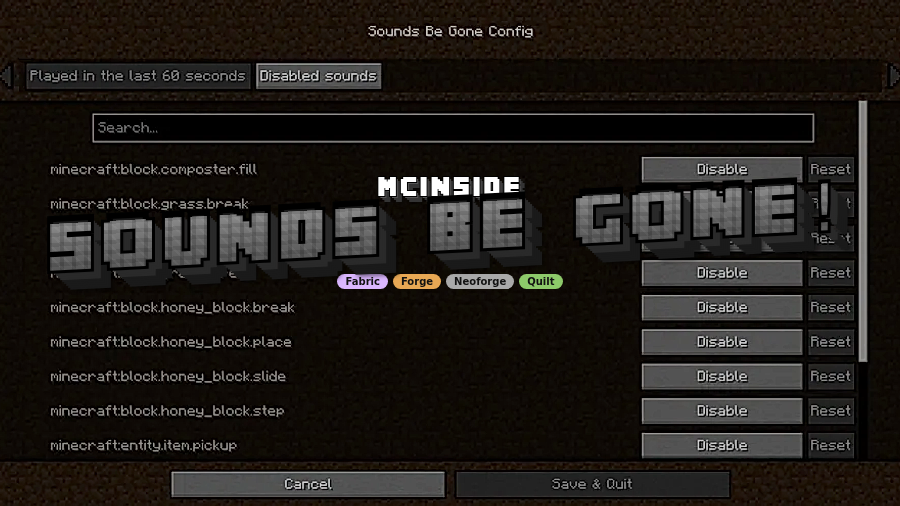
Sounds Be Gone! is a client-side utility mod that lets you mute specific sound events for Minecraft on Fabric, Forge, NeoForge, and Quilt.
Minecraft can be easy to enjoy until one repeated sound becomes impossible to ignore, especially for players with misophonia or anyone who wants a quieter, more controlled game. Sounds Be Gone solves that problem by letting you mute the exact sound that is causing trouble instead of forcing you to hunt through files, and its 1,665,297 Modrinth downloads suggest that a lot of players have found the workflow genuinely useful.
Key Features of Sounds Be Gone! Mod
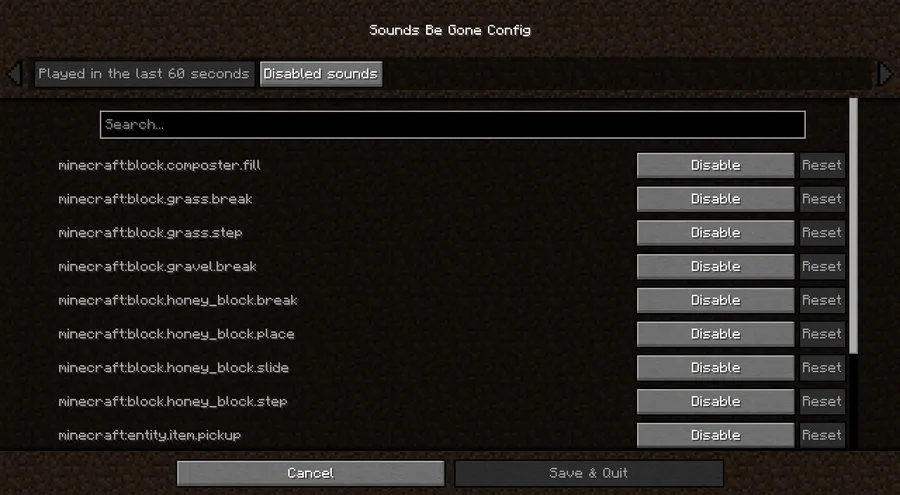
- Mute specific sound events — You are not limited to broad volume sliders, because the mod lets you silence exact sound events one at a time. That matters when only one block action, mob noise, or modded effect is getting in the way of playing comfortably.
- Recently played sound list — The mod keeps a short list of sounds you have heard recently, which removes the guesswork from finding the right entry. Instead of memorizing filenames or digging through logs, you can hear the sound, open the menu, and pick it from a familiar list.
- Reversible mute history — Every mute has an audit trail, so you can unmute later without starting over. That makes the mod feel practical instead of permanent, which is important if you are experimenting with what needs to stay quiet.
- Client-side behavior only — Your sound preferences stay on your own game client, and there is no server requirement to use the mod. That keeps the experience predictable and also makes it easier to use across single-player worlds and multiplayer sessions.
- Built for accessibility — The design is clearly aimed at sensory comfort, with a predictable UI and reversible actions. If noisy environments make it hard to relax in-game, this kind of targeted control is a much better fit than a blunt all-or-nothing mute.
- Cloth Config and Mod Menu support — Cloth Config helps power the settings screen, while Mod Menu makes it easier to reach the configuration panel from inside the game. On older setups especially, that convenience matters because it shortens the path from "this sound is bothering me" to "fixed."
- Telemetry with opt-out control — The mod can collect anonymous telemetry to help the author understand which Minecraft versions and loaders are in use, but it is optional. It only runs client-side when enabled, and the implementation is open in Telemetry.java so you can review what is being sent.
Screenshots
How to Install Sounds Be Gone! Mod
- Choose the loader that matches your setup: Fabric Mod Loader, Minecraft Forge, NeoForge, or Quilt Loader.
- Install Cloth Config, and add Mod Menu if you want a quicker way to open the settings screen.
- Download the build that matches your Minecraft version from the table below.
- Place the mod files into your `mods` folder and launch the game to confirm everything loads correctly.
- Use the in-game settings or press `B` in Minecraft 1.20 and newer to open the sound list, then mute the entries that are bothering you.
Requirements & Compatibility
| Item | Details |
|---|---|
| Minecraft versions | 1.21.11, 1.21.10, 1.21.9, 1.21.8, 1.21.7, 1.21.6, 1.21.5, 1.21.4, 1.21.1, 1.21, 1.20.4, 1.20.2, 1.20.1, 1.19.4, 1.19.2 |
| Supported loaders in the metadata | Fabric, Forge, NeoForge, Quilt |
| Provided download matrix | Fabric and NeoForge for 1.21.9 through 1.21.11; Fabric, NeoForge, and Quilt for 1.21.4 through 1.21.8 |
| Loader notes | Fabric is supported on releases below 1.20, and NeoForge builds are available for Minecraft 1.20.4 and newer. |
| Required library | Cloth Config |
| Optional helper | Mod Menu |
| Behavior | Client-side only, with sound choices saved locally to your profile |
| Telemetry | Optional, client-side, and disabled unless you turn on the setting in game |
What's New
- Version 1.4.10 is the current changelog entry for the mod.
- The update adds support for Minecraft 1.21.11.
- Old Mod Menu dependency references were fixed.
- The changelog also notes a dependency update pass alongside the bug fixes.
Pros and Cons
Pros
- Lets you mute exact sound events instead of lowering everything at once.
- Recently played sounds make it easy to find the source of a problem fast.
- Mute changes are reversible, so you can refine your setup later.
- Everything stays on the client, which keeps the experience simple and local.
- The telemetry setting is optional and can be reviewed before you use it.
Cons
- You still need Cloth Config, and Mod Menu is helpful if you want easier access.
- The default `B` keybind may conflict with other mods or personal control layouts.
- Support is version-specific, so you need to match the correct loader and Minecraft release.
- Older versions require a slightly different path to reach the settings screen.
Alternatives to Sounds Be Gone! Mod
- Cloth Config - This is the config library that supports the mod's settings workflow, so it is the most practical companion if you are building a smooth setup around sound controls.
- Mod Menu - Optional, but it makes the configuration screen easier to open from the main menu, which is useful when you do not want to jump into a world just to change a setting.
- NeoForge - Not a replacement for the mod itself, but a relevant platform choice if you are installing one of the newer supported builds and want the right loader path first.
Download Sounds Be Gone! Mod
| Minecraft Version | Fabric | Forge | NeoForge | Quilt |
|---|---|---|---|---|
| For Minecraft 1.21.11 | Download | — | Download | — |
| For Minecraft 1.21.10 | Download | — | Download | — |
| For Minecraft 1.21.9 | Download | — | Download | — |
| For Minecraft 1.21.8 | Download | — | Download | Download |
| For Minecraft 1.21.7 | Download | — | Download | Download |
| For Minecraft 1.21.6 | Download | — | Download | Download |
| For Minecraft 1.21.5 | Download | — | Download | Download |
| For Minecraft 1.21.4 | Download | — | Download | Download |
| For Minecraft 1.21.1 | Download | — | Download | Download |
| For Minecraft 1.21 | Download | — | Download | Download |
| For Minecraft 1.20.4 | Download | — | Download | Download |
| For Minecraft 1.20.2 | Download | Download | — | Download |
Always download mods from official sources to stay safe.
Frequently Asked Questions
Is Sounds Be Gone! client-side only?
Yes — the mod is designed to work on your own client, so your muted sounds stay local to your game. That makes it easier to use in single-player and multiplayer without needing any server-side setup.
Can it mute modded sounds as well as vanilla sounds?
Yes — the mod can silence sound events from both vanilla Minecraft and other mods. That is one of the main reasons it is useful, because the noise that bothers you is not always part of the base game.
Can I unmute sounds later?
Yes — the mod keeps enough history for you to reverse a mute when you change your mind. That makes it a flexible tool rather than a permanent commitment.
Do I need a server plugin to use it?
No — there is no server requirement for the feature set described here. Your settings are handled on the client, so you control the experience from your own game instance.
Does Sounds Be Gone! support Minecraft 1.21.11?
Yes — the changelog says 1.21.11 support was added in version 1.4.10. If you are on that release, use the matching build from the download table.
Can I turn telemetry off?
Yes — you can disable telemetry from the in-game settings screen by turning off the enable telemetry option. The data collection only runs client-side when that toggle is enabled, and the implementation is open for review in Telemetry.java.

![[Let's Do] Brewery (1.21.1, 1.20.1) – Brewing & Cooking in Oktoberfest](http://mcinside.com/wp-content/uploads/2026/04/thumbnail-116-300x169.webp)




![HiddenMons [Cobblemon] Mod (1.21.1) - thumbnail](http://mcinside.com/wp-content/uploads/2026/04/thumbnail-262-52x52.webp)


