
StackDeobfuscator is a utility mod that remaps logged stack traces and crash reports into readable mappings for Minecraft Fabric. It is designed to turn obfuscated production names into human-readable class and method names while you play or test mods.
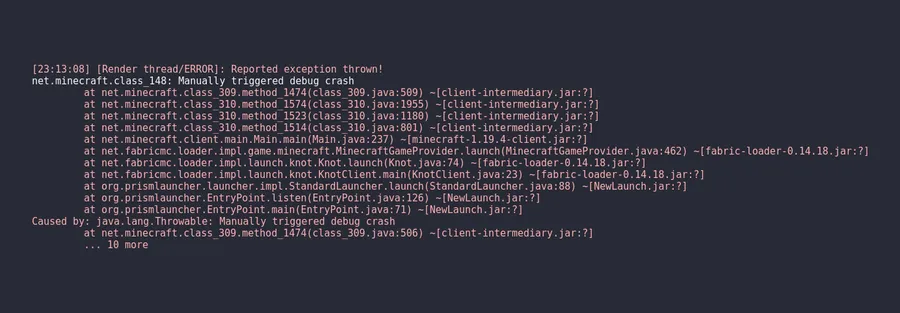
Most Minecraft crash logs are hard to read because they use obfuscated names like class_310, which slows down debugging and turns simple issues into long guesswork. This mod fixes that specific pain point by remapping those names into readable ones directly in console output and crash reports, so you can identify the real failing code faster. With 4,201,228 downloads on Modrinth, StackDeobfuscator has clear social proof from a very large troubleshooting-focused audience.
Key Features of StackDeobfuscator
- Readable stack traces in logs — The core value is immediate remapping of unreadable production symbols into mapped names you can actually understand. That matters because when an error appears mid-session, you can act on the first log pass instead of translating names manually. In practice, this reduces confusion and helps you decide whether the issue is in Minecraft internals, a specific mod, or launcher-side code.
- Readable names in crash reports — StackDeobfuscator does not only affect live console output; it also remaps crash report traces. This is important for sharing reports with teammates, server admins, or mod authors, because the file is clearer before it leaves your machine. Better first-pass clarity usually means faster bug triage and fewer back-and-forth questions.
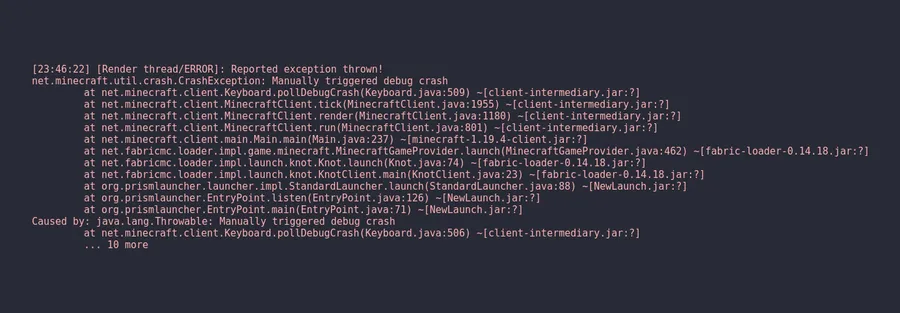
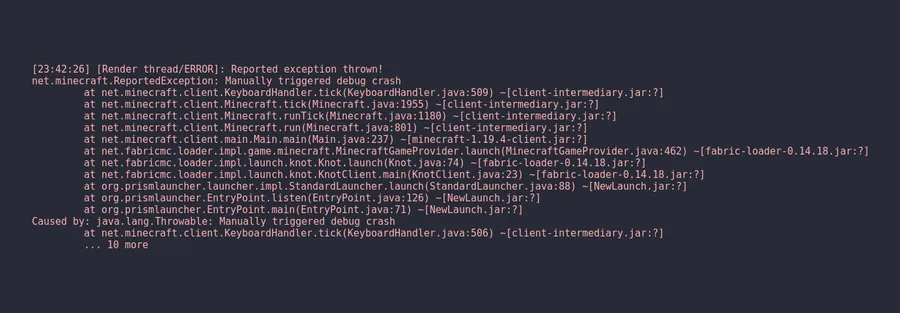
- Before/after clarity from obfuscated to mapped output — The project's own comparison shows exactly why this matters: entries like
net.minecraft.class_310become understandable names such asnet.minecraft.client.MinecraftClient. That single improvement can turn "unknown crash source" into a concrete debugging path. If you work on packs or mods, this kind of name resolution is often the difference between guessing and fixing. - Useful outside development environments — The mod is especially helpful when you are not running a full development setup but still need actionable traces. That means pack maintainers, testers, and advanced players can get development-style readability in normal game environments. For real-world troubleshooting, this is one of the most practical benefits.
- Yarn/Quilt-style mapped readability — The provided example output highlights mapped naming that aligns with common Fabric ecosystem expectations. This matters because the logs become easier to compare with documentation, issue trackers, and community troubleshooting discussions. When naming conventions line up, diagnosis tends to move faster.
- Configuration and web viewer support — The mod links to a configuration wiki and also provides a web version at
stackdeobf.net. That gives you flexibility in how you review or process stack traces beyond just staring at raw launcher output. For users who regularly parse errors, that extra workflow support is a meaningful quality-of-life improvement.
Screenshots
How to Install StackDeobfuscator
- Install the latest compatible Fabric Mod Loader for your Minecraft version.
- Confirm you are running a supported Fabric game version from the list in this article (for example 1.21.11, 1.21.10, 1.21.9, down to 1.21.5 release candidates).
- Download the correct StackDeobfuscator file from the download table below and match it to your game version branch.
- Place the mod JAR into your Minecraft
modsfolder in your Fabric instance. - Launch Minecraft with Fabric, reproduce or open logs as needed, and verify that stack traces are shown with readable mapped names.
Requirements & Compatibility
| Item | Details |
|---|---|
| Mod Name | StackDeobfuscator Mod |
| Author | booky10 |
| Category | Minecraft Mods |
| Tags | management, utility |
| Required Loader | Fabric Mod Loader |
| Mod Type | Fabric |
| Supported Minecraft Versions | 1.21.11-rc3, 1.21.11-rc2, 1.21.11-rc1, 1.21.11-pre5, 1.21.11-pre4, 1.21.11-pre3, 1.21.11-pre2, 1.21.11-pre1, 1.21.11, 1.21.10-rc1, 1.21.10, 1.21.9-rc1, 1.21.9-pre4, 1.21.9-pre3, 1.21.9-pre2, 1.21.9-pre1, 1.21.9, 1.21.8-rc1, 1.21.8, 1.21.7-rc2, 1.21.7-rc1, 1.21.7, 1.21.6-rc1, 1.21.6-pre4, 1.21.6-pre3, 1.21.6-pre2, 1.21.6-pre1, 1.21.6, 1.21.5-rc2, 1.21.5-rc1 |
| Status Note | Marked obsolete for Minecraft versions newer than 1.21.11, while still maintained for older versions. |
| License | LGPL-3.0-only |
What's New
- Added more version data to the web viewer, extending coverage from 1.20.4-rc1 up to 1.21.
- Removed checksum verification for Yarn Maven metadata to avoid unreliable validation behavior in cached Maven responses.
- Improved styling of the web viewer for cleaner readability.
- Updated a library to avoid issues caused by mapping-io version changes interacting with other mods.
Pros and Cons
Pros
- Converts hard-to-read stack traces into readable mappings directly in logs and crash reports.
- Particularly useful for modpack testing, bug triage, and support workflows outside IDE setups.
- Large adoption (4M+ downloads) suggests strong trust in real troubleshooting scenarios.
- Includes configuration docs and a web companion for additional workflow flexibility.
Cons
- Fabric-focused, so it is not a loader-agnostic solution.
- Officially marked obsolete for versions newer than 1.21.11.
- It improves readability, but it does not fix the underlying bug by itself.
Alternatives to StackDeobfuscator
- Not Enough Crashes — A complementary crash-focused utility mod often used in debugging-heavy setups to get better failure handling context.
- Debugify — A complementary fix-oriented utility mod for addressing many vanilla issues that may appear during testing sessions.
- Mod Menu — A companion management tool that helps you quickly inspect installed mods when narrowing down likely crash sources.
Download StackDeobfuscator
| Minecraft Version | Fabric |
|---|---|
| For Minecraft 1.21.11 | Download |
| For Minecraft 1.21.10 | Download |
| For Minecraft 1.21.9 | Download |
| For Minecraft 1.21.8 | Download |
| For Minecraft 1.21.7 | Download |
| For Minecraft 1.21.6 | Download |
| For Minecraft 1.21.5 | Download |
| For Minecraft 1.21.4 | Download |
| For Minecraft 1.21.3 | Download |
| For Minecraft 1.21.2 | Download |
| For Minecraft 1.21.1 | Download |
| For Minecraft 1.21 | Download |
Always download mods from official sources to stay safe.
Frequently Asked Questions
What does the StackDeobfuscator mod actually change?
It remaps logged stack traces and crash report entries into readable mapped names. In practical terms, that means obfuscated identifiers are replaced with names that are easier to interpret when debugging. The goal is faster and clearer issue diagnosis, especially in Fabric environments.
Do I need Fabric Mod Loader to use StackDeobfuscator?
Yes — Fabric Mod Loader is required. The provided requirement data lists Fabric Mod Loader as the dependency, and the mod type is Fabric. If your instance is not running Fabric, this package is not the right fit.
Is StackDeobfuscator compatible with Minecraft 1.21.11 release candidates and pre-releases?
Yes — multiple 1.21.11 release candidates and pre versions are listed as supported. The compatibility list includes 1.21.11-rc3 through rc1 and pre1 through pre5, plus stable 1.21.11. You should still match the exact file to your exact game build branch.
Should I install it on Minecraft versions newer than 1.21.11?
No — the project warning says it is obsolete for versions newer than 1.21.11. It is still maintained for older versions, so its intended use is clearly focused on those supported branches. If you run a newer game line, verify current tooling before installing.
Is there documentation for configuration and a web option?
Yes — both are provided. Configuration is documented in the linked wiki, and a web version is available at stackdeobf.net. That gives you two paths: in-game/log-file usage and web-based viewing workflows.


