
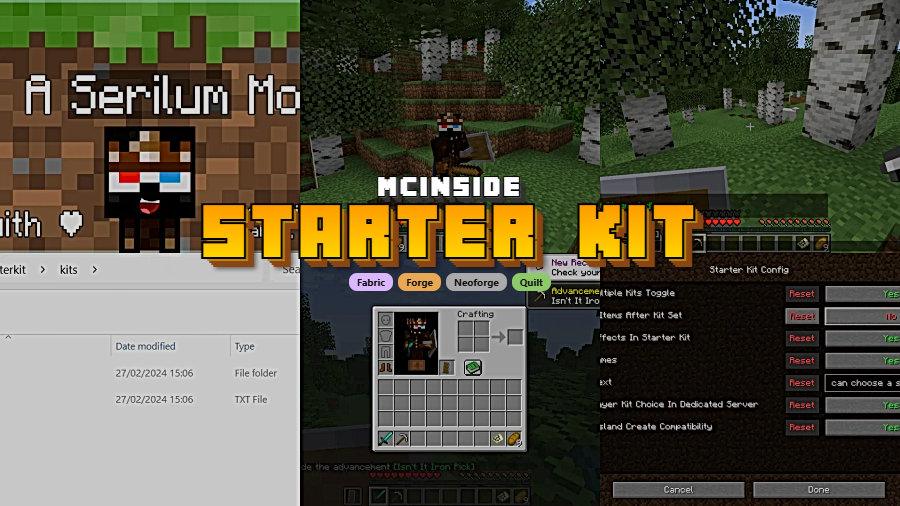
Starter Kit is a utility mod that gives every new player joining a Minecraft world a fully configurable set of starter gear, items, and potion effects, available for Fabric, Forge, NeoForge, and Quilt mod loaders.
Anyone who has run a multiplayer Minecraft server knows the frustration: new players join, punch a tree for ten minutes, and quit before they ever experience the content you spent weeks building. Modpacks with complex progression systems are especially vulnerable to this dropout. Starter Kit, developed by Serilum, solves this problem by letting server operators define a precise starting inventory that every first-time player receives automatically. With more than 8.3 million downloads since its 2022 release and consistent updates through Minecraft 26.1, it has become one of the most trusted utility mods in the community. The mod works server-side only for basic functionality, which means players do not even need to install it themselves to receive their starter gear.
Key Features of Starter Kit Mod
- Fully Configurable Starter Inventory — You define exactly which items new players receive through a simple config file. This goes far beyond just handing out a wooden pickaxe; you can specify item quantities, NBT data, enchantments, and even custom-named items. Server operators get complete control over the first impression their world makes on new players.
- Precise Slot Assignment — Items can be assigned to any specific inventory slot, including the offhand slot and all four armor slots. This means players can spawn fully armored and ready to explore, with their hotbar organized exactly how you want it. No more confusion about where to find the starter sword versus the food stack.
- Starter Potion Effects — Beyond physical items, you can grant new players temporary potion effects like speed, resistance, or night vision. This is particularly useful for servers where the spawn area is dangerous or where you want new players to feel powerful during their first few minutes of gameplay.
- Smart First-Join Detection — The mod accurately detects which players have never joined the world before, ensuring starter kits are only distributed once per player. Returning players will not receive duplicate items, which prevents inventory clutter and potential economy exploits on servers with valuable starter gear.
- Existing Item Handling — When other mods add their own first-join items, such as guide books or welcome messages, Starter Kit can either remove them entirely or add them alongside the configured kit. The addExistingItemsAfterKitSet config option gives you precise control over how these interactions work, preventing conflicts between multiple mods that all want to modify the starting inventory.
- FTB Team Islands Compatibility — For modpack servers using FTB's Team Islands, Starter Kit includes optional support that triggers after the create island command. This ensures players on skyblock-style or island-based servers still receive their configured starter gear at the right moment, not just on world join.
- Server-Side Operation — The core functionality runs entirely server-side, meaning you can add or update starter kits without requiring players to install anything. If you want players to access the optional "Choose Kit GUI" to select from multiple kit options, the client-side installation is available but not mandatory. Players can also choose kits via server commands as an alternative.
How to Install Starter Kit Mod
- Install your preferred mod loader: Fabric, Forge, NeoForge, or Quilt. Make sure the loader version matches your Minecraft version.
- Download and install the Collective library mod, which is a required dependency for Starter Kit to function.
- Download the correct Starter Kit file for your Minecraft version and mod loader from the download section below.
- Place both the Starter Kit and Collective
.jarfiles into yourmodsfolder inside your Minecraft or server directory. - Launch the game or server once to generate the config file, then edit the configuration to define your desired starter items, potion effects, and slot assignments.
Requirements & Compatibility
| Requirement | Details |
|---|---|
| Mod Loaders | Fabric, Forge, NeoForge, Quilt |
| Minecraft Versions | 1.16.5, 1.18.2, 1.19.2–1.19.4, 1.20–1.20.6, 1.21–1.21.11, 26.1 |
| Required Dependency | Collective library mod |
| Side | Server-side only (client optional for GUI) |
| Author | Serilum |
What's New
- Updated to support Minecraft 26.1, the latest game version.
- Continued cross-loader compatibility across Fabric, Forge, NeoForge, and Quilt.
- Ongoing maintenance and stability improvements since the original 2022 release.
- Full changelog history available on Serilum's official site.
Pros and Cons
Pros
- Works server-side only — no client installation needed for basic features
- Supports all four major mod loaders simultaneously
- Extremely wide version range from 1.16.5 through 26.1
- Fine-grained control over inventory slots, armor, offhand, and potion effects
- Built-in FTB Team Islands compatibility for modpack servers
- Over 8.3 million downloads with active, long-term maintenance
Cons
- Requires the Collective library mod as a mandatory dependency
- Configuration is file-based, which may be less intuitive than an in-game GUI for beginners
- The optional client-side "Choose Kit GUI" requires players to also install the mod
- All rights reserved license limits modification or redistribution
Alternatives to Starter Kit Mod
- Initial Inventory — A simpler alternative that focuses on setting a basic starting inventory without the advanced slot assignment or potion effect features that Starter Kit offers.
- FTB Essentials — A broader server utility mod that includes kit functionality alongside teleportation, homes, and other administrative commands for modpack servers.
- Custom Starter Gear — A lightweight option for servers that only need basic starter item configuration without the multi-kit selection or FTB Team Islands integration.
Download Starter Kit Mod
| Minecraft Version | Fabric | Forge | NeoForge | Quilt |
|---|---|---|---|---|
| For Minecraft 26.1 | Download | Download | Download | Download |
| For Minecraft 1.21.11 | Download | Download | Download | Download |
| For Minecraft 1.21.10 | Download | Download | Download | Download |
| For Minecraft 1.21.9 | Download | Download | Download | Download |
| For Minecraft 1.21.8 | Download | Download | Download | Download |
| For Minecraft 1.21.7 | Download | Download | Download | Download |
| For Minecraft 1.21.6 | Download | Download | Download | Download |
| For Minecraft 1.21.5 | Download | Download | Download | Download |
| For Minecraft 1.21.4 | Download | Download | Download | Download |
| For Minecraft 1.21.3 | Download | Download | Download | Download |
| For Minecraft 1.21.2 | Download | — | Download | Download |
| For Minecraft 1.21.1 | Download | Download | Download | Download |
Always download mods from official sources to stay safe.
Frequently Asked Questions
Does Starter Kit work on servers without players installing it?
Yes — the core item distribution works entirely server-side. Players will receive their configured starter items and potion effects without needing to install anything on their client. The only exception is the optional "Choose Kit GUI" feature, which requires client-side installation if you want players to visually browse and select from multiple kits.
Can I assign items to specific inventory slots like armor or offhand?
Yes, Starter Kit supports assigning items to any inventory slot. You can place items in specific hotbar positions, the offhand slot, and all four armor slots (helmet, chestplate, leggings, boots). This gives you complete control over how the player's inventory looks the moment they join.
Will players receive the starter kit every time they join?
No — the mod only distributes the kit once per player. Starter Kit tracks which players have already joined the world and only triggers for genuine first-time joins. Returning players will log in with whatever inventory they had when they last left.
Is Starter Kit compatible with FTB Team Islands?
Yes, there is built-in optional support for FTB Team Islands. When enabled, the starter kit can be triggered after a player uses the create island command, which is ideal for skyblock-style modpack servers where players do not technically "join" the main world in the traditional sense.
What happens if another mod also adds items on first join?
Starter Kit handles this through its addExistingItemsAfterKitSet config option. When enabled, items from other mods — such as guide books or welcome items — are preserved and added to the inventory after the starter kit is applied. When disabled, those extra items are removed, and only your configured kit remains.


![[Let's Do] Meadow Mod (1.21.1) - thumbnail](http://mcinside.com/wp-content/uploads/2026/04/thumbnail-64-52x52.webp)


![Not Enough Recipe Book [NERB] Mod (1.21.11) - thumbnail](http://mcinside.com/wp-content/uploads/2026/04/thumbnail-63-52x52.webp)
