

Structure Credits Mod is a utility mod that automatically displays a structure's name and mod source when you enter it for Minecraft on Fabric, Forge, and NeoForge. It supports Minecraft 1.21.1 and 1.20.1.
If you explore a lot of modded worlds, it can be hard to remember which mod added a given ruin, hut, room, or dungeon. Structure Credits Mod solves that problem by identifying structures as you enter them, which makes exploration easier and gives proper visibility to the creators behind custom content. With more than 1.2 million downloads on Modrinth, it has clearly found an audience among players who want useful structure labeling without turning the screen into clutter.
Key Features of Structure Credits Mod
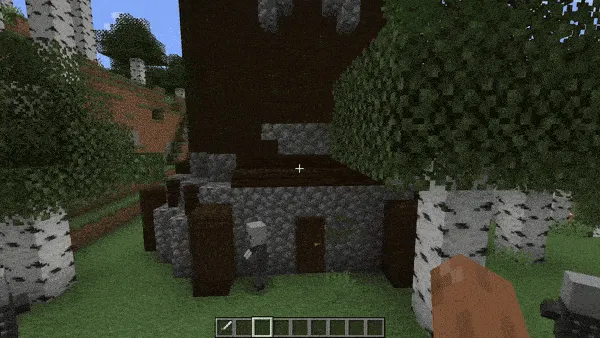
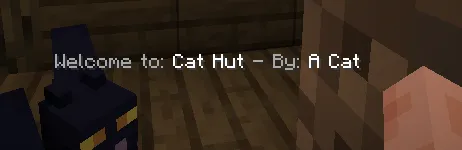
- Automatic structure identification — When you step into a structure, the mod shows its name and source without requiring you to check a wiki or remember every mod by heart. That matters most in large modpacks, where similar-looking buildings can come from very different sources.
- Mod source credit display — The message does not just tell you what the structure is called; it also points to the mod behind it. That is useful for players who want to learn where a structure came from and for creators who want their work credited in a visible way.
- One-time structure messages by default — The mod is designed so a structure's message usually appears only once, which keeps it from spamming your HUD while you live, mine, or build nearby. In practice, that makes it much easier to leave enabled all the time.
- Custom structure name mapping — You can rename structures in the config, which is helpful if you want more readable labels or a different naming style. This is especially nice for modpacks that use themed content and need custom wording.
- Vanilla structure inclusion control — If you want Minecraft's own structures to show messages too, you can remove the `minecraft:` entries from the config file. That gives you fine control over how broad the system should be.
- Dimensional Dungeons support — The mod is compatible with Dimensional Dungeons, and the author notes a specific recommended config setup for custom rooms. That is a real advantage if you use that mod and want structure credits to behave predictably.
- In-game toggle options — There is a keybind you can assign to deactivate all messages when you do not want the overlays. That is a practical escape hatch for moments when you want a clean screen while still keeping the mod installed.
Screenshots
How to Install Structure Credits Mod
- Pick the loader that matches your setup: Fabric Mod Loader, Minecraft Forge, or NeoForge.
- Download the build for your Minecraft version, either 1.21.1 or 1.20.1, from the matching download section.
- Install the required mod loader first if it is not already present in your profile.
- Place the Structure Credits Mod jar file into your `mods` folder.
- Launch the game once, then open `config/structurecredits-config.json` if you want to adjust structure names, vanilla structure filtering, or message behavior.
Requirements & Compatibility
| Item | Details |
|---|---|
| Minecraft versions | 1.21.1, 1.20.1 |
| Supported loaders | Fabric, Forge, NeoForge |
| Core purpose | Displays a structure's name and mod source when you enter it |
| Config file | config/structurecredits-config.json |
| Behavior controls | Active toggle, one-time messages, chat message option, custom structure names, excluded structure lists |
| Compatibility note | Includes support guidance for Dimensional Dungeons custom rooms |
What's New
- The latest logged update focuses on a lag fix.
- The June 15, 2025 update appears to be a maintenance release rather than a feature expansion.
- If you were waiting for stability work, that is the main change recorded for this version.
Pros and Cons
Pros
- Clear structure naming makes exploration easier in modded worlds.
- One-time messages keep the experience from feeling spammy.
- Custom name mapping gives pack makers and players useful control.
- Supports multiple major loaders, which makes it easy to fit into different setups.
- Appears to be lightweight enough for a utility-focused mod, with the latest update even addressing lag.
Cons
- You may need to edit the config if you want different behavior from the default message filters.
- If you disable one-time messages, repeated visits can trigger the notification again after leaving and re-entering structures.
- Players who want a completely silent UI may still need to use the keybind or config to tune it properly.
Alternatives to Structure Credits Mod
- JourneyMap helps you stay oriented while exploring large worlds, which pairs well with structure-heavy modpacks.
- Xaero's Minimap gives you a compact navigation layer that makes it easier to revisit interesting structures later.
- Roughly Enough Items is a useful companion when you want to identify blocks and items you discover inside modded structures.
Download Structure Credits Mod
| Minecraft Version | Fabric | Forge | NeoForge |
|---|---|---|---|
| For Minecraft 1.21.1 | Download | — | Download |
| For Minecraft 1.20.1 | Download | Download | Download |
Always download mods from official sources to stay safe.
Frequently Asked Questions
Is Structure Credits Mod annoying during normal play?
No — the default setup is meant to stay out of your way, because structure messages only appear once per structure unless you change that behavior in the config. That makes it a better fit for bases, survival worlds, and long modpack sessions.
Can I show structure credits for vanilla Minecraft buildings?
Yes — you can make vanilla structures show up by removing the `minecraft:` lines from `structurecredits-config.json`. The mod ships with those entries in the config so you can decide whether you want vanilla content included.
Can I rename the structure messages?
Yes — the config supports custom structure names, so you can replace default labels with names that make more sense to you. That is helpful if you want cleaner wording or a more themed pack presentation.
Does it work with Dimensional Dungeons?
Yes — the author notes compatibility with Dimensional Dungeons and gives a recommended `dontShowAll` setting for custom rooms. For that setup, the `dimdungeons:` entry is the important part to keep behavior consistent.
Can I turn the messages off in game?
Yes — the mod includes an in-game keybind you can assign to deactivate all messages. That is useful when you want a temporary break from structure overlays without uninstalling anything.
Is it okay to use Structure Credits Mod in a modpack?
Yes — the author explicitly says modpack use is allowed. If you are building a pack, the config options also make it easier to tune the experience for different players.


