
TaCZ addon Mod is a Forge mod that expands TaCZ with better attachment management and related quality-of-life tools for Minecraft 1.20 through 1.20.6.
TaCZ gets much easier to live with once you start juggling compatible attachments, ammo types, crafting materials, and inventory clutter. TaCZ addon Mod focuses on that pain point, giving you better filtering, clearer tooltips, faster crafting, and a more organized GunSmithTable flow. With over 3.3 million downloads, it is already a proven pick for players who want TaCZ's weapon systems to feel practical instead of messy.
Key Features of TaCZ addon Mod
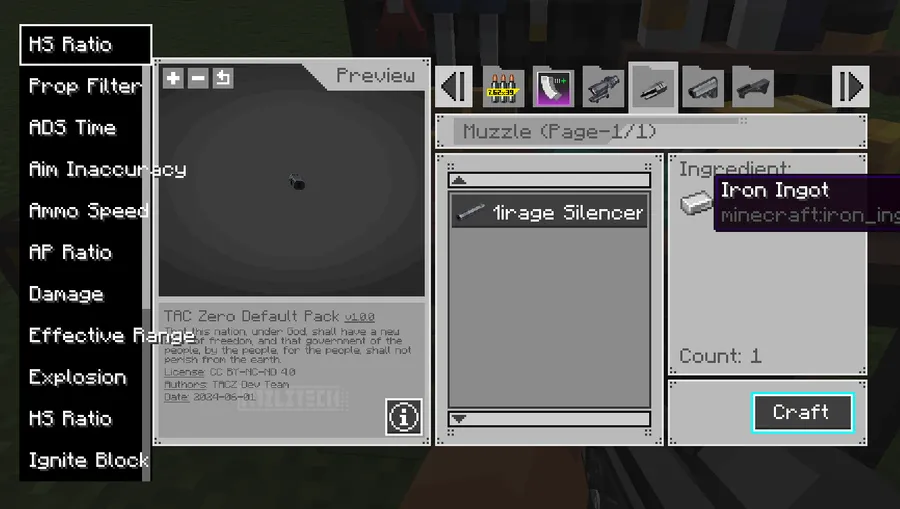
- GunSmithTable filtering for the gun you are holding — When you open the GunSmithTable with a gun in your main hand or offhand, the menu narrows down to attachments and ammo that actually match that weapon. That saves time immediately because you are not scrolling past irrelevant items every time you want to build or upgrade a loadout. It also makes the crafting screen feel much closer to a real weapon workbench instead of a general item dump.
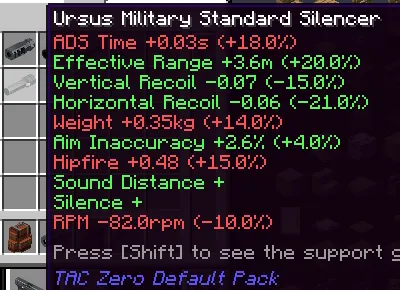
- Better attachment stats and tooltip clarity — The mod can filter attachments by their bonus attributes, which helps when you care more about a specific perk than the item name itself. It also shows how an attachment affects the main-hand gun's properties in the tooltip, so you can compare options before committing materials. That matters because TaCZ attachments are most useful when you can understand their tradeoffs at a glance.
- Faster crafting workflow — You get shift-click batch crafting, and the number crafted can be adjusted through the config file. The mod also pulls materials from nearby containers, including compatibility with Sophisticated Backpacks, which reduces the constant back-and-forth between storage and bench. A toast notification after crafting makes it easier to tell when your order finished without watching the GUI the entire time.
- Recipe and material convenience — The mod displays brief material information and lets you click through to JEI recipes. That is a small change, but it removes one of the biggest frustrations in modded crafting: losing context while trying to remember what each material is for. If you keep a lot of attachment recipes in rotation, this makes the whole loop much easier to read.
- AttachmentPack support — TaCZ addon adds an AttachmentPack system that can be defined through data pack recipes. In practice, that means you can bundle a gun with a predefined list of attachments and switch between them through NBT rather than treating every attachment as a separate manual swap. It is a more structured way to build a weapon system, especially if you want a complete loadout package instead of one-off upgrades.
- Inventory and container highlighting — Hovering an item can highlight related items in the container, such as matching ammo or attachments tied to a gun. That makes it much easier to see relationships inside crowded storage screens, which is especially useful when you have several similar parts in one inventory. The mod also limits how many supported guns are shown when shift-hovering an attachment, which helps keep large lists from overwhelming the screen.
- Gun handling and aiming quality-of-life — You can hold TAB and scroll the mouse wheel to cycle through guns in your inventory, and the keybind is configurable. The mod can also designate certain guns as melee weapons through client configs, replacing firing animations with melee attacks, and it can automatically switch to first-person aiming in third-person view. Those options are useful if you want TaCZ to fit your control habits instead of forcing you into one fixed interaction style.
Screenshots
How to Install TaCZ addon Mod
- Install Minecraft Forge using the site's Forge installation guide and make sure you are using a supported version.
- Download the matching TaCZ addon file for your Minecraft version from the download table below.
- Place the mod jar into your Forge profile's
modsfolder, alongside the TaCZ setup you already play with. - Launch Minecraft and confirm the addon loads on a supported Forge profile.
- If Forge mods do not appear correctly, check the site's Forge troubleshooting guide.
Requirements & Compatibility
| Item | Details |
|---|---|
| Loader | Forge |
| Supported Minecraft Versions | 1.20, 1.20.1, 1.20.2, 1.20.3, 1.20.4, 1.20.5, 1.20.6 |
| Notable Compatibility | Compatible with Sophisticated Backpacks for pulling materials from nearby containers; the third-person aiming feature is compatible with Shoulder Surfing Reloaded. |
| Known Limitation | Guns using AttachmentPack cannot also be equipped with a single attachment. |
Pros and Cons
Pros
- Cleaner GunSmithTable menus that show only relevant attachments and ammo.
- Useful attachment tooltips and attribute filtering for faster decision-making.
- Batch crafting, nearby container pulling, and recipe links all improve the workflow.
- AttachmentPack adds a more structured way to manage weapon setups.
- Several quality-of-life controls, including gun cycling and aiming behavior tweaks.
Cons
- Forge only, with no loader support listed for Fabric, Quilt, or NeoForge.
- AttachmentPack guns cannot use a single attachment, so the system is all-or-nothing.
- Scroll-position saving is noted as invalid for 1.1.4 and newer.
- Some features depend on configs or pack setup, which adds extra management for advanced use.
Alternatives to TaCZ addon Mod
- Timeless & Classics Zero is the base gun mod that TaCZ addon extends, so it is the obvious companion if you want the full weapon ecosystem.
- JEI is a helpful recipe companion because TaCZ addon leans on recipe clarity and click-through crafting information.
- Sophisticated Backpacks pairs well with the addon's nearby container pulling, making ammo and material handling less tedious.
Download TaCZ addon Mod
| Minecraft Version | Forge |
|---|---|
| For Minecraft 1.20.6 | Download |
| For Minecraft 1.20.5 | Download |
| For Minecraft 1.20.4 | Download |
| For Minecraft 1.20.3 | Download |
| For Minecraft 1.20.2 | Download |
| For Minecraft 1.20.1 | Download |
| For Minecraft 1.20 | Download |
Always download mods from official sources to stay safe.
Frequently Asked Questions
Is TaCZ addon Mod only for Forge?
Yes — the data lists Forge as the only loader. If you are building a Forge profile for TaCZ, that is the environment this addon is meant for.
What Minecraft versions does TaCZ addon Mod support?
It supports Minecraft 1.20 through 1.20.6. That version range covers the current download options listed in the data, so you should match the file to your exact game version.
Does TaCZ addon Mod work with Sophisticated Backpacks?
Yes — the crafting workflow is compatible with Sophisticated Backpacks. That is useful because the mod can pull materials from nearby containers, which makes weapon crafting much less repetitive.
What is AttachmentPack in TaCZ addon Mod?
It is a data-pack-driven system that lets a gun swap between a predefined list of attachments through NBT. In other words, it turns a set of compatible parts into a more organized weapon package instead of a pile of separate upgrades.
Can guns with AttachmentPack still use single attachments?
No — the author notes that guns with AttachmentPack installed cannot be equipped with a single attachment. That means you should treat it as a complete system, not as a partial upgrade path.
Does TaCZ addon Mod help with aiming in third-person view?
Yes — it can automatically switch to first-person aiming when you are aiming in third-person. The data also says this behavior is compatible with Shoulder Surfing Reloaded, which makes the feature more practical for players who use camera tweaks.
Does the mod make crafting faster?
Yes — shift-click batch crafting is supported, and the crafting count can be adjusted in the config file. It also reduces friction by showing page counts, saving scroll position in older versions, and pulling materials from nearby containers.


