
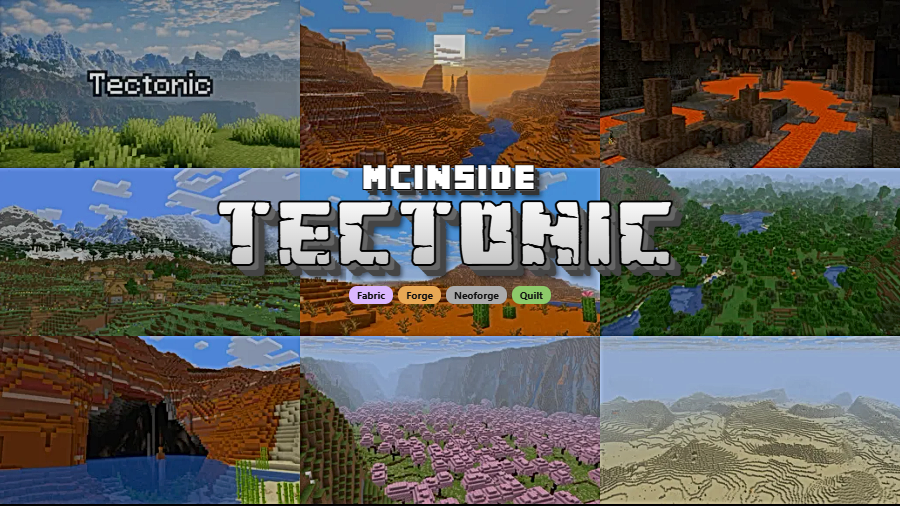
Tectonic is a world generation mod that completely overhauls Minecraft's terrain shaping, introducing massive continent-like landmasses, towering mountain ranges, deeper oceans, and underground rivers for Fabric, Forge, NeoForge, and Quilt mod loaders.
Vanilla Minecraft world generation has always had a fundamental limitation: terrain tends to feel uniform after a few hundred blocks of exploration. Mountains cap out well below the build limit, oceans are shallow, and rivers vanish whenever the terrain gets too steep. Tectonic, created by Apollo, solves all of these problems in one cohesive package. With over 12 million downloads on Modrinth since its 2022 release, it has become one of the most popular terrain generation mods in the Minecraft community — and for good reason. Whether you are a builder searching for dramatic backdrops, a survival player craving more challenging landscapes, or an explorer who wants every chunk to feel genuinely new, Tectonic delivers a world that feels grander and more alive than anything vanilla offers.
Key Features of Tectonic Mod
- Continent and Island Generation — Tectonic v3 reshapes the overworld into continent-like landmasses stretching thousands to tens of thousands of blocks wide. Between these continents, smaller ocean islands up to a thousand blocks across use vanilla-style mountain terrain shaping, which means you can actually find traditional mountain ring formations surrounded by open water. This gives exploration a genuine sense of geographic scale that vanilla Minecraft simply cannot match.
- Massive Mountain Ranges — The standout feature of Tectonic is its enormous mountain ranges that can stretch for tens of thousands of blocks and reach heights approaching the build limit. These are not the modest hills vanilla calls "mountains" — they are sprawling alpine barriers that divide biomes and create natural chokepoints. For builders and survival players alike, these ranges provide dramatic scenery and meaningful terrain obstacles.
- Deeper Oceans — Oceans are significantly deeper than in vanilla Minecraft, with deep ocean variants extending all the way into the deepslate layer. Deep oceans also feature more varied underwater terrain including overhangs and valleys, making ocean exploration far more interesting. When the mod version is installed, Ocean Monuments generate at lower depths to match the new ocean floor.
- Underground Rivers — In areas where mountain terrain is too steep for regular surface rivers, Tectonic carves underground river channels that seamlessly connect to surface waterways. These subterranean rivers vary in size and shape, creating natural cave systems you can navigate by boat. This solves the long-standing vanilla problem of rivers simply cutting off at mountain edges.
- In-Game Config Screen — Tectonic v3 introduced a built-in configuration screen that lets you tweak terrain generation settings without manually editing config files. You can see what each field does and adjust values in real time, making it easier than ever to fine-tune the world generation to your preferences.
- Broad Biome Mod Compatibility — Tectonic works with most biome mods that use Terrablender or Biolith, including Biomes O' Plenty, Regions Unexplored, and Nature's Spirit. It also offers a special Terralith-compatible version and provides datapack tweaks for CliffTree compatibility on 1.21, so you can combine multiple worldgen mods without conflicts.
- Available as Mod or Datapack — Tectonic ships as both a mod and a datapack, giving you flexibility in how you install it. The mod version includes extra features like adjusted Ocean Monument placement and bundled compatibility patches, while the datapack version works on servers without requiring players to install anything client-side.
Screenshots
How to Install Tectonic Mod
- Install your preferred mod loader. Tectonic supports Fabric, Minecraft Forge, NeoForge, or Quilt Loader. Follow the instructions for your chosen loader to set it up with your Minecraft version.
- Download the correct Tectonic file for your Minecraft version and mod loader from the official download section below. Make sure the version matches — for example, grab the NeoForge build if you are running NeoForge.
- Place the downloaded
.jarfile into your.minecraft/modsfolder. If the folder does not exist, launch Minecraft once with your mod loader profile to create it automatically. - Launch Minecraft using your mod loader profile. When creating a new world, Tectonic's terrain generation will apply automatically. Use the in-game config screen (v3+) to customize generation settings to your liking.
- If you want to combine Tectonic with Terralith or CliffTree, download the appropriate compatibility datapack from Modrinth and place it in your world's
datapacksfolder before generating terrain.
Requirements & Compatibility
| Requirement | Details |
|---|---|
| Minecraft Versions | 1.20 – 1.21.11, 26.1 |
| Mod Loaders | Fabric, Forge, NeoForge, Quilt |
| Compatible Biome Mods | Biomes O' Plenty, Regions Unexplored, Nature's Spirit, Terralith (via patch), CliffTree (1.21 via patch) |
| License | MIT (open source) |
| Author | Apollo |
What's New
- Fixed a crash that occurred when River Lanterns were enabled in the configuration.
- Continued support for Minecraft 26.1 and 1.21.11 as the primary maintained versions.
- Ongoing stability improvements and bug fixes for the v3 terrain generation engine.
Pros and Cons
Pros
- Dramatically improves terrain variety with continent-scale generation
- Mountain ranges that approach the build limit create stunning landscapes
- Underground rivers solve vanilla's broken river generation in steep terrain
- Compatible with most major biome mods including Biomes O' Plenty and Terralith
- In-game config screen makes customization accessible to all players
- Available as both mod and datapack for flexible installation
- Open source under MIT license with active development since 2022
Cons
- Only 1.21.1 and 26.1 are actively maintained — older versions will not receive bug fixes
- CliffTree compatibility requires a separate datapack on 1.21 and is not supported on 1.20
- Existing worlds cannot benefit from terrain changes — requires new world generation
- Larger terrain features may increase chunk generation time on lower-end hardware
Alternatives to Tectonic Mod
- Terralith — A popular worldgen datapack that adds over 100 new biomes with custom terrain. Works alongside Tectonic via a compatibility patch for players who want both new biomes and overhauled terrain shaping.
- Biomes O' Plenty — One of the longest-running biome mods for Minecraft, adding dozens of new biomes with unique vegetation and terrain. Fully compatible with Tectonic through Terrablender integration.
- Regions Unexplored — A newer biome mod that focuses on visually striking, hand-crafted biomes with custom trees and foliage. Compatible with Tectonic and offers a fresh alternative to Biomes O' Plenty.
Download Tectonic Mod
| Minecraft Version | Fabric | NeoForge |
|---|---|---|
| For Minecraft 26.1 | Download | Download |
| For Minecraft 1.21.11 | Download | Download |
| For Minecraft 1.21.10 | Download | Download |
| For Minecraft 1.21.9 | Download | — |
| For Minecraft 1.21.8 | Download | Download |
| For Minecraft 1.21.7 | Download | Download |
| For Minecraft 1.21.6 | Download | Download |
| For Minecraft 1.21.5 | Download | Download |
| For Minecraft 1.21.4 | — | — |
| For Minecraft 1.21.3 | — | — |
| For Minecraft 1.21.2 | — | — |
| For Minecraft 1.21.1 | Download | Download |
Always download mods from official sources to stay safe.
Frequently Asked Questions
Is Tectonic compatible with Terralith?
Yes — Tectonic has a dedicated Terralith compatibility version. The mod version of Tectonic ships with this compatibility built in, but a standalone datapack called Terratonic is also available on Modrinth for datapack users. With Terralith installed, ocean islands between continents can even spawn Calderas and Volcanoes.
Does Tectonic work with Fabric and NeoForge?
Yes — Tectonic supports both Fabric and NeoForge as its primary mod loaders for current versions. It also supports Forge and Quilt on older Minecraft versions. Check the download table above to find the correct file for your specific loader and Minecraft version combination.
Can I add Tectonic to an existing world?
No — Tectonic modifies world generation at the terrain level, so it only affects newly generated chunks. Existing terrain in already-explored areas will remain unchanged. For the best experience, create a new world after installing Tectonic.
Will Tectonic affect game performance?
Tectonic appears to be lightweight for most systems, though generating the larger terrain features like continent-scale mountain ranges may slightly increase chunk loading times compared to vanilla. The mod has been downloaded over 12 million times without widespread performance complaints, suggesting it runs well on typical Minecraft hardware. Pairing it with performance mods like Sodium can help offset any additional generation overhead.
What Minecraft versions does Tectonic currently support?
Tectonic actively supports Minecraft 1.21.1 and 26.1 as its primary maintained versions. While the mod has builds available for versions ranging from 1.20 through 1.21.11 and 26.1, the developer has stated that bug fixes will only be applied to the two actively supported versions. Older builds remain available for download but should be used with that limitation in mind.


![[Let's Do] Candlelight - Farm&Charm compat Mod (1.21.1) - thumbnail](http://mcinside.com/wp-content/uploads/2026/04/thumbnail-81-52x52.webp)


![[Let's Do] Meadow Mod (1.21.1) - thumbnail](http://mcinside.com/wp-content/uploads/2026/04/thumbnail-64-52x52.webp)


![Not Enough Recipe Book [NERB] Mod (1.21.11) - thumbnail](http://mcinside.com/wp-content/uploads/2026/04/thumbnail-63-52x52.webp)