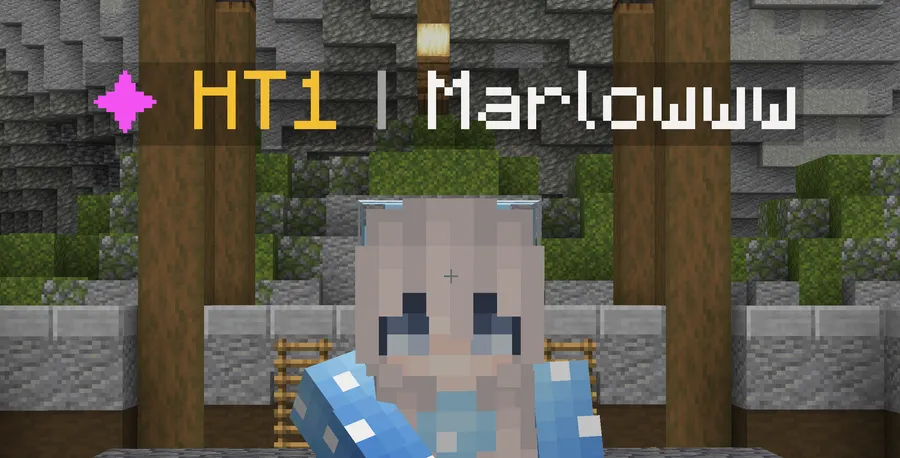
Tier Tagger Mod is a social utility mod that displays a player's PvP tiers in their nametag for Minecraft Fabric and Quilt, with NeoForge support on 26.1.x builds.
PvP communities spend a lot of time asking for ranks, checking profiles, or guessing how a player stacks up before a fight starts. This mod removes that friction by putting tier information directly into the nametag, and its 1.6 million+ downloads are strong proof that a lot of players want exactly that kind of clarity. It is also officially supported by mctiers.com, which matters if your server already revolves around that ecosystem.
Key Features of Tier Tagger Mod
- Tier info in nametags — The main value here is immediate recognition. Instead of opening a profile or asking in chat, you can see a player's PvP tier while you are already in the middle of a lobby or match.
- MCTiers and SubTiers support — Tier Tagger is not locked to a single tierlist. Support for SubTiers makes it a better fit for communities that use different ranking systems, so the display stays relevant even if your group is not on the default path.
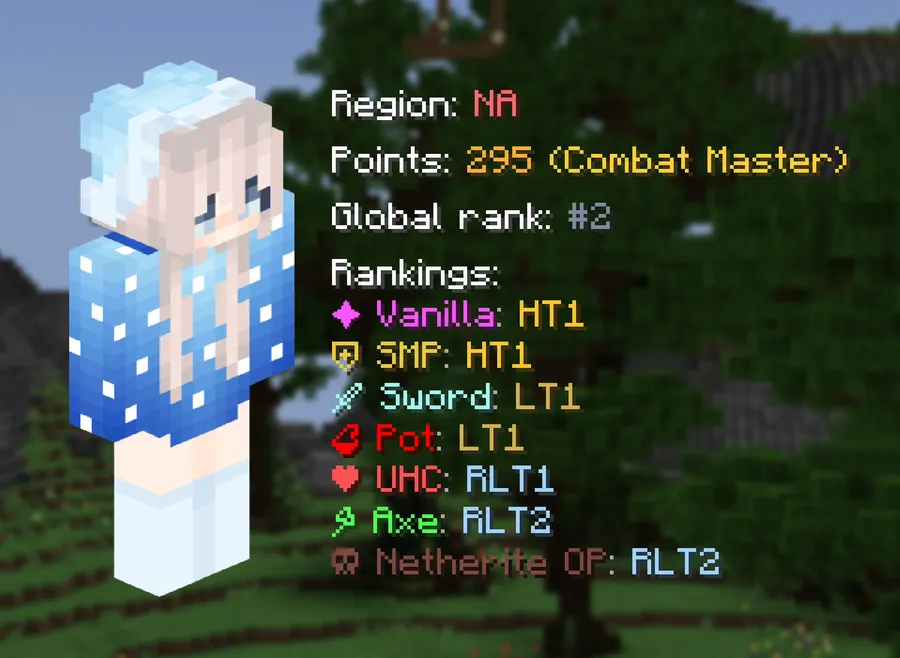
- All eight MCTiers game modes — The mod covers the full set of MCTiers modes, which is useful when different queues or formats matter to your server. That makes the tier display feel more accurate because it can reflect the mode people actually care about.
- Fallback to the highest overall tier — If a player is unranked in the selected mode, the mod shows their highest tier overall instead of leaving you with a blank or unhelpful result. In practice, that keeps nametags informative even when a profile is incomplete in one specific category.
- Built-in profile viewing — The mod includes a profile viewer, so you can inspect a player without bouncing between the game and a browser. That is a small quality-of-life improvement, but it saves time when you are trying to organize teams or verify a rank quickly.
- Configurable default mode and fork-friendly licensing — You can choose the default gamemode to display, which helps communities tune the mod around their main PvP format. The project is licensed under MPL-2.0, so forks must stay open source under the same license and keep proper credit, although the bundled icons are only cleared for this mod and cannot be reused in your fork.
Screenshots
How to Install Tier Tagger Mod
- Pick the loader that matches your setup: Fabric or Quilt. If you are on the newest 26.1.x line and want NeoForge, use the matching NeoForge page.
- Download the Tier Tagger file for your Minecraft version from the download table below.
- Install ukulib, because the author notes that Tier Tagger depends on it to work.
- Place both files in your `mods` folder and launch the game once so Minecraft can generate any needed config files.
- Open the mod config if you want to change the default gamemode or tailor the display to your server's tier format.
Requirements & Compatibility
| Item | Details |
|---|---|
| Category | Minecraft Mods, social and utility |
| Primary Loaders | Fabric Mod Loader, Quilt Loader |
| Newest Loader Support | NeoForge on 26.1 and 26.1.1 builds |
| Dependency | ukulib |
| Minecraft Versions | 26.1.1, 26.1, and 1.21.11 through 1.18 |
| License | MPL-2.0 |
| Source | GitHub repository |
| Published / Updated | Published 2022-12-22, updated 2026-03-29 |
Compatibility note: the author says 1.21.1 and 1.21.11 stay supported during the transition period until 26.4.
What's New
- Updated to Minecraft 26.1.
- Added NeoForge support for the newest release line.
- Kept the current build aligned with the mod's active 26.1.x support window.
Pros and Cons
Pros
- Easy at-a-glance PvP tier visibility in normal play.
- Works with both MCTiers and SubTiers.
- Built-in profile viewing reduces context switching.
- Open-source under MPL-2.0, which is helpful for communities that want to adapt the idea.
Cons
- You need ukulib installed before the mod will run.
- The bundled icons are not reusable in forks, so custom branding takes extra work.
- It is most useful in tier-based PvP communities, not as a general-purpose visual mod.
- Version support is specific, so you need to match the exact Minecraft line you are playing on.
Alternatives to Tier Tagger Mod
- Mod Menu — Helpful if you want a simple way to inspect installed mods and reach configuration screens after setting up Tier Tagger.
- ukulib — This is the library Tier Tagger depends on, so it is the first companion mod to install and keep updated.
- NameTagEdit — A good choice if you want broader nametag customization beyond tier display alone.
Download Tier Tagger Mod
| Minecraft Version | Fabric | NeoForge | Quilt |
|---|---|---|---|
| For Minecraft 26.1.1 | Download | Download | Download |
| For Minecraft 26.1 | Download | Download | Download |
| For Minecraft 1.21.11 | Download | — | Download |
| For Minecraft 1.21.10 | Download | — | Download |
| For Minecraft 1.21.9 | Download | — | Download |
| For Minecraft 1.21.8 | Download | — | Download |
| For Minecraft 1.21.7 | Download | — | Download |
| For Minecraft 1.21.6 | Download | — | Download |
| For Minecraft 1.21.5 | Download | — | Download |
| For Minecraft 1.21.4 | Download | — | Download |
| For Minecraft 1.21.3 | Download | — | Download |
| For Minecraft 1.21.2 | Download | — | Download |
Always download mods from official sources to stay safe.
Frequently Asked Questions
Does Tier Tagger Mod support SubTiers?
Yes — support for other tierlists, including SubTiers, has been included since version 2.0. That makes the mod useful for more than just MCTiers-based communities.
Do I need ukulib for Tier Tagger Mod?
Yes — the author explicitly says TierTagger depends on ukulib to work. If you skip the dependency, the mod will not load correctly.
Can Tier Tagger Mod show a player's highest tier overall?
Yes — if a player is unranked in the selected game mode, the mod falls back to their highest tier overall. That keeps the nametag informative even when a specific mode has no rank entry.
Is Tier Tagger Mod open source?
Yes — it is licensed under MPL-2.0. If you fork it, you need to keep the fork open source under the same license and credit the original work properly.
Does Tier Tagger Mod work on Fabric and Quilt?
Yes — Fabric and Quilt are the primary loaders listed for the mod. The latest 26.1 and 26.1.1 builds also add NeoForge support.
What Minecraft versions does Tier Tagger Mod support?
The publisher lists 26.1.1, 26.1, and 1.21.11 through 1.18. Those listed versions cover a wide span, and the author also notes that 1.21.1 and 1.21.11 remain supported through the 26.4 transition period.