
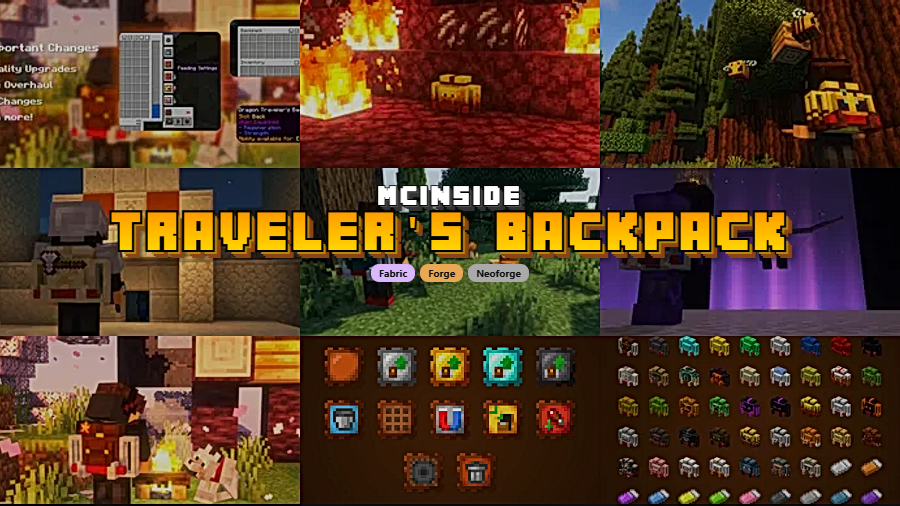
Traveler's Backpack is a storage and equipment mod that adds unique, upgradeable backpacks with five material tiers, 11 functionality upgrades, and over 45 cosmetic designs for Minecraft Fabric, Forge, and NeoForge.
Vanilla Minecraft gives you 36 inventory slots — and anyone who has tried a long mining expedition, a Nether fortress raid, or a simple building project knows that's never enough. You end up dumping items, making endless trips back to base, or cluttering your hotbar with shulker boxes. Traveler's Backpack, created by Tiviacz1337, solves this with a backpack system that goes far beyond basic extra slots. Originally a successor to JavierDarkona's Adventure Backpack, it has been rebuilt from the ground up with new textures, a tiered progression system, and deep mod integration. With over 14.5 million downloads on Modrinth alone, it's one of the most popular storage mods in the Minecraft ecosystem — and for good reason.
Key Features of Traveler's Backpack
- Five-Tier Upgrade System (Leather → Netherite) — Rather than giving you a single static backpack, Traveler's Backpack lets you progress through Leather, Iron, Gold, Diamond, and Netherite tiers at a Smithing Table. Each tier unlocks additional storage rows, more upgrade slots, and extra tool slots. This means your backpack grows alongside your world progression, so you're never stuck with an end-game item too early or an underpowered pouch too late.
- 11 Functionality Upgrades — You can equip upgrades like Magnet (auto-pulls nearby items), Feeding (automatically eats food for you), Crafting (portable crafting grid), Furnace (on-the-go smelting), Void (destroys junk items), Pickup, and Tanks for fluid storage. Each upgrade transforms the backpack from simple storage into a genuine portable workstation, letting you stay in the field longer without returning to base.
- Built-In Tool Slots and Swapping — Dedicated tool slots on the backpack let you store pickaxes, swords, or shovels separately from your main inventory. You can swap between them on the fly, which keeps your hotbar clean and makes switching between mining, combat, and building seamless. It's a small feature that dramatically improves quality of life during exploration.
- Fluid Management with the Hose Item — The Hose is a unique gadget that lets you pick up, store, and dispense fluids directly from your backpack's built-in tanks. Whether you need lava for a smeltery setup or water for farming, you can carry and deploy fluids without juggling buckets. This is especially useful for players who work with tech or automation mods alongside Traveler's Backpack.
- Wearable with On-Back Rendering — The backpack renders visually on your character's back when equipped, which adds a satisfying aesthetic touch. You can equip it through the GUI or via Curios/Trinkets/Accessories integration by placing it in the "Back" slot. Press B (default keybind) to access it instantly without opening your full inventory.
- World Placement and Automation Support — You can place the backpack in the world as a block, which makes its contents accessible to hoppers and pipes. This bridges the gap between portable storage and base automation — drop your backpack next to a sorting system when you return home, and your items flow right into storage without manual sorting.
- Smart Organization Tools — Sort, Quick Stack, and Transfer buttons are built directly into the backpack GUI. You can also mark specific slots as unsortable or memorize a stack in a slot so that particular items always return to the same position. For players who like a tidy inventory, these features eliminate the tedium of manual reorganization after every trip.
Screenshots
How to Install Traveler's Backpack
- Install your preferred mod loader: Fabric Loader, Minecraft Forge, or NeoForge for your Minecraft version (1.21.11 or compatible).
- If using Fabric, also install Fabric API as a required dependency.
- Download the correct Traveler's Backpack file for your loader and Minecraft version from the download section below.
- Place the downloaded
.jarfile into your.minecraft/modsfolder. If the folder doesn't exist, launch the game once with your mod loader to generate it. - Launch Minecraft and check the mod list to confirm Traveler's Backpack is loaded. Press B in-game to verify the keybind is active.
Requirements & Compatibility
| Detail | Info |
|---|---|
| Mod Loaders | Fabric, Forge, NeoForge |
| Minecraft Versions | 1.21.11, 1.21.10, 1.21.8, 1.21.7, 1.21.6, 1.21.5, 1.21.1, 1.21, 1.20.1 |
| Latest Version Support | Fabric & NeoForge for 1.21.11 |
| API Integration | Curios API (Forge/NeoForge), Trinkets (Fabric), Accessories |
| Author | Tiviacz1337 |
| License | LGPL-3.0-only |
What's New
- Switched from Cloth Config to Forge Config API Port — note that existing config changes need to be reapplied after updating.
- Fixed a syncing issue where the backpack became invisible after dying with keepInventory enabled, requiring a world reload to reappear.
- Fixed a critical bug that caused backpacks to disappear entirely when playing with keepInventory enabled.
- Resolved a crash related to smelting upgrades and fixed server-side issues.
- Magnet and Pickup upgrades now work when the backpack is placed as a block — Magnet pulls items within a 5-block radius, and Pickup collects items within 1 block of the placed backpack.
Pros and Cons
Pros
- Five-tier progression keeps the backpack relevant from early game to Netherite stage
- 11 upgrades turn it into a full portable workstation, not just extra slots
- Works across Fabric, Forge, and NeoForge with Curios/Trinkets support
- Placeable as a block with hopper/pipe compatibility for automation
- Over 45 cosmetic backpack designs for personalization
- Actively maintained with frequent updates and bug fixes
Cons
- Config changes must be reapplied when switching dependency libraries after updates
- The large number of upgrades and features can feel overwhelming for new players
- Forge support for 1.21+ appears limited compared to Fabric and NeoForge
Alternatives to Traveler's Backpack
- Sophisticated Backpacks — A backpack mod with a similar tiered upgrade system and filter-based item management, ideal for players who prefer automation-focused storage.
- Iron Shulker Boxes — Upgrades vanilla shulker boxes through metal tiers for more storage, a good choice if you prefer to stick closer to vanilla mechanics.
- Inmis — A lightweight Fabric backpack mod that offers simple, no-frills extra inventory space without the upgrade complexity.
Download Traveler's Backpack
| Minecraft Version | Fabric | Forge | NeoForge |
|---|---|---|---|
| For Minecraft 1.21.11 | Download | — | Download |
| For Minecraft 1.21.10 | Download | — | Download |
| For Minecraft 1.21.8 | Download | — | Download |
| For Minecraft 1.21.7 | Download | — | Download |
| For Minecraft 1.21.6 | Download | — | Download |
| For Minecraft 1.21.5 | Download | — | Download |
| For Minecraft 1.21.1 | Download | — | Download |
| For Minecraft 1.21 | — | — | Download |
| For Minecraft 1.20.1 | Download | Download | — |
Always download mods from official sources to stay safe.
Frequently Asked Questions
Is Traveler's Backpack compatible with Curios and Trinkets?
Yes — Traveler's Backpack has built-in compatibility with Curios API on Forge/NeoForge, Trinkets on Fabric, and the Accessories framework. When one of these mods is installed, you can equip the backpack by placing it in the dedicated "Back" slot rather than using the GUI equip button. This also means it won't conflict with other equipped accessories.
Can I use hoppers or pipes to move items in and out of the backpack?
Yes — when placed in the world as a block, the backpack's storage is fully accessible to hoppers, item pipes, and other automation systems. This makes it easy to dump your backpack contents into a sorting system when you return to base, and recent updates also allow Magnet and Pickup upgrades to function while the backpack is placed.
How do I upgrade my backpack to a higher tier?
Use a Smithing Table with three components: a Leather template, your current backpack, and the tier upgrade item (Iron Ingot, Gold Ingot, Diamond, or Netherite Ingot). Each tier increases the number of storage slots, upgrade slots, and tool slots available. You can configure the exact slot counts per tier in the mod's config file.
Does Traveler's Backpack work on servers?
Yes — the mod is designed for both singleplayer and multiplayer. Recent updates specifically fixed server-side issues including syncing bugs and keepInventory compatibility problems. Both the server and all connecting clients need to have the same version of the mod installed.
What happens to my items if I die with the backpack equipped?
The backpack follows standard Minecraft death mechanics — items drop unless keepInventory is enabled. A recent hotfix resolved a bug where the backpack would visually disappear after death with keepInventory on, so make sure you're running the latest version to avoid that issue. The backpack and all its contents, including fluids and upgrades, are preserved on death when keepInventory is active.


![[Let's Do] Meadow Mod (1.21.1) - thumbnail](http://mcinside.com/wp-content/uploads/2026/04/thumbnail-64-52x52.webp)


![Not Enough Recipe Book [NERB] Mod (1.21.11) - thumbnail](http://mcinside.com/wp-content/uploads/2026/04/thumbnail-63-52x52.webp)

