

Ultramarine Mod is a decoration mod that adds ancient Chinese style building blocks, furniture, and interior details to Minecraft for Forge and NeoForge. It is designed as a cosmetic building-focused add-on for players who want more architectural variety without leaving the vanilla visual style too far behind.
The main problem the ultramarine mod solves is visual limitation: vanilla Minecraft can build almost anything in theory, but it struggles to capture the layered roofs, carved wood details, lantern-lit interiors, and refined stonework that define ancient Chinese inspired builds. Ultramarine fills that gap with a much broader decorative palette, and its appeal is clearly established by more than 1 million downloads on Modrinth, which is strong social proof for a cosmetic building mod in this niche.
Key Features of Ultramarine Mod
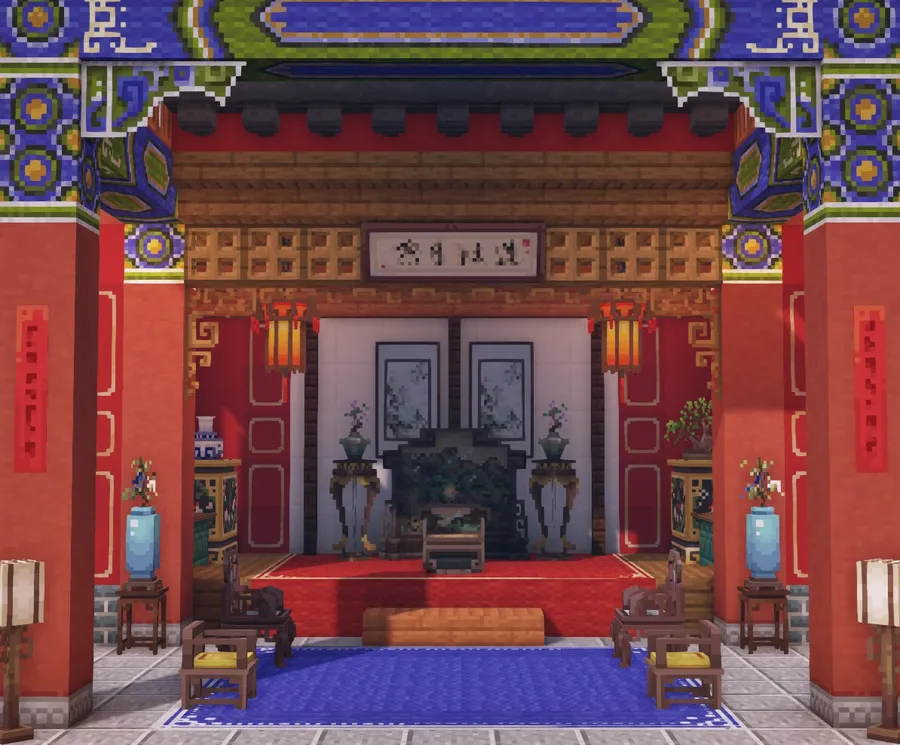
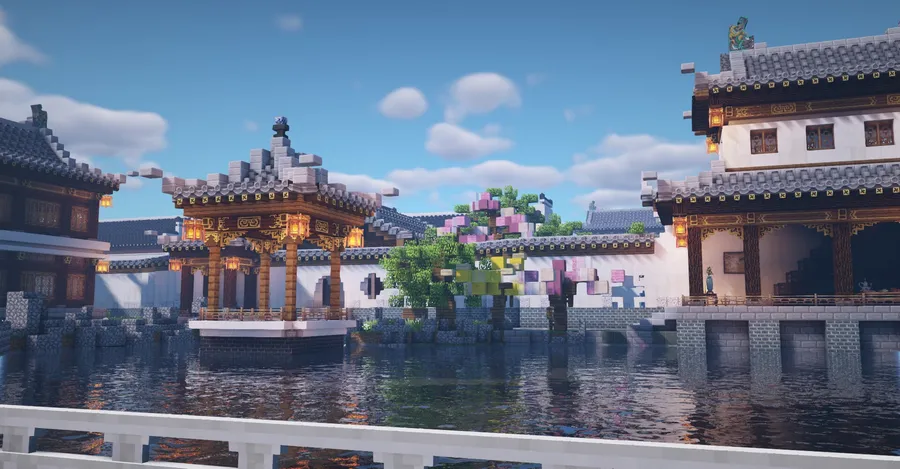
- Ancient Chinese architectural blocks - Ultramarine adds a large collection of roof tiles, wooden brackets, and caihua-style decorative blocks inspired by traditional Chinese wooden architecture. That matters because the silhouette of a build usually comes from its roofline and trim, and this mod gives you the shapes needed to make temples, halls, gates, and pavilions feel convincing instead of improvised.
- Expanded general building materials - Beyond themed pieces, the mod also includes practical floor tiles, stone blocks in multiple materials, and brick blocks for broader construction work. This makes the pack useful for entire projects rather than just accent pieces, so you can keep a consistent style from foundations and courtyards to walls and interior rooms.
- Cultural decorative items - Palace lanterns, vases, bonsai plants, and censers help turn an empty shell into a finished space with character. Small decorations matter in Minecraft because they sell scale and atmosphere, and Ultramarine gives builders more ways to make interiors feel curated rather than sparsely furnished.
- Functional furniture pieces - The mod includes Chinese style furniture with practical use, such as cabinet-like storage blocks and chairs you can sit on. That is valuable because decorative mods often stop at appearance, while Ultramarine lets your builds stay livable and interactive instead of becoming static showcases.
- Vanilla-friendly 16x16 textures - According to the author, the textures are based on a 16x16 approach and are meant to blend smoothly with vanilla blocks. For players, this is a big advantage because the mod appears to be visually cohesive in ordinary worlds, so you can mix its content into survival towns or existing bases without an obvious style clash.
- Survival mode support - Ultramarine is not limited to creative mode display builds, because it includes materials, intermediate crafting items, and recipes for obtaining almost all of its content in survival. That makes the mod more practical for long-term play, especially if you want your decorative progression to feel earned rather than spawned in.
- Special recipe integrations - The mod adds three new recipe types, and it also lists optional support for Patchouli, JEI, and Jade. In practice, that means players who want guide-book help, recipe visibility, or extra block information can build a smoother quality-of-life setup around Ultramarine without changing its core purpose.
Screenshots



How to Install Ultramarine Mod
- Pick the correct Minecraft version first: Ultramarine has builds for 1.21.1, 1.20.1, and 1.18.2, so your game version needs to match the mod file exactly.
- Install the right mod loader for that version. Use NeoForge for Minecraft 1.21.1, or use Minecraft Forge for Minecraft 1.20.1 or 1.18.2.
- Download the Ultramarine file that matches both your Minecraft version and your loader, then place the jar file into your Minecraft
modsfolder. - Launch Minecraft with the same Forge or NeoForge profile you installed, then confirm Ultramarine appears in your mod list before loading a world.
- Optionally add Patchouli, JEI, or Jade if you want guide-book support, recipe integration, or extra HUD information for supported blocks.
Requirements & Compatibility
| Item | Details |
|---|---|
| Mod Author | LocusAzzurro |
| Category | Minecraft Mods |
| Tag | Decoration |
| Minecraft 1.21.1 | NeoForge |
| Minecraft 1.20.1 | Forge |
| Minecraft 1.18.2 | Forge |
| Required Loaders | Forge or NeoForge, depending on the version you install |
| Optional Integrations | Patchouli for guide book support, JEI for recipe integration, Jade for extra HUD information |
| Project Source | GitHub source repository |
| License | LicenseRef-BSD-3-AND-CC-BY-NC-4.0 |
What's New
- The latest linked release entry is version 0.6.6, which is the current changelog reference provided for the project.
- Project metadata shows the mod was updated on 2026-04-05, indicating active maintenance beyond its original 2025 publication.
- The current release lineup still covers NeoForge on Minecraft 1.21.1 and Forge on Minecraft 1.20.1 and 1.18.2, keeping the mod available across three supported game branches.
- The GitHub source repository remains public, which makes it easier to track release history and development activity.
Pros and Cons
Pros
- Large decorative block library focused on a clear architectural theme
- 16x16-style textures are designed to blend with vanilla blocks
- Includes functional furniture rather than purely visual props
- Supports survival crafting instead of creative-only usage
- Optional integrations with Patchouli, JEI, and Jade add quality-of-life value
Cons
- Loader support is limited to Forge and NeoForge
- The mod is cosmetic and building-focused, so players looking for combat or tech systems will not get that here
- To get the best guide and recipe experience, some players may also want optional companion mods
Alternatives to Ultramarine Mod
- Patchouli - A complementary choice if you want in-game guide book support for mods like Ultramarine.
- JEI - A practical companion mod for browsing Ultramarine recipes and understanding its added crafting systems more quickly.
- Jade - A helpful add-on if you want extra HUD information when interacting with supported Ultramarine blocks.
Download Ultramarine Mod
| Minecraft Version | Forge | NeoForge |
|---|---|---|
| For Minecraft 1.21.1 | — | Download |
| For Minecraft 1.20.1 | Download | — |
| For Minecraft 1.18.2 | Download | — |
Always download mods from official sources to stay safe.
Frequently Asked Questions
What does Ultramarine Mod add to Minecraft?
Ultramarine adds building and decoration content inspired by ancient Chinese architecture and interior design. That includes roof tiles, wooden brackets, caihua blocks, floor tiles, stone and brick materials, lanterns, vases, bonsai plants, censers, and functional furniture such as cabinets and chairs.
Is Ultramarine Mod available for Forge and NeoForge?
Yes, Ultramarine supports both Forge and NeoForge. Based on the provided downloads, Minecraft 1.21.1 uses NeoForge, while Minecraft 1.20.1 and 1.18.2 use Forge.
Can you use Ultramarine in Survival Mode?
Yes, Ultramarine supports Survival Mode. The mod includes crafting materials, intermediate items, and recipes for obtaining almost all of its blocks, which makes it suitable for survival building projects.
Do Ultramarine textures fit with vanilla Minecraft?
Yes, the textures are intended to fit with vanilla Minecraft. The author states that the pack uses a 16x16-based texture style so the blocks can blend well with vanilla materials instead of looking disconnected.
Do you need Patchouli, JEI, or Jade to use Ultramarine?
No, those mods are not listed as hard requirements for basic use. They are optional integrations that improve the experience through guide book support, recipe visibility, and extra HUD details for some blocks.
Which Minecraft versions are supported by Ultramarine Mod?
The supported versions listed here are 1.21.1, 1.20.1, and 1.18.2. You should download the file that matches both your exact Minecraft version and the correct loader for that version.


