

Vein Mining is a utility mod that adds a configurable Vein Mining enchantment, allowing enchanted tools to break entire clusters of matching connected blocks at once, available for Fabric, Forge, NeoForge, and Quilt mod loaders.
Mining in vanilla Minecraft is repetitive. You find a vein of iron, coal, or diamonds, and then you click each block individually until the entire deposit is gone. It is one of the most common complaints among survival players, and it only gets worse in modpacks where ores spawn in massive clusters. Vein Mining solves this by letting you break an entire connected group of identical blocks with a single swing — but unlike some overpowered alternatives, it does so through an enchantment system with highly tunable limits. With over 6 million downloads on Modrinth alone, it has become one of the most trusted quality-of-life mods in the Minecraft modding community. Developed by TheIllusiveC4, the mod strikes a careful balance between convenience and gameplay integrity.
Key Features of Vein Mining
- Enchantment-Based System — Unlike mods that simply toggle vein mining on or off, this mod ties the ability to a proper enchantment. You can find it on enchanting tables, in villager trades, and on loot books. This means players must earn the ability through normal gameplay progression rather than receiving it for free, which keeps survival worlds feeling balanced.
- Configurable Max Blocks and Distance — Server owners and modpack developers can set exactly how many blocks can be mined per activation and how far the chain reaction travels. Both values scale with enchantment level, so a Vein Mining I enchantment might break 10 blocks while Vein Mining III could handle 50. This granular control prevents the mod from trivializing resource gathering in competitive or progression-focused environments.
- Diagonal Mining Support — When enabled, the mod detects connected blocks diagonally, not just on the six cardinal faces. This is particularly useful for ores like diamond and ancient debris that often generate in scattered diagonal patterns. Players can toggle this setting off if they prefer a more conservative chain-breaking behavior.
- Relocate Drops — All items mined through a vein break can be automatically collected at the player's position instead of scattering across the mined area. This eliminates the frustrating experience of watching half your diamonds fall into lava or disappear into unreachable crevices deep underground.
- Tool Durability Protection — The mod includes a "Prevent Tool Breaking" option that stops vein mining before your tool reaches zero durability. Combined with the configurable tool damage multiplier, this ensures players never accidentally destroy a valuable enchanted pickaxe by triggering a large vein break. You can also limit mining strictly by remaining tool durability for the most cautious balance approach.
- Flexible Activation Methods — Players can configure vein mining to activate while sneaking, while standing normally, or through a dedicated keybinding. This flexibility means the mod adapts to your play style rather than forcing a specific input pattern, and it avoids conflicts with other mods that may already use the sneak key for different functions.
- Block Whitelist and Blacklist System — Administrators can define exactly which blocks are eligible for vein mining using whitelists, blacklists, and custom block groups built from tags and block IDs. This is critical for modpacks where certain modded blocks should not be mass-mined for balance reasons.
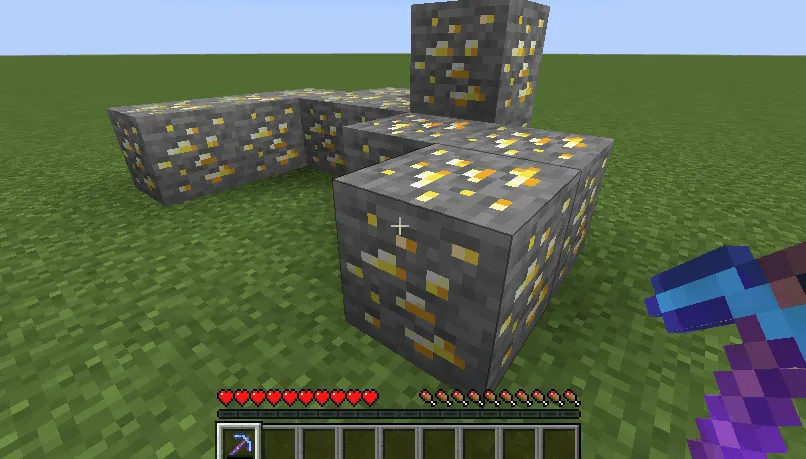
Screenshots
How to Install Vein Mining
- Choose and install your preferred mod loader: Fabric, Minecraft Forge, NeoForge, or Quilt. The mod supports all four, so pick whichever your existing modpack uses.
- Download the correct version of Vein Mining for your Minecraft version and mod loader from the official Modrinth or CurseForge page. Double-check that both the game version and loader type match your installation.
- Place the downloaded
.jarfile into your.minecraft/modsfolder. If the folder does not exist, launch the game once with your mod loader to generate it automatically. - Launch Minecraft and load into a world. The Vein Mining enchantment will now appear on enchanting tables and can be applied to pickaxes, axes, shovels, and hoes.
- To customize behavior, navigate to your
.minecraft/configfolder and editveinmining-common.tomlfor gameplay settings orveinmining-server.tomlfor server-specific limits. The client config handles visual and activation preferences.
Requirements & Compatibility
| Requirement | Details |
|---|---|
| Minecraft Versions | 1.21, 1.20.6, 1.20.4, 1.20.2, 1.20.1, 1.20, 1.19.4, 1.19.3, 1.19.2, 1.19.1, 1.19, 1.18.2, 1.17.1, 1.17, 1.16.5, 1.16.4 |
| Mod Loaders | Fabric, Forge, NeoForge, Quilt |
| Dependencies | Respective mod loader installed |
| Side | Server-side (works on servers without client install) |
| License | LGPL-3.0-or-later (open source) |
What's New
- Updated to NeoForge 21.0.143 for Minecraft 1.21 compatibility in the latest beta release (v5.0.0-beta.2).
- The mod now follows Semantic Versioning, making it easier for modpack developers to track breaking changes versus minor updates.
- Major version bump to 5.0.0 signals a significant internal rework for the 1.21 Minecraft update cycle.
- Ongoing improvements align with the Keep a Changelog format — full history is available on the project's GitHub repository.
Pros and Cons
Pros
- Extremely configurable — separate client, server, and common config files cover every aspect of behavior
- Enchantment-based design maintains vanilla progression feel
- Supports all four major mod loaders (Fabric, Forge, NeoForge, Quilt)
- Wide version support spanning from 1.16.4 to 1.21
- Tool protection features prevent accidental item destruction
- Open source under LGPL-3.0, actively maintained
Cons
- Currently in beta for Minecraft 1.21, so minor bugs may exist
- Configuration requires editing TOML files manually — no in-game GUI for settings
- The enchantment must be found or traded for, which can feel slow in early-game
- Large vein breaks on servers may cause brief lag spikes depending on hardware
Alternatives to Vein Mining
- Ore Excavation — A long-standing vein mining mod that uses a keybind-based approach instead of an enchantment, offering a more immediate but less balanced alternative for players who prefer instant access to chain-breaking.
- FTB Ultimine — Part of the FTB suite, this mod provides shape-based mining patterns including tunnels and areas in addition to vein mining, making it a solid choice for players already running FTB modpacks.
- TreeChop — Focused specifically on tree felling rather than ore mining, TreeChop makes chopping trees break the entire trunk at once and is an excellent companion mod to pair alongside Vein Mining for complete quality-of-life coverage.
Download Vein Mining
| Minecraft Version | Fabric | Forge | NeoForge | Quilt |
|---|---|---|---|---|
| For Minecraft 1.21 | Download | Download | Download | — |
| For Minecraft 1.20.6 | Download | Download | Download | — |
| For Minecraft 1.20.4 | Download | Download | Download | — |
| For Minecraft 1.20.2 | Download | Download | — | — |
| For Minecraft 1.20.1 | Download | Download | Download | Download |
| For Minecraft 1.20 | Download | Download | Download | Download |
| For Minecraft 1.19.4 | Download | Download | — | Download |
| For Minecraft 1.19.3 | Download | Download | — | Download |
| For Minecraft 1.19.2 | Download | Download | — | — |
| For Minecraft 1.19.1 | Download | Download | — | — |
| For Minecraft 1.19 | Download | Download | — | — |
| For Minecraft 1.18.2 | Download | Download | — | — |
Always download mods from official sources to stay safe.
Frequently Asked Questions
Does Vein Mining work on multiplayer servers?
Yes — Vein Mining works fully on multiplayer servers. The mod primarily operates server-side, meaning the server administrator needs to install it, and all configuration options like max blocks, distance limits, and block whitelists are controlled through the server config files. Players connecting to the server do not necessarily need the mod installed on their client.
Can I use Vein Mining with Fabric and Forge at the same time?
No — you must choose one mod loader per Minecraft installation. Vein Mining provides separate downloads for Fabric, Forge, NeoForge, and Quilt, so download the version that matches the loader you already have installed. If you are unsure which loader to pick, Fabric and NeoForge are the most actively supported options for Minecraft 1.21.
Is the Vein Mining enchantment compatible with other enchantments like Efficiency or Fortune?
Yes — the Vein Mining enchantment stacks alongside standard tool enchantments. Fortune will apply its multiplier to each block broken in the chain, and Efficiency affects the initial break speed. This makes a fully enchanted pickaxe with both Fortune III and Vein Mining an extremely powerful mining setup.
How do I change the activation key for Vein Mining?
Open the veinmining-client.toml file in your Minecraft config folder to change the activation method. You can switch between sneaking, standing, or a custom keybinding. If you choose the keybinding option, the specific key can be reassigned through Minecraft's standard Controls menu under the Vein Mining category.
Does Vein Mining cause lag or performance issues?
Generally no — the mod appears to be lightweight for normal use. However, breaking very large veins (50+ blocks) on servers with limited hardware may produce brief lag spikes since all blocks are processed in a single tick. You can mitigate this by lowering the max blocks and max distance values in veinmining-server.toml to match your server's capabilities.


![[Let's Do] Meadow Mod (1.21.1) - thumbnail](http://mcinside.com/wp-content/uploads/2026/04/thumbnail-64-52x52.webp)


![Not Enough Recipe Book [NERB] Mod (1.21.11) - thumbnail](http://mcinside.com/wp-content/uploads/2026/04/thumbnail-63-52x52.webp)
