
WITS (What Is This Structure?) is a utility mod that adds a /wits command to show the registry names of structures at your current location for Minecraft Fabric, Forge, and NeoForge.
If you have ever stood in a world and wondered what structure generated under your feet, WITS solves that exact problem with a single command. It strips away the trial-and-error of biome mapping and external tools, and its 1.5 million+ Modrinth downloads show that a lot of players value that kind of direct answer.
Key Features of WITS (What Is This Structure?) Mod
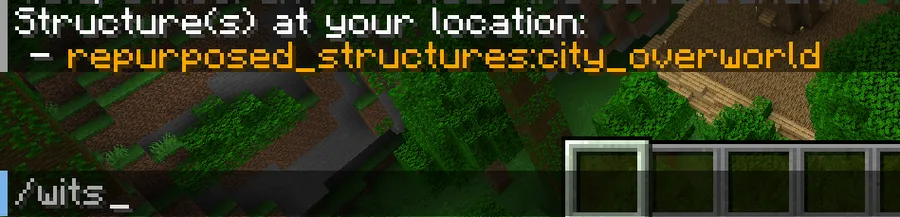
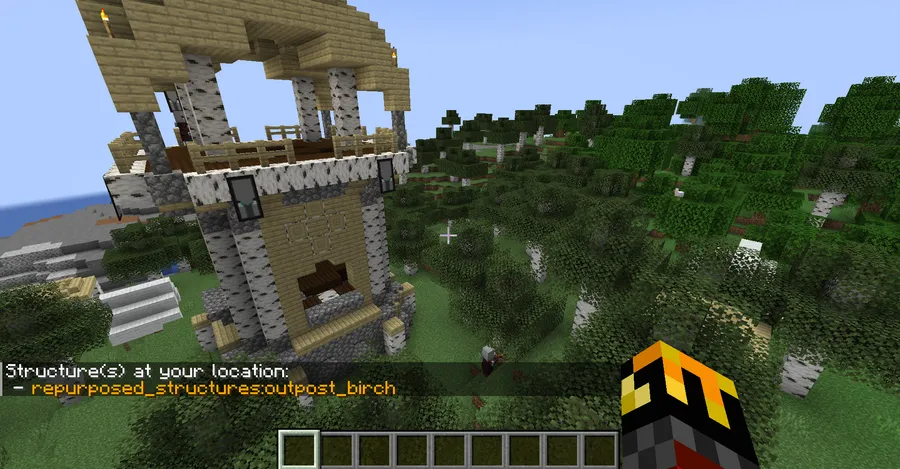
- Simple /wits command at your current position — The core appeal is that you can ask the game what structure exists where you are standing. That matters because it turns structure identification into an in-world action instead of a guessing game, which is much faster when you are testing terrain, documenting a seed, or checking a modded build.
- Works in single-player worlds and on servers — You do not need a special offline setup just to use it in one environment. That makes the mod practical for both personal worlds and multiplayer servers, so you can rely on the same workflow whether you are exploring alone or helping others troubleshoot world generation.
- Server-friendly design that can expose the base command to all clients — The mod can be installed on a server and still let connected players use the basic /wits command, including vanilla clients. That is useful because it lowers the barrier for multiplayer adoption and keeps the mod from becoming something only a modded client can take advantage of.
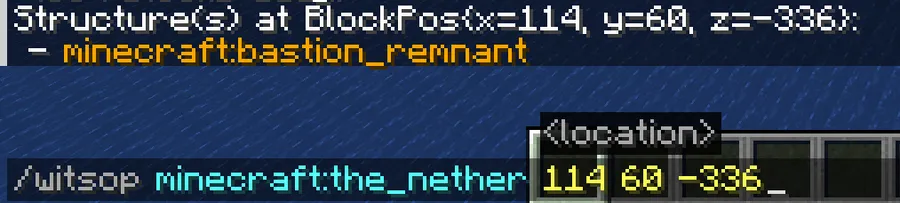
- Operator-only /witsop lookup for any dimension and coordinates — Server owners and operators can go beyond their own position and inspect structures elsewhere by adding dimension and coordinate parameters. That is the kind of admin-focused control that saves time when you are verifying worldgen issues, checking a report from a player, or confirming a specific location without traveling there first.
- Reports registry names, not vague guesses — WITS prints the structure registry names rather than trying to interpret the terrain in a fuzzy way. That matters because registry names are concrete and easier to reference when you are sharing coordinates, comparing notes, or trying to match what the game generated against a modpack's structure list.
- Focused scope that appears to be lightweight — The mod does one job and does not try to become a full exploration suite. That narrow scope is a strength for players who want a tool that stays out of the way until they need it.
- Clear limitation awareness — The author notes that WITS only detects actual structures and not every generated feature. That honesty matters because it helps set expectations correctly, so you do not waste time assuming the command will identify worldgen elements that the game does not store the same way.
Screenshots
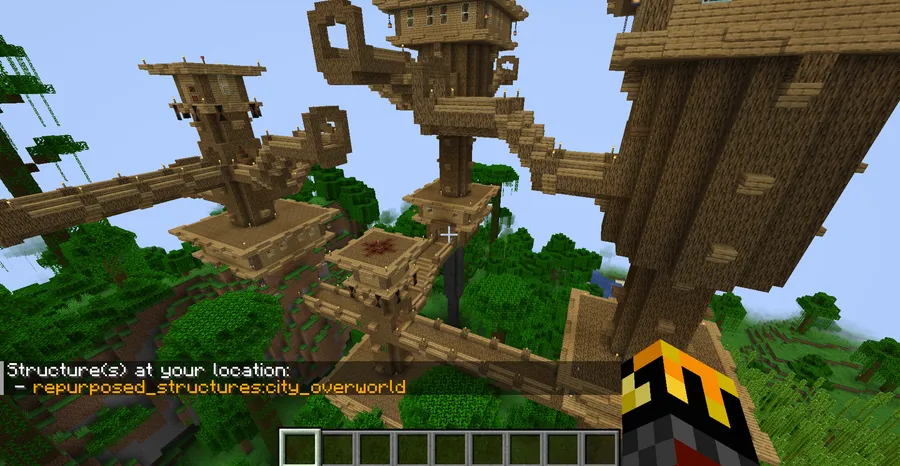
How to Install WITS (What Is This Structure?) Mod
- Pick the loader that matches your setup, then open the relevant page for Fabric Mod Loader, Minecraft Forge, or NeoForge.
- Choose the download that matches your Minecraft version from the supported list, such as 26.1, 1.21.11, 1.21.10, or an older release like 1.20.1 or 1.16.5.
- Download the WITS jar for the loader you are using. The provided latest builds here are shown for Fabric and NeoForge.
- Place the mod file into your `mods` folder for the client, or into the server's `mods` folder if you are setting it up on a server.
- Launch the game or restart the server, then test the command with `/wits`. If you are an operator on a server, you can also use `/witsop` with dimension and coordinate parameters.
Requirements & Compatibility
| Item | Details |
|---|---|
| Mod type | Utility / worldgen |
| Supported loaders | Fabric, Forge, NeoForge |
| Current download formats shown | Fabric and NeoForge for the listed releases |
| Supported Minecraft versions | 26.1, 1.21.11, 1.21.10, 1.21.9, 1.21.8, 1.21.7, 1.21.6, 1.21.5, 1.21.4, 1.21.3, 1.21.1, 1.21, 1.20.6, 1.20.4, 1.20.3, 1.20.2, 1.20.1, 1.19.2, 1.18.2, 1.17.1, 1.16.5 |
| Server support | Yes, it works on servers and can expose the base command to connected clients |
| Vanilla client support | Yes, vanilla clients can use the base /wits command on a compatible server |
| Author | TelepathicGrunt |
| License | MIT |
| Source | GitHub repository |
What's New
- Updated for Minecraft 26.1.
- The changelog labels this release as version 1.4.1.
- No additional gameplay, balance, or feature changes were listed in the provided changelog.
- The update keeps the mod aligned with the newest version shown in the data.
Pros and Cons
Pros
- Fast structure identification with a single command.
- Useful in both single-player and multiplayer environments.
- Can be made available to vanilla clients on a server.
- Operator command supports dimension and coordinate lookups.
- Very focused scope, which keeps the experience straightforward.
Cons
- It cannot detect every generated feature, only structures the game stores that way.
- The extended /witsop command is limited to operators or server owners.
- It is not a replacement for broader exploration or mapping mods.
Alternatives to WITS (What Is This Structure?) Mod
- Nature's Compass — A good companion if you want to search for biomes as part of your exploration workflow instead of only identifying structures beneath your feet.
- Explorer's Compass — A structure-finding tool that complements WITS when you want to actively search for a target rather than inspect the current location.
- Xaero's Minimap — Helpful for navigation and orientation, especially if you want a broader travel aid alongside structure lookup.
Download WITS (What Is This Structure?) Mod
| Minecraft Version | Fabric | NeoForge |
|---|---|---|
| For Minecraft 26.1 | Download | Download |
| For Minecraft 1.21.11 | Download | Download |
| For Minecraft 1.21.10 | Download | Download |
| For Minecraft 1.21.9 | Download | Download |
| For Minecraft 1.21.8 | Download | Download |
| For Minecraft 1.21.7 | Download | Download |
| For Minecraft 1.21.6 | Download | Download |
| For Minecraft 1.21.5 | Download | Download |
| For Minecraft 1.21.4 | Download | Download |
| For Minecraft 1.21.3 | Download | Download |
| For Minecraft 1.21.1 | Download | Download |
| For Minecraft 1.21 | Download | Download |
Always download mods from official sources to stay safe.
Frequently Asked Questions
What does the /wits command do?
It shows the registry names of structures at the exact spot where you are standing. That makes it a direct in-game lookup tool for figuring out what the game generated around you.
Does WITS work on servers?
Yes, it works on servers. The mod is designed so server owners can install it and allow connected players to use the base command without needing anything more complicated.
Can vanilla clients use WITS?
Yes, vanilla clients can use the base /wits command on a server that has WITS installed. That is one of the most practical parts of the mod because it reduces the need for everyone on the server to run the same client modpack.
What is /witsop for?
It is the operator and server-owner version of the command. It lets trusted users check structures at chosen coordinates in any dimension, which is useful for admin work and worldgen verification.
Can WITS detect every kind of generated build or feature?
No, it cannot detect every generated feature. The mod only reads information the game stores for structures, so things like dungeons and desert wells are outside its reach.
Is WITS a lightweight mod?
Yes, it appears to be lightweight. The mod has a narrow purpose and focuses on one command rather than adding large systems or extra content.
Which loaders does WITS support?
It supports Fabric, Forge, and NeoForge according to the provided data. The download set shown here includes Fabric and NeoForge builds for the listed versions.


