

World Play Time Mod is a client-side utility mod that shows each Minecraft world's playtime in the world selection menu for Fabric, Forge, and NeoForge.
World Play Time Mod solves a small but real navigation problem: once you have several survival worlds, test worlds, and old backups, it becomes hard to remember which save has the most progress. By putting playtime directly in the world list, it gives you a fast visual cue before you even click a save. With 1,710,355 downloads, it has already earned clear community trust as a practical menu improvement.
Key Features of World Play Time Mod
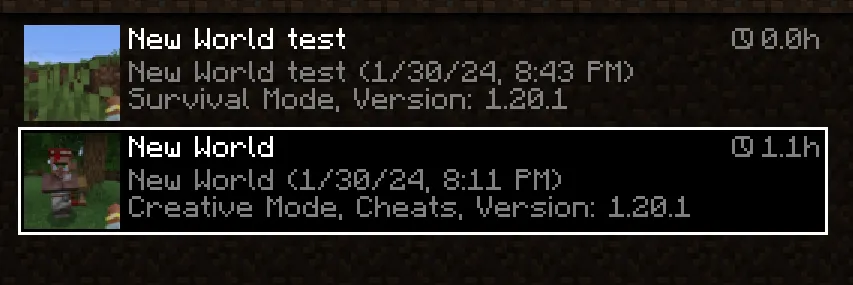
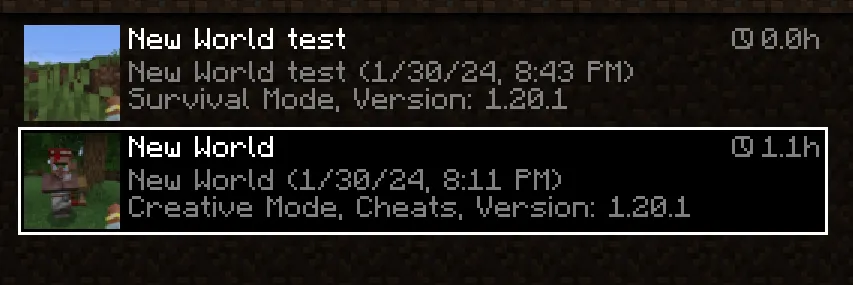
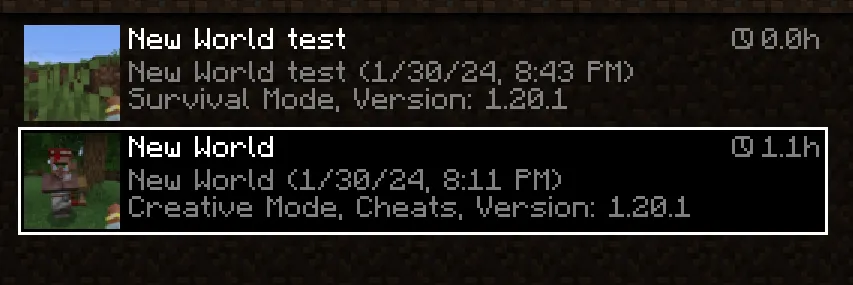
- Playtime shown right in the world list — The mod displays a world's total time in the top-right corner of each entry, which makes the selection screen far more informative. Instead of opening worlds one by one, you can spot your long-term saves instantly.
- Uses the built-in Play Time statistic — This matters because the mod is not dependent on a fresh save created after installation. Existing worlds can still show their time, so you do not have to start over to get value from it.
- Client-side only behavior — It only changes what you see in the client and does nothing on the server. That keeps it easy to justify for solo play and makes it a low-friction install for players who mainly want better world management.
- Helpful for organizing multiple worlds — If you keep separate bases, challenge runs, test worlds, or modpack saves, this mod saves mental effort. The playtime number becomes a quick sorting hint when names alone are not enough.
- Works with older saves — Since the mod reads the playtime statistic instead of writing a new tracking system from scratch, it remains useful on worlds you already care about. That is the difference between a gimmick and a genuinely useful utility.
- Simple, focused feature set — World Play Time Mod does one thing and stays out of the way. In practice, that usually makes a utility mod more dependable because there is less visual clutter and fewer moving parts.
Screenshots
How to Install World Play Time Mod
- Pick the loader you use most often: Fabric, Forge, or NeoForge.
- Check that your Minecraft version matches one of the supported releases listed below, such as 1.21.x, 1.20.x, or 1.19.2.
- Download the correct build for your loader and version from the download section on this page.
- Place the mod file into your Minecraft
modsfolder. - Launch the game, open the world selection menu, and confirm that playtime now appears in each world entry.
Requirements & Compatibility
| Category | Details |
|---|---|
| Mod type | Utility / management / decoration |
| Loader support listed by author | Fabric, Forge, NeoForge |
| Current download entries shown | Fabric and NeoForge builds are listed for the versions below |
| Minecraft versions | 26.1, 1.21.10, 1.21.9, 1.21.8, 1.21.7, 1.21.6, 1.21.5, 1.21.4, 1.21.3, 1.21.2, 1.21.1, 1.21, 1.20.4, 1.20.1, 1.20, 1.19.2 |
| Client or server | Client-side only |
| License | MIT |
What's New
- The mod was reuploaded with a fix for a loading issue.
- The startup problem was tied to a missing
fabricmod id reference from the older Fabric API naming. - The update focuses on restoring proper loading rather than changing the mod's core behavior.
- No feature redesign is noted in the changelog, so the main improvement is compatibility and stability.
Pros and Cons
Pros
- Makes the world selection menu more informative at a glance.
- Works on existing worlds by reading the Play Time statistic.
- Client-side only, so it stays narrowly scoped and easy to use.
- Available across a broad set of Minecraft versions.
- Useful for players who manage multiple saves or long-running worlds.
Cons
- It is intentionally narrow in scope, so it will not add broader world management tools.
- The feature only matters if you care about playtime visibility in the world list.
- The current download entries shown here are Fabric and NeoForge builds, so loader/version matching still matters.
Alternatives to World Play Time Mod
- Mod Menu — A good companion for keeping installed client mods easy to review and manage.
- BetterF3 — Useful if you want more readable in-game information without changing gameplay.
- MiniHUD — A broader utility pick for players who like extra on-screen information and practical debugging tools.
Download World Play Time Mod
| Minecraft Version | Fabric | NeoForge |
|---|---|---|
| For Minecraft 26.1 | Download | Download |
| For Minecraft 1.21.10 | Download | Download |
| For Minecraft 1.21.9 | Download | Download |
| For Minecraft 1.21.8 | Download | Download |
| For Minecraft 1.21.7 | Download | Download |
| For Minecraft 1.21.6 | Download | Download |
| For Minecraft 1.21.5 | Download | Download |
| For Minecraft 1.21.4 | Download | Download |
| For Minecraft 1.21.3 | Download | Download |
| For Minecraft 1.21.2 | Download | Download |
| For Minecraft 1.21.1 | Download | — |
| For Minecraft 1.21 | Download | — |
Always download mods from official sources to stay safe.
Frequently Asked Questions
Does World Play Time Mod work on existing worlds?
Yes — it reads the world's Play Time statistic, so older saves can still show their accumulated time. That is one of the biggest reasons to install it, because you do not need a brand-new world to benefit.
Is World Play Time Mod client-side only?
Yes — it only affects the client and does nothing on the server side. That keeps it focused on the world selection screen and makes it a low-risk quality-of-life addition for solo and multiplayer players alike.
Which Minecraft loaders does it support?
It is listed for Fabric, Forge, and NeoForge. The download entries shown on this page currently include Fabric and NeoForge builds for the supported versions, so you should match the file to your setup.
Which Minecraft versions are available?
It is available for Minecraft 26.1, 1.21.10 through 1.21.1, 1.21, 1.20.4, 1.20.1, 1.20, and 1.19.2. That range covers a lot of modern modded setups, especially if you are staying on recent releases.
Does it change gameplay?
No — it does not alter survival mechanics, world generation, or server behavior. Its only job is to make the world list more informative so you can make better choices before loading a save.
Is it worth installing if I only play one world?
Yes — even a single-world player can use it as a quick reminder of long-term progress. If you do keep multiple saves, the value becomes much more obvious because it helps you identify each world without opening it first.


