
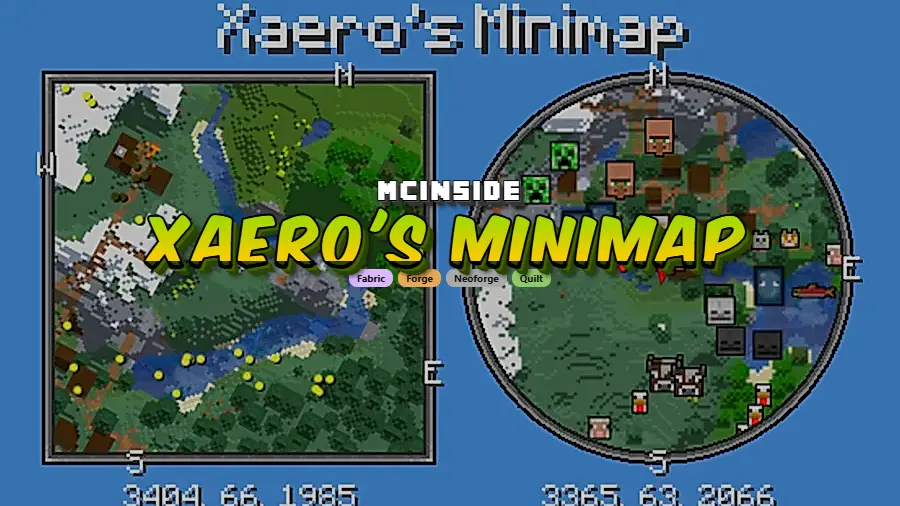
Xaero's Minimap is a real-time minimap mod for Minecraft that shows nearby terrain, players, mobs, and entities in the corner of your screen on Fabric, Forge, NeoForge, and Quilt. It also includes waypoints, cave mapping, and flexible HUD controls, making it one of the most complete navigation mods available for Minecraft 1.21.11 and 1.20.4.
Xaero's Minimap solves one of vanilla Minecraft's biggest friction points: finding your way back after exploring, mining, or traveling long distances. Instead of relying on coordinates alone, you get a live minimap, visible waypoints, optional entity radar, and a cave view that helps underground navigation feel much less disorienting. With more than 70 million downloads and support for Fabric, Forge, NeoForge, and Quilt, it remains one of the most established minimap mods for players who want better navigation without a bloated interface.
Key Features of Xaero's Minimap
- Vanilla-style aesthetics — Unlike many minimap mods that slap a jarring overlay onto your screen, Xaero's Minimap is designed to match the look and feel of vanilla Minecraft maps. This means the minimap does not break visual immersion, which matters especially if you play with friends who are picky about keeping things close to the original game experience.
- Rotating square and circle minimap shapes — Xaero's Minimap was the first to introduce a rotating square minimap for Minecraft, and it also offers a circle shape option. You can lock the rotation and use a direction arrow instead, giving you full control over how the minimap behaves and looks on your HUD.
- Waypoint system with in-world visibility — You can place custom waypoints that appear both on the minimap and as beacons in the 3D game world. This is invaluable for marking bases, mob spawners, biome borders, or any coordinates you need to revisit. There is even optional teleportation support for creative or server-enabled play.
- Entity radar with customizable display — Players, mobs, and items show up on the minimap as colored dots or as icon heads. You can customize the colors to distinguish hostile mobs from passive ones at a glance, which gives you a real tactical edge during exploration or PvP encounters.
- Cave mode for underground navigation — When you go below the surface, the minimap automatically switches to cave mode, rendering the blocks around you underground. This makes strip mining, cave exploration, and nether navigation far less disorienting since you can see the tunnels and chambers around you in real time.
- Flexible screen positioning — The minimap can be placed anywhere on your screen, adjustable down to a single pixel. This is especially useful if you run other HUD mods or resource packs that occupy specific screen corners, letting you avoid overlap without compromise.
- Fair-play edition for PvP servers — The mod ships in two editions: full and fair-play. The fair-play version disables features like entity radar that some multiplayer servers consider an unfair advantage, so you can enjoy minimap navigation without violating server rules.
Screenshots
How to Install Xaero's Minimap
- Install your preferred mod loader. Xaero's Minimap supports Fabric, Minecraft Forge, NeoForge, and Quilt Loader. Follow the instructions for whichever loader matches your setup.
- Download the correct version of Xaero's Minimap for your Minecraft version and mod loader from the official Modrinth or CurseForge page.
- Place the downloaded
.jarfile into your.minecraft/modsfolder. If the folder does not exist, launch the game once with your mod loader to generate it. - Launch Minecraft using your mod loader profile. The minimap should appear in the top-left corner of your screen by default.
- Press the minimap settings key (default:
Y) to customize the shape, size, position, zoom level, and entity display options to your preference.
Requirements & Compatibility
| Detail | Info |
|---|---|
| Mod Loaders | Fabric, Forge, NeoForge, Quilt |
| Latest MC Version | 1.21.11 |
| Supported Versions | 1.21.11, 1.21.10, 1.21.8, 1.21.5, 1.21.4, 1.21.1, 1.21, 1.20.4, 1.20.1, 1.20, 1.19.2, 1.18.2, 1.16.5, 1.12.2 |
| Side | Mostly client-side (server-side optional for extra features) |
| Author | thexaero |
| Downloads | 70,200,000+ |
What's New
- The mod has been updated to support Minecraft 1.21.11, the latest release as of 2026.
- Continued compatibility across all four major mod loaders: Fabric, Forge, NeoForge, and Quilt.
- Ongoing bug fixes and stability improvements — full changelogs are available on the official site at chocolateminecraft.com.
Pros and Cons
Pros
- Vanilla-matching art style that blends into the game naturally
- Works on Fabric, Forge, NeoForge, and Quilt — no loader lock-in
- Extremely wide version support from 1.12.2 all the way to 1.21.11
- Fair-play edition available for PvP and competitive servers
- Highly customizable — shape, position, zoom, entity display, and color modes
- Mostly client-side so no server installation is required to use it
Cons
- All rights reserved license — not open source, so community contributions are limited
- Some multiplayer servers may still restrict even the fair-play edition
- Does not include a full-screen world map — you need Xaero's World Map separately for that
Alternatives to Xaero's Minimap
- Xaero's World Map — A companion mod by the same author that adds a full-screen world map. Most players install it alongside the minimap for complete navigation coverage.
- JourneyMap — A feature-rich mapping mod with a full-screen map, minimap, and web-based map viewer. A strong alternative if you want an all-in-one solution in a single mod.
- VoxelMap — A classic minimap mod that has been around for many Minecraft versions, offering waypoints, mob radar, and cave mapping with a different visual style.
Download Xaero's Minimap
| Minecraft Version | Fabric | Forge | NeoForge | Quilt |
|---|---|---|---|---|
| For Minecraft 1.21.11 | Download | Download | Download | Download |
| For Minecraft 1.21.10 | Download | Download | Download | Download |
| For Minecraft 1.21.8 | Download | Download | Download | Download |
| For Minecraft 1.21.5 | Download | Download | Download | Download |
| For Minecraft 1.21.4 | Download | Download | Download | Download |
| For Minecraft 1.21.1 | Download | Download | Download | Download |
| For Minecraft 1.21 | — | Download | Download | — |
| For Minecraft 1.20.4 | Download | Download | Download | Download |
| For Minecraft 1.20.1 | Download | Download | — | Download |
| For Minecraft 1.20 | Download | Download | — | Download |
| For Minecraft 1.19.2 | Download | Download | — | Download |
| For Minecraft 1.19.1 | Download | Download | — | Download |
Always download mods from official sources to stay safe.
Related Guides
If you are deciding between minimap options, see Xaero's Minimap Alternatives. For a broader shortlist, read Best Minecraft Mods for 1.21.11 and Best Performance Mods for Minecraft.
Frequently Asked Questions
Is Xaero's Minimap client-side only?
Yes — Xaero's Minimap is mostly client-side, meaning you only need to install it on your own game. Installing it on the server side is optional and only needed for additional features like automatic world identification. You do not need to ask a server admin to install anything for the minimap to work.
Does Xaero's Minimap work with Fabric and Forge at the same time?
No — you need to download the correct version for your specific mod loader. Xaero's Minimap has separate builds for Fabric, Forge, NeoForge, and Quilt. Make sure you pick the file that matches the loader you have installed, or the mod will not load.
Can I use Xaero's Minimap on multiplayer servers?
Yes — since the mod is client-side, it works on most multiplayer servers without any server-side changes. However, some competitive or PvP servers may restrict minimap mods. The fair-play edition disables features like entity radar to comply with stricter server rules, so check your server's mod policy before playing.
Is Xaero's Minimap compatible with Xaero's World Map?
Yes — the two mods are made by the same developer and are designed to work together. Xaero's Minimap handles the corner HUD map while Xaero's World Map provides a full-screen map with broader terrain coverage. Installing both gives you a complete navigation toolkit.
Does Xaero's Minimap affect game performance?
The mod appears to be lightweight and is generally reported to run smoother than many other minimap mods. According to the developer, it is optimized for minimal performance impact. However, actual results can vary depending on your system specs, render distance, and how many other mods you have loaded alongside it.


