Equipment Compare Mod is a client-side utility mod that makes it easier to compare equipment by showing what you are already wearing alongside the item tooltip for Minecraft Fabric, Forge, and NeoForge.
If you have ever hovered over a new helmet, weapon, or accessory and had to mentally swap back and forth between your inventory and your equipped gear, this mod solves that annoyance cleanly. Instead of changing the item tooltip itself, it adds a comparison view for the item you are currently wearing, which helps it stay useful in modded setups with lots of custom stats and item behavior. With more than 1.5 million downloads, it has already proven that a simple comparison tool can save a lot of time for players who care about gear choices.
Key Features of Equipment Compare Mod
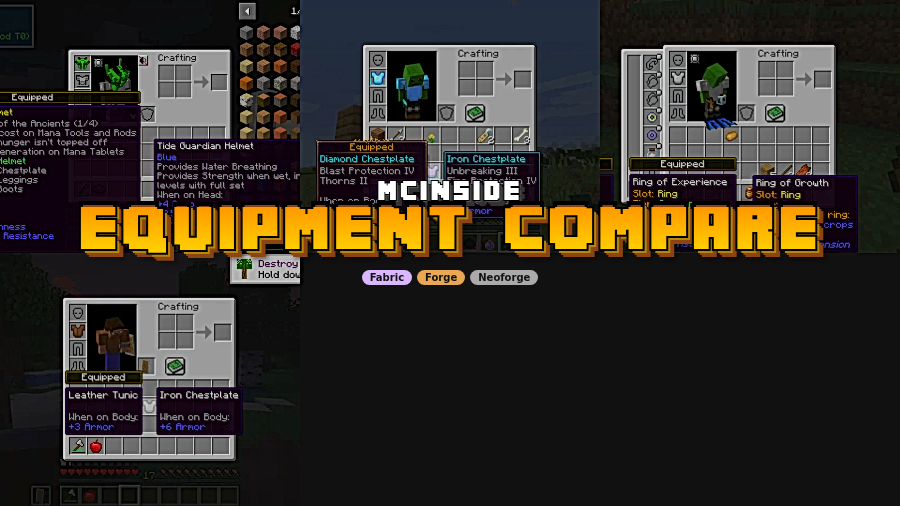
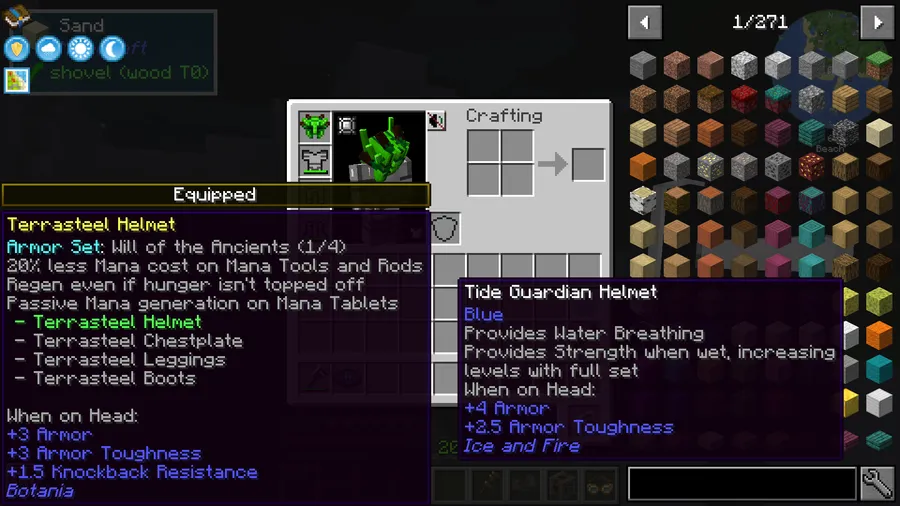
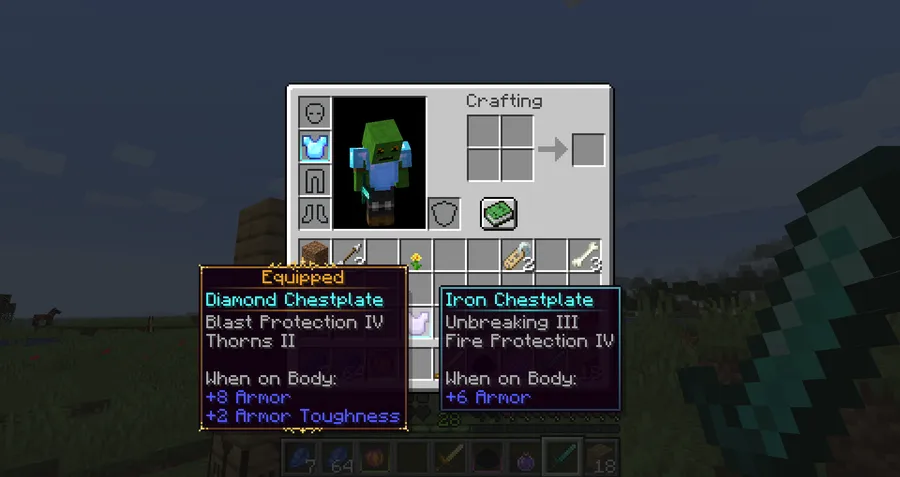
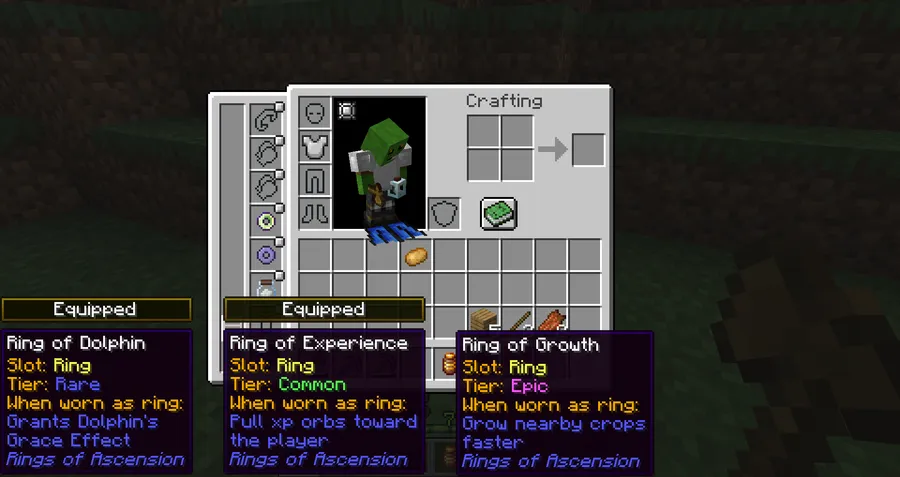
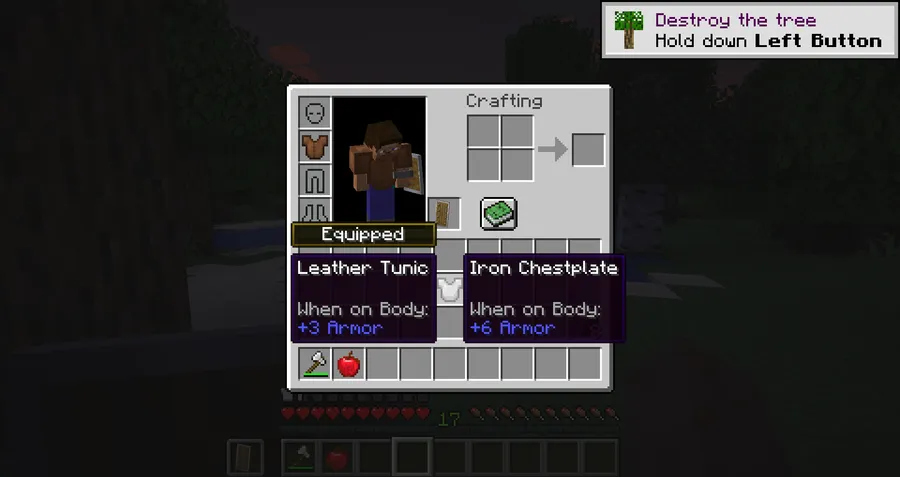
- Equipped-item comparison tooltips — The core idea is practical: you can see the tooltip for the item you are hovering over and the item you are already wearing in one place. That makes side-by-side comparison much easier when you are deciding whether a new piece of gear is actually an upgrade.
- Better support for modded gear — The mod compares the item you wear rather than trying to force every comparison into one custom tooltip format. In a heavily modded environment, that approach matters because it gives broader support for new stats and features added by other mods.
- Client-side only design — You do not need to install anything on a server for normal use. That keeps setup simple and makes the mod a good fit for single-player worlds and modpacks where you just want a local quality-of-life upgrade.
- Shift-to-show behavior with keybind support — By default, comparisons appear when you hold Shift while hovering over an item. This is convenient because it keeps the interface clean until you actually need the extra information, and the behavior can be moved to a keybind in the inventory controls menu.
- Configurable display behavior — The configuration file lets you reverse the default behavior so comparisons are shown all the time unless a key is held. That flexibility is useful if you compare gear constantly and do not want to keep pressing a modifier key.
- Custom badge styling and item blacklisting — You can change the color and text used for the equipped badge that appears above tooltips. If certain items do not work well with comparisons, you can also blacklist specific item IDs and disable the feature for them.
Screenshots
How to Install Equipment Compare Mod
- Choose the Minecraft version and loader that matches your setup from the download table below.
- Install the correct mod loader first: Fabric Mod Loader, Minecraft Forge, or NeoForge.
- Download the matching Equipment Compare file for your Minecraft version.
- Install Iceberg for every version except 1.12.2, since the mod depends on it for most releases.
- Place the mod jar into your `mods` folder, launch the game, and check the Inventory controls menu if you want to change the tooltip keybind.
Requirements & Compatibility
| Requirement | Details |
|---|---|
| Minecraft versions | 1.21.5, 1.21.4, 1.21.3, 1.21.2, 1.21.1, 1.21, 1.20.6, 1.20.5, 1.20.4, 1.20.2, 1.20.1, 1.20, 1.19.4, 1.19.3, 1.19.2, 1.19.1, 1.19, 1.18.2, 1.18.1, 1.16.5, and 1.12.2 |
| Loaders | Fabric, Forge, and NeoForge, with loader availability varying by version |
| Dependency | Iceberg is required on all versions except 1.12.2 |
| Client / Server | Fully client-side |
| Modpacks | Allowed for modpack use |
Changelog
- Fixed a bug that prevented Curios from being compared correctly.
- Added a configuration option to enable or disable accessory comparisons.
- Accessory comparisons are disabled by default in the updated build.
Pros and Cons
Pros
- Makes gear comparison faster and easier to read.
- Supports a wide range of modded equipment contexts by comparing what you are wearing directly.
- Client-side only, so setup is straightforward.
- Offers flexible controls and configuration options.
- Permitted for modpacks.
Cons
- Requires Iceberg on most supported versions.
- Loader support is version-dependent, so not every Minecraft version has the same download options.
- The feature is focused on comparison tooltips rather than a broader inventory overhaul.
- Players who never compare gear may not use it often.
Alternatives to Equipment Compare Mod
- Jade — A useful information overlay mod that helps you inspect blocks and entities quickly, making it a solid companion for players who like on-screen utility tools.
- AppleSkin — A classic HUD utility mod that exposes hunger and saturation information, which fits well if you prefer clearer gameplay data while exploring and gearing up.
- Inventory Profiles Next — A practical inventory management mod for sorting and organizing items, which complements equipment comparison by reducing general inventory clutter.
Download Equipment Compare Mod
| Minecraft Version | Fabric | Forge | NeoForge |
|---|---|---|---|
| For Minecraft 1.21.5 | — | — | Download |
| For Minecraft 1.21.4 | Download | Download | Download |
| For Minecraft 1.21.3 | Download | Download | Download |
| For Minecraft 1.21.2 | — | — | Download |
| For Minecraft 1.21.1 | Download | Download | Download |
| For Minecraft 1.21 | Download | Download | Download |
| For Minecraft 1.20.6 | Download | Download | — |
| For Minecraft 1.20.5 | Download | — | — |
| For Minecraft 1.20.4 | Download | Download | — |
| For Minecraft 1.20.2 | Download | Download | — |
| For Minecraft 1.20.1 | Download | Download | — |
| For Minecraft 1.20 | Download | Download | — |
Always download mods from official sources to stay safe.
Frequently Asked Questions
Is Equipment Compare Mod client-side only?
Yes, it is fully client-side. That means you can use it for local gameplay without asking a server to install the mod too.
Does Equipment Compare Mod require Iceberg?
Yes, it requires Iceberg for every supported version except 1.12.2. If you are installing a newer version, make sure Iceberg is included alongside the main mod file.
Can I use Equipment Compare Mod in modpacks?
Yes, you are free to use it in modpacks. That makes it easy to include in curated modded setups where small usability improvements matter.
How do I show comparison tooltips by default?
Hold Shift while hovering over an item to see the comparison tooltip by default. If that does not fit your workflow, the behavior can be changed in the controls menu and in the configuration file.
Can I reverse the tooltip behavior?
Yes, the mod can be configured so comparisons show all the time unless a key is held. That option is useful if you compare gear constantly and want fewer extra button presses.
Can I hide comparisons for specific items?
Yes, you can blacklist item IDs in the configuration file. This is helpful if certain items or modded equipment do not need comparison support.
Does it work with accessories and Curios?
Yes, the changelog shows that Curios comparison issues were fixed and accessory comparisons can now be toggled. The accessory comparison option is disabled by default, so you can enable it only if you want that behavior.