
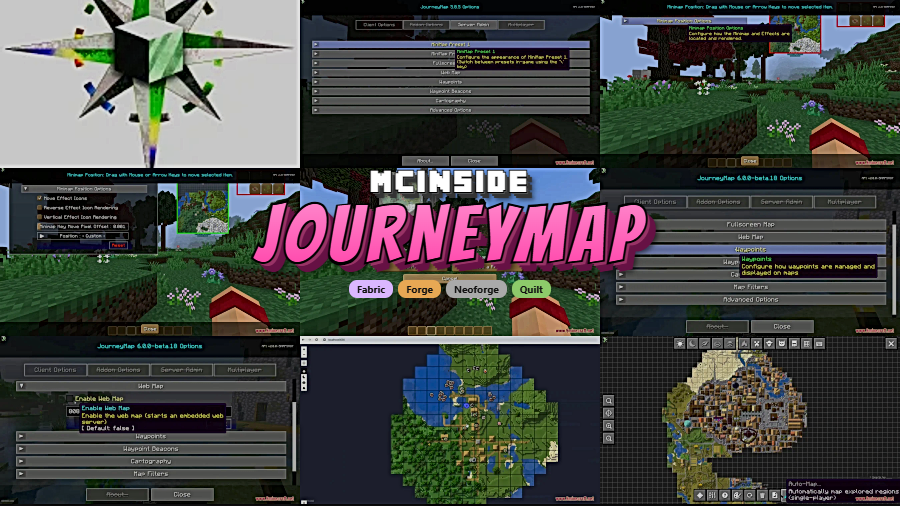
JourneyMap is a real-time mapping mod that generates a full map of your Minecraft world as you explore, viewable in-game as a minimap or full-screen overlay, or even in a web browser, for Minecraft Forge, Fabric, NeoForge, and Quilt.
Navigating vanilla Minecraft can be genuinely frustrating. You dig into a cave system, emerge somewhere unfamiliar, and spend twenty minutes trying to find your base. You mark coordinates in a notepad, build ugly pillar towers as landmarks, or simply accept getting lost as part of the game. JourneyMap eliminates all of that. Developed by mysticdrew and the TeamJM crew, this mod has earned over 9.6 million downloads since its original release because it solves the single most common quality-of-life complaint in Minecraft: there is no usable map. With support across Forge, Fabric, NeoForge, and Quilt, JourneyMap fits into nearly every modded setup you can think of.
Key Features of JourneyMap
- Real-Time World Mapping — JourneyMap builds your world map on the fly as you move through it. You never need to manually chart terrain or mark locations yourself. Every block you walk past gets rendered into a detailed overhead view, which means the map grows naturally with your exploration and always reflects the current state of your world.
- In-Game Minimap — A corner minimap gives you constant awareness of your surroundings without opening a full-screen menu. This is invaluable during combat, mining, or navigating dense forests where losing your bearings takes seconds. You can customize the minimap shape, size, and zoom level to fit your playstyle.
- Full-Screen Map View — When you need the big picture, the full-screen map lets you scroll across your entire explored world. This is perfect for planning long-distance trips, finding previously discovered structures, or simply appreciating the scale of your survival world. Day and night map layers let you toggle between surface views.
- Web Browser Map — JourneyMap can serve your world map to any web browser on your local network. This means you can pull up your map on a second monitor, a tablet, or even your phone while you play. For streamers and players with multi-monitor setups, this feature alone justifies the install.
- Waypoint System — You can drop waypoints to mark important locations like bases, villages, spawners, or portals. Waypoints display as beacons visible from a distance in-game, so you always know which direction to head. Sharing waypoints with other players on a server makes coordinating group exploration effortless.
- Server-Side Configuration — Server administrators can install JourneyMap on the server to control which features clients are allowed to use. This is useful for PvP servers where cave mapping might give unfair advantages, or for adventure maps where exploration should remain a challenge. Clients without JourneyMap can still connect to servers running it, and vice versa.
- Multi-Loader Support — Whether you run Forge, Fabric, NeoForge, or Quilt, JourneyMap has a build for your setup. This cross-loader compatibility means you do not need to switch mapping mods when you change your modding platform, keeping your workflow consistent across different modpack configurations.
How to Install JourneyMap
- Install your preferred mod loader. JourneyMap supports Fabric, Minecraft Forge, NeoForge, or Quilt. Make sure Java 21 is installed for the latest Minecraft versions.
- Download the JourneyMap .jar file that matches both your Minecraft version and your mod loader from the download section below.
- Place the downloaded .jar file into your
.minecraft/modsfolder. If the folder does not exist, launch the game once with your mod loader to generate it. - Launch Minecraft using your mod loader profile. JourneyMap will automatically begin mapping your world as soon as you load into a save or join a server.
- Press J in-game to open the full-screen map, or look for the minimap in the corner of your screen. Access settings through the map interface to customize the display to your preference.
Requirements & Compatibility
| Requirement | Details |
|---|---|
| Minecraft Versions | 26.1, 1.21.11, 1.21.10, 1.21.9, 1.21.8, 1.21.7, 1.21.1 |
| Mod Loaders | Forge, Fabric, NeoForge, Quilt |
| Java Version | Java 21 |
| Side | Client required; server optional |
| License | All Rights Reserved |
What's New
- Updated to support Minecraft 1.21.11 with NeoForge 21.11.0-beta compatibility.
- Java 21 is now required for the latest builds.
- Continued multi-loader support across Forge, Fabric, NeoForge, and Quilt for the newest Minecraft releases.
- Ongoing bug fixes and stability improvements from the TeamJM development team.
Pros and Cons
Pros
- Works across all four major mod loaders without switching mods
- Web browser map is a unique feature most mapping mods lack
- Highly customizable minimap with shape, size, and zoom options
- Server admins can control which mapping features clients use
- Massive community and long development history ensure reliability
Cons
- All Rights Reserved license limits modpack redistribution flexibility
- Server-side installation only controls client features, does not generate maps
- May overlap with other minimap mods in heavily modded packs
Alternatives to JourneyMap
- Xaero's Minimap — A lightweight minimap mod with a clean aesthetic and built-in waypoint system, popular among players who prefer a less resource-intensive mapping solution.
- Xaero's World Map — A companion full-screen world map mod that pairs well with Xaero's Minimap, offering a scrollable overview of explored terrain.
- VoxelMap — A classic mapping mod with mob radar, cave mapping, and waypoint teleportation features that has been a staple in the Minecraft modding community for years.
Download JourneyMap
| Minecraft Version | Fabric | Forge | NeoForge | Quilt |
|---|---|---|---|---|
| For Minecraft 26.1 | Download | Download | Download | Download |
| For Minecraft 1.21.11 | Download | Download | Download | Download |
| For Minecraft 1.21.10 | Download | Download | Download | Download |
| For Minecraft 1.21.9 | Download | Download | Download | Download |
| For Minecraft 1.21.8 | Download | Download | Download | Download |
| For Minecraft 1.21.7 | Download | Download | Download | Download |
| For Minecraft 1.21.1 | Download | Download | Download | Download |
Always download mods from official sources to stay safe.
Related Guides
If you are comparing minimap mods, also read Xaero's Minimap Alternatives and Best Minecraft Mods for 1.21.11. For navigation-first setups, compare this with Xaero's Minimap.
Frequently Asked Questions
Is JourneyMap client-side only?
Yes — JourneyMap runs on the client and does not require server-side installation to function. You can install it on your client and join any server, even vanilla ones. The optional server-side component only exists to let administrators control which JourneyMap features are available to connected players.
Does JourneyMap work with Fabric?
Yes — JourneyMap has dedicated builds for Fabric, along with Forge, NeoForge, and Quilt. Make sure you download the correct version that matches both your Minecraft version and your mod loader to avoid compatibility issues.
Can I use JourneyMap on a multiplayer server?
Yes — you can use JourneyMap on any multiplayer server without the server needing to install anything. Your map will generate locally based on the chunks you explore. Server administrators can optionally install JourneyMap server-side to restrict certain features like cave mapping on PvP servers.
How do I open the map in a web browser?
Enable the webmap feature in JourneyMap's settings, then open the provided localhost URL in any browser on your network. This renders your explored world in a browser tab, which is especially useful for dual-monitor setups or for viewing your map on a phone or tablet while you play.
Is JourneyMap compatible with OptiFine or performance mods?
Generally yes — JourneyMap is designed to coexist with most rendering and performance mods. However, as with any mod combination, specific version pairings can occasionally cause conflicts. Check the JourneyMap Discord or documentation at journeymap.info if you encounter rendering issues with a particular performance mod.


![Chat Animation [Smooth Chat] Mod (1.21.11, 1.20.6) – Smooth Animation](http://mcinside.com/wp-content/uploads/2026/03/thumbnail-2253-300x169.webp)


![[Let's Do] Meadow Mod (1.21.1) - thumbnail](http://mcinside.com/wp-content/uploads/2026/04/thumbnail-64-52x52.webp)


![Not Enough Recipe Book [NERB] Mod (1.21.11) - thumbnail](http://mcinside.com/wp-content/uploads/2026/04/thumbnail-63-52x52.webp)
