
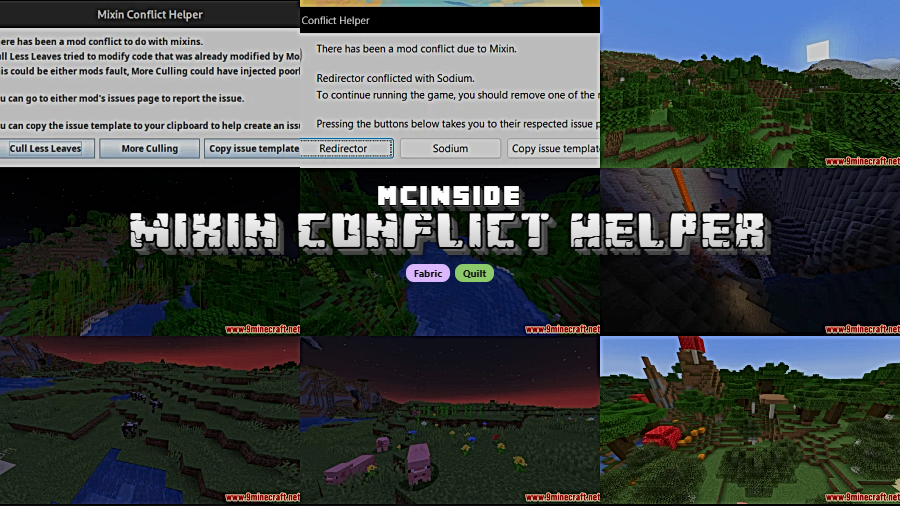
Modded Minecraft crashes are frustrating enough without cryptic error logs that leave you guessing which mod broke everything. Mixin Conflict Helper Mod tackles one of the most common causes of "unknown" crashes — mixin conflicts between mods — by catching injection exceptions and presenting a clear, readable GUI that pinpoints exactly which mods are clashing. Downloaded over 1.5 million times, this lightweight utility by XanderIsDev has become an essential diagnostic tool for anyone running a heavy modpack.
Key Features
- Automatic Conflict Detection — When two mixins try to modify the same class or object and collide, Mixin Conflict Helper intercepts the resulting injection exception before it turns into an unhelpful crash log.
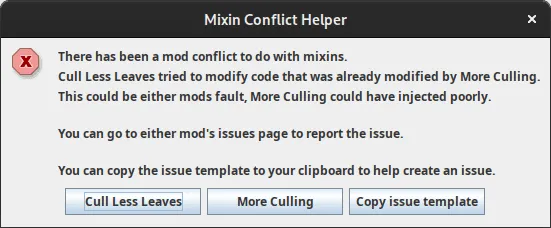
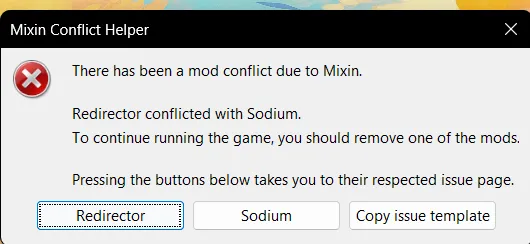
- User-friendly Error GUI — Instead of dumping a wall of stack traces, the mod displays a clean graphical interface that clearly identifies which mods or mixins caused the conflict, making troubleshooting accessible even for less technical players.
- One-click Issue Reporting — The error GUI includes direct buttons to report the conflict on the responsible mod's issue tracker, streamlining communication between players and mod developers so fixes arrive faster.
- Graceful Crash Handling — After you review the conflict details and interact with the GUI, the game proceeds to crash as it normally would — the mod doesn't attempt to suppress or bypass the underlying issue, keeping behavior predictable.
Screenshots








How to Install
- Install Fabric Loader (or Quilt Loader) for your Minecraft version.
- Download and place Fabric API into your
.minecraft/modsfolder. - Download Mixin Conflict Helper for your Minecraft version from the link below.
- Drop the downloaded
.jarfile into the samemodsfolder and launch the game.
Requirements
| Requirement | Details |
|---|---|
| Mod Loader | Fabric, Quilt |
| Dependencies | Fabric API, Quilt Loader |
| Minecraft Versions | 26.1, 1.21.11, 1.21.10, 1.19 |
Pros & Cons
Pros
- Turns cryptic mixin crash logs into readable, actionable error messages
- Built-in buttons for reporting issues directly to mod developers
- Broad version support from 1.19 through 26.1
- Appears to be lightweight — runs passively until a conflict actually occurs
- Open-source under LGPL-3.0, actively maintained on GitHub
Cons
- Only available for Fabric and Quilt — no Forge or NeoForge support
- Does not fix or resolve conflicts, only identifies them
- The game still crashes after reviewing the error GUI
Download
Always download mods from official sources to stay safe.
What's New
- Revised error template now displays additional context including your full mod list, Minecraft version, and loader version.
- JVM forking is now enabled on all operating systems — LWJGL does not support Swing on any platform, so this ensures the GUI always renders correctly.
- The system Look and Feel is now used across all OSs for a more native appearance.
FAQ
Does Mixin Conflict Helper fix mod conflicts automatically?
No. The mod identifies which mods are conflicting and displays the information in a readable GUI, but it does not attempt to resolve the conflict itself. You will still need to remove one of the conflicting mods or wait for the mod authors to release a fix.
Can I use Mixin Conflict Helper with Forge or NeoForge?
Mixin Conflict Helper is designed for Fabric and Quilt loaders only. There is currently no Forge or NeoForge version available.
Will this mod affect performance if no conflicts occur?
The mod appears to be lightweight and only activates when a mixin injection exception is thrown. During normal gameplay with no conflicts, it runs passively in the background.


![Not Enough Recipe Book [NERB] Mod (1.21.11, 1.20.6) – New Recipes](http://mcinside.com/wp-content/uploads/2026/04/thumbnail-63-300x169.webp)


![[Let's Do] Meadow Mod (1.21.1) - thumbnail](http://mcinside.com/wp-content/uploads/2026/04/thumbnail-64-52x52.webp)


![Not Enough Recipe Book [NERB] Mod (1.21.11) - thumbnail](http://mcinside.com/wp-content/uploads/2026/04/thumbnail-63-52x52.webp)


