
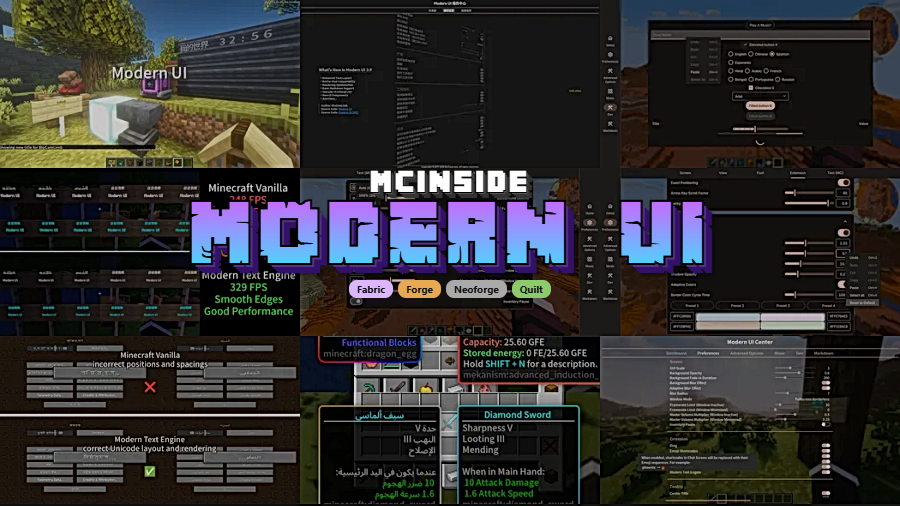
Modern UI is a comprehensive UI overhaul and text rendering mod that replaces Minecraft's dated interface framework with a modern desktop-grade graphics engine, available for Fabric, Forge, NeoForge, and Quilt mod loaders.
Minecraft's default user interface has barely changed in over a decade. Fonts render at fixed pixel sizes, text looks jagged at non-standard GUI scales, and there is no native support for modern typographic features like color emoji or bidirectional scripts. For players who spend hours in menus, chat, and inventory screens, this creates an experience that feels stuck in 2011. Modern UI, developed by BloCamLimb (Icyllis Milica), addresses this gap head-on by injecting a real desktop application framework into the game. With over 12 million downloads on Modrinth and consistent updates since its 2023 debut on the platform, it has become one of the most widely adopted UI mods in the Minecraft ecosystem. The mod goes far beyond cosmetic tweaks — it rebuilds how Minecraft handles text layout, font rendering, and screen compositing from the ground up.
Key Features of Modern UI
- Anti-Aliased Text with SDF Rendering — Minecraft's default bitmap text looks blocky and unreadable at many GUI scales. Modern UI replaces this with signed distance field (SDF) rendering in both 2D and 3D, combined with FreeType font hinting. The result is smooth, crisp text at any resolution, whether you are reading chat messages or item tooltips. Batch rendering ensures this quality comes without unnecessary draw calls.
- TrueType and OpenType Font Support with Live Preview — You can load any TrueType or OpenType font into Minecraft and preview changes in real time without restarting the game. The mod computes exact font sizes in device space for native glyph rendering, meaning your chosen fonts look as sharp as they would in a desktop application. A robust font fallback system ensures missing characters gracefully switch to backup fonts instead of displaying blank squares.
- Full Unicode 15.1 Emoji via Google Noto Color Emoji — Vanilla Minecraft has no color emoji support at all. Modern UI bundles Google Noto Color Emoji and supports the complete Unicode 15.1 emoji set, plus compatibility with Discord, Slack, GitHub, and JoyPixels emoji shortcodes. This transforms Minecraft chat from a plain-text experience into something that feels genuinely modern.
- Advanced Text Layout Engine — The mod includes a full Unicode text layout engine with support for bidirectional text (essential for Arabic, Hebrew, and mixed-script content), CSS-style line-break and word-break rules, and asynchronous layout computation. For servers with international communities, this is a major accessibility improvement that vanilla Minecraft simply cannot match.
- Memory-Efficient Glyph System — Modern UI uses real grayscale textures at 1 byte per pixel for glyph storage, compared to Minecraft's default 4 bytes per pixel. Combined with a faster rectangle packing algorithm for glyph atlases, this means the mod uses significantly less VRAM for text rendering while actually looking better. The engine appears to be lightweight enough that most players should not notice a performance difference.
- Quality-of-Life UI Improvements — Beyond text, the mod adds genuinely useful interface features: borderless fullscreen and maximized window modes, Gaussian blur screen backdrops with fade-in animations, smooth scrolling in all vanilla and Forge scroll panels, an OptiFine-style zoom on the C key, undo/redo support in all text fields, and automatic volume fading and framerate limiting when the game window loses focus. It even pauses singleplayer when your inventory is open.
- Broad Mod Compatibility — Modern UI is tested and compatible with OptiFine, Sodium (and its Forge port Rubidium), Iris (and its Forge port Oculus), and many other popular mods. It also respects Minecraft's own JSON font definitions, so resource packs that use custom bitmap or TTF fonts continue to work correctly alongside the mod's rendering engine.
Screenshots
How to Install Modern UI
- Download and install your preferred mod loader. Modern UI supports Fabric, Minecraft Forge, NeoForge, or Quilt — choose whichever matches your existing mod setup.
- Download the correct Modern UI file for your Minecraft version and loader from the download section below. Make sure the version numbers match exactly.
- Place the downloaded
.jarfile into your.minecraft/modsfolder. If the folder does not exist, launch Minecraft once with your mod loader to generate it. - Launch Minecraft and wait for the game to reach the main menu. You may hear a "ding" sound confirming Modern UI has loaded successfully.
- Press Ctrl+K (or ⌘+K on macOS) in-game to open the Action Center, where you can configure fonts, UI behavior, and all Modern UI settings. Swipe through the Preferences screen to explore font options.
Requirements & Compatibility
| Requirement | Details |
|---|---|
| Minecraft Versions | 1.18.1 – 1.21.8 |
| Mod Loaders | Fabric, Forge, NeoForge, Quilt |
| Compatible With | OptiFine, Sodium, Rubidium, Iris, Oculus |
| License | LGPL-3.0-or-later (open source) |
| NeoForge 1.21.8 Note | On Windows/Linux, set config/fml.toml > earlyWindowControl to false on first launch |
What's New
- Version 3.12.0.4 brings full support for Minecraft 1.21.8, adapting to all vanilla technical changes in the latest release.
- Blur effects are now enabled by default on 1.21.8, even when OptiFine is installed alongside the mod.
- A known NeoForge issue on 1.21.8 requires manually disabling
earlyWindowControlinconfig/fml.toml— this will be resolved automatically in Minecraft 1.21.9 and later. - Backported updates are available for 1.21.4, 1.21–1.21.1, and 1.20–1.20.1, ensuring older worlds receive the latest fixes.
- Updated NeoForge Extension for 1.21.8, 1.21.4, and 1.21.1 with stability improvements across all supported platforms.
Pros and Cons
Pros
- Dramatically improves text readability at every GUI scale with anti-aliased SDF rendering
- Supports any TrueType/OpenType font with real-time preview — no restarts needed
- Full color emoji support transforms the in-game chat experience
- Works across all four major mod loaders (Fabric, Forge, NeoForge, Quilt)
- Confirmed compatible with popular performance mods like Sodium, OptiFine, and Iris
- Uses less VRAM than vanilla text rendering thanks to optimized grayscale glyph textures
- Active development with frequent updates covering the latest Minecraft versions
Cons
- NeoForge users on 1.21.8 must manually edit a config file on first launch to avoid a crash
- The extensive settings in Action Center can be overwhelming for players who just want simple font changes
- Some features overlap with OptiFine (zoom, fullscreen modes), which may cause confusion about which mod is handling what
- As a deep UI framework mod, troubleshooting conflicts with niche UI mods can be complex
Alternatives to Modern UI
- Smooth Font — A lighter-weight mod focused specifically on anti-aliased font rendering without the full UI framework, suitable for players who only want better text quality.
- BetterF3 — Redesigns the F3 debug screen with color-coded, customizable modules for players who want a cleaner information overlay without overhauling all game menus.
- Controlling — Adds search and conflict highlighting to the keybindings menu, complementing Modern UI for players managing large mod packs with many key assignments.
Download Modern UI
| Minecraft Version | Fabric | Forge | NeoForge | Quilt |
|---|---|---|---|---|
| For Minecraft 1.21.8 | Download | Download | Download | — |
| For Minecraft 1.21.7 | Download | Download | Download | — |
| For Minecraft 1.21.6 | Download | Download | Download | — |
| For Minecraft 1.21.4 | Download | Download | Download | — |
| For Minecraft 1.21.3 | Download | Download | Download | Download |
| For Minecraft 1.21.2 | — | — | Download | — |
| For Minecraft 1.21.1 | Download | Download | Download | Download |
| For Minecraft 1.21 | Download | Download | Download | Download |
| For Minecraft 1.20.6 | Download | Download | Download | Download |
| For Minecraft 1.20.4 | Download | Download | Download | Download |
| For Minecraft 1.20.2 | Download | Download | Download | Download |
| For Minecraft 1.20.1 | Download | Download | Download | Download |
Always download mods from official sources to stay safe.
Frequently Asked Questions
Is Modern UI compatible with Sodium and OptiFine?
Yes — Modern UI is tested and compatible with both OptiFine and Sodium (including its Forge port, Rubidium), as well as Iris and Oculus shader mods. You can run Modern UI alongside these performance mods without disabling any of their features. On Minecraft 1.21.8, the mod even enables its blur effects by default when OptiFine is present.
Does Modern UI affect game performance or FPS?
The mod appears to be lightweight and may actually reduce VRAM usage for text rendering, since it uses 1 byte-per-pixel grayscale textures instead of Minecraft's default 4 bytes per pixel. It also uses batch rendering for SDF text, which reduces draw calls. Most players should not notice any negative performance impact, though results may vary depending on hardware and other installed mods.
Can I use custom fonts with Modern UI?
Yes — you can load any TrueType (.ttf) or OpenType (.otf) font into the mod and preview changes in real time. Press Ctrl+K to open the Action Center, then swipe to the Preferences screen to configure your fonts. The mod also supports font fallback chains, so characters missing from your primary font will automatically render from a backup font instead of showing blank squares.
Which Minecraft versions does Modern UI support?
Modern UI supports Minecraft versions from 1.18.1 through 1.21.8. The latest release (3.12.0.4) is built for Minecraft 1.21.6 through 1.21.8, with separate backported builds available for 1.21.4, 1.21–1.21.1, and 1.20–1.20.1. All four major mod loaders — Fabric, Forge, NeoForge, and Quilt — are supported, though loader availability varies slightly by Minecraft version.
Do I need to change any config files after installing Modern UI?
No — for most setups, Modern UI works immediately after dropping the jar into your mods folder. The one exception is NeoForge on Minecraft 1.21.8 (Windows and Linux only), where you must set earlyWindowControl to false in config/fml.toml to prevent a crash on first launch. This is a known NeoForge issue that will be resolved in Minecraft 1.21.9 and later. All other settings can be adjusted in-game through the Action Center (Ctrl+K).


![[Let's Do] Candlelight - Farm&Charm compat Mod (1.21.1) - thumbnail](http://mcinside.com/wp-content/uploads/2026/04/thumbnail-81-52x52.webp)


![[Let's Do] Meadow Mod (1.21.1) - thumbnail](http://mcinside.com/wp-content/uploads/2026/04/thumbnail-64-52x52.webp)


![Not Enough Recipe Book [NERB] Mod (1.21.11) - thumbnail](http://mcinside.com/wp-content/uploads/2026/04/thumbnail-63-52x52.webp)