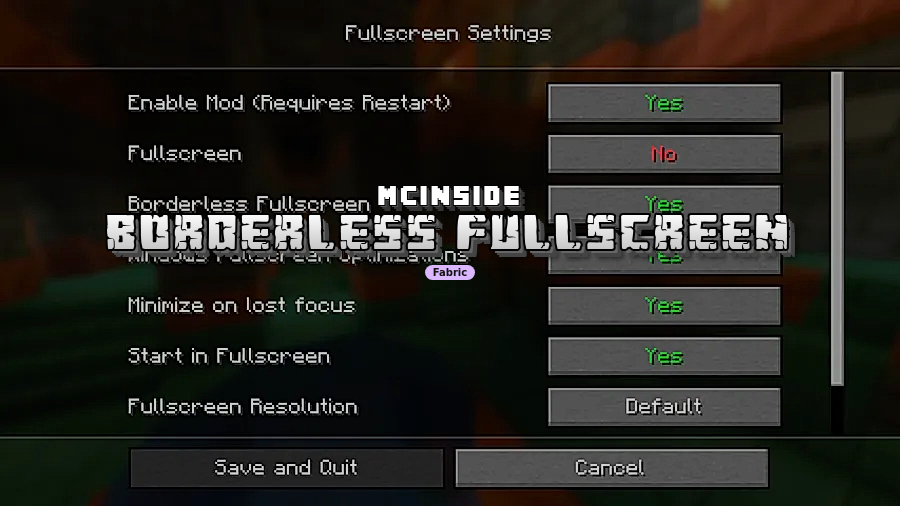
Borderless Fullscreen Mod is a Fabric mod that makes Minecraft's fullscreen mode more configurable for Fabric-based Minecraft versions including 1.20.1 and the 1.21.x line through 26.1.1. It focuses on giving players more control over how fullscreen behaves without changing Minecraft's core gameplay.
The big problem this mod solves is that Minecraft's default fullscreen behavior can feel rigid, especially if you use more than one monitor or like to keep other windows visible while playing. Instead of forcing you into one fullscreen style, it gives you practical controls for focus, startup behavior, and display handling, which explains why it has already passed 947K downloads on Modrinth. For a utility mod, that kind of adoption is strong social proof that many players want a smoother desktop-and-game experience.
Key Features of Borderless Fullscreen Mod
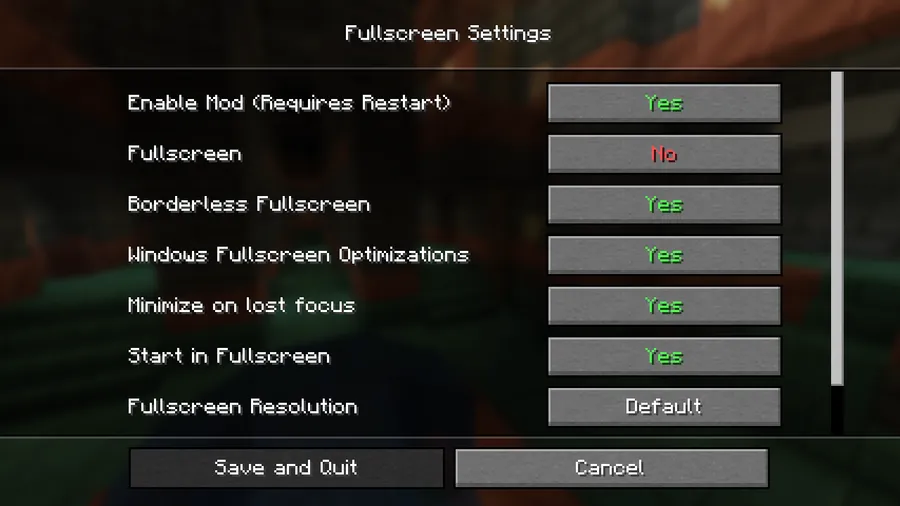
- Mouse cursor capture inside the game window — This feature helps prevent accidental clicks on another monitor while you are moving quickly or turning in-game. That matters a lot on multi-monitor setups, where one stray click can pull focus away from Minecraft at the worst possible moment. The data notes that this option is not available for Minecraft 1.20.1 because of the older GLFW version, so newer supported versions get the better experience here.
- Switch between exclusive fullscreen and borderless fullscreen without restarting — This is the headline convenience feature because it removes the usual friction of testing which fullscreen mode feels better on your setup. If you use Minecraft for both focused play sessions and desktop multitasking, being able to change modes on demand is far more practical than relaunching the game each time.
- Stop Minecraft from minimizing when you tab out — This makes alt-tabbing feel less disruptive and is one of the most useful quality-of-life improvements in the entire mod. If you check Discord, a browser, a guide, or a video while playing, keeping the game visible instead of minimizing can make the whole experience feel smoother and less fragile.
- Prevent Minecraft from starting in fullscreen mode — This is a small option, but it solves a real annoyance for players who prefer to launch in windowed mode first and switch later. It is useful if you are troubleshooting, changing displays, or just do not want Minecraft to immediately take over your screen at startup.
- Open the config screen with CTRL + F11 or through Mod Menu — Good utility mods are only helpful if their settings are easy to reach, and this one keeps configuration accessible from inside your normal play routine. Being able to open the settings through a hotkey or Mod Menu means you are more likely to actually fine-tune the behavior instead of leaving the defaults untouched.
- Better control over overlays and focus behavior — The original description explains that the mod lets other windows stay on top of the game and changes how fullscreen reacts when focus is lost. That makes it appealing for players who use picture-in-picture video, overlays, or other desktop tools alongside Minecraft, though the Windows troubleshooting notes show that Fullscreen Optimizations can affect how well that works while the game is focused.
Screenshots
How to Install Borderless Fullscreen Mod
- Install Fabric Mod Loader, because Borderless Fullscreen Mod requires Fabric.
- Download the version of the mod that matches your Minecraft version, such as 26.1.1, 26.1, or one of the supported 1.21.x builds listed on this page.
- Place the mod file into your Minecraft
modsfolder for your Fabric installation. - Launch Minecraft with the Fabric profile and confirm the mod is loaded.
- Open the configuration with
CTRL + F11or through Mod Menu if you want to adjust fullscreen behavior right away.
Requirements & Compatibility
| Category | Details |
|---|---|
| Mod Loader | Fabric Mod Loader |
| Mod Type | Fabric |
| Author | Bestsoft100 |
| Category | Minecraft Mods |
| Tags | optimization, utility |
| Supported Versions Listed | 26.1.1, 26.1, 1.21.11, 1.21.10, 1.21.9, 1.21.8, 1.21.7, 1.21.6, 1.21.5, 1.21.4, 1.21.3, 1.21.2, 1.21.1, 1.21, 1.20.1 |
| License | GPL-3.0-only |
| Published | 2024-10-04 |
| Last Updated | 2026-04-03 |
Pros and Cons
Pros
- Solves several common fullscreen annoyances in one utility mod.
- Lets you switch between exclusive and borderless fullscreen without restarting.
- Useful for multi-monitor setups and frequent alt-tabbing.
- Configuration is easy to access with a hotkey or Mod Menu.
- Supports a wide range of listed Minecraft versions.
Cons
- Requires Fabric Mod Loader, so it is not a universal install for every loader.
- Mouse cursor capture is not available in Minecraft 1.20.1.
- Windows Fullscreen Optimizations can limit overlay behavior while the game is focused.
- Some Linux window systems may need custom window rules for always-on-top behavior.
Alternatives to Borderless Fullscreen Mod
- Utility Mods — A broader place to look if you want other quality-of-life mods that improve how Minecraft behaves outside normal gameplay systems.
- Optimization Mods — A useful category if you are building a smoother overall client setup and want to pair display tweaks with other client-side improvements.
- Fabric Mods — The best general fallback if you specifically want more Fabric-compatible client mods that complement a customized Minecraft installation.
Download Borderless Fullscreen Mod
| Minecraft Version | Fabric |
|---|---|
| For Minecraft 26.1.1 | Download |
| For Minecraft 26.1 | Download |
| For Minecraft 1.21.11 | Download |
| For Minecraft 1.21.10 | Download |
| For Minecraft 1.21.9 | Download |
| For Minecraft 1.21.8 | Download |
| For Minecraft 1.21.7 | Download |
| For Minecraft 1.21.6 | Download |
| For Minecraft 1.21.5 | Download |
| For Minecraft 1.21.4 | Download |
| For Minecraft 1.21.3 | Download |
| For Minecraft 1.21.2 | Download |
Always download mods from official sources to stay safe.
Frequently Asked Questions
Is Borderless Fullscreen Mod worth installing?
Yes — it is worth installing if Minecraft's default fullscreen behavior gets in your way. The mod focuses on practical controls that make fullscreen more flexible, especially for players who tab out often, use multiple monitors, or want quick access to fullscreen settings.
Does Borderless Fullscreen Mod require Fabric?
Yes — this mod requires Fabric Mod Loader. The provided data lists Fabric as both the required loader and the mod type.
Can this mod switch between exclusive fullscreen and borderless fullscreen without restarting Minecraft?
Yes — that is one of its main features. Being able to change modes without relaunching is one of the biggest reasons to use this mod instead of relying on Minecraft's default fullscreen behavior alone.
Does Borderless Fullscreen Mod stop Minecraft from minimizing when I alt-tab?
Yes — preventing the game from automatically minimizing when tabbing out is a core feature. For players who multitask while playing, that can make Minecraft feel much more convenient to use.
Can I keep Minecraft from launching in fullscreen mode?
Yes — the mod includes an option to prevent the game from starting in fullscreen. That is helpful if you prefer to launch safely in windowed mode and decide later how you want the game displayed.
Does mouse cursor capture work on Minecraft 1.20.1?
No — the data specifically says that feature is not available in 1.20.1 because of the older GLFW version. If cursor capture is your priority, one of the newer listed versions appears to be the better fit.
Can I configure the mod in-game?
Yes — you can open the configuration screen by pressing CTRL + F11, or by using Mod Menu. That makes it easy to adjust settings without digging through external files.